ENGLISH
7
NOTES
PATR
L/
,
QUIET
,
A.COMFORT
QUIET
,
A.COMFORT
• Can be activated in all modes and can be cancelled by
pressing the respective button again.
• Cannot be selected at the same time.
8
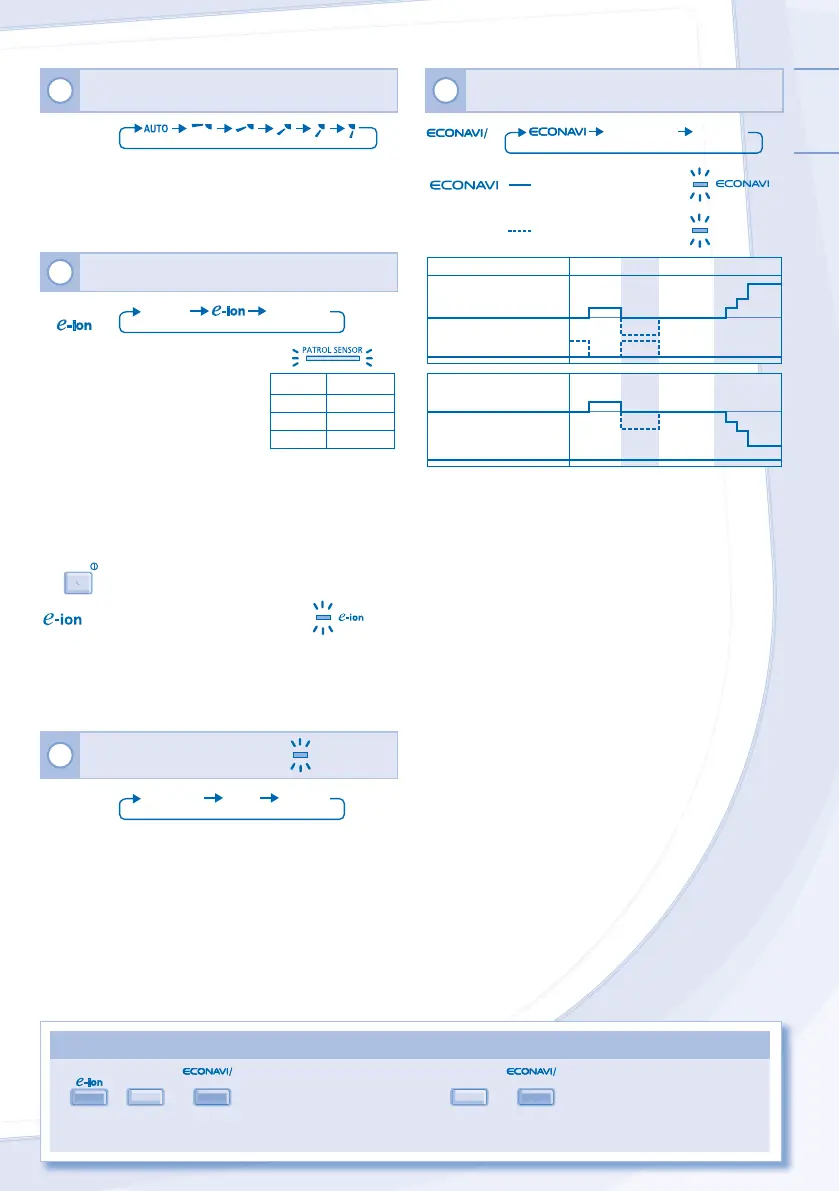
TO MONITOR HUMAN PRESENCE & ACTIVITY
FOR ENERGY SAVING & COMFORT
A.COMFORT
A.COMFORT NORMAL
To optimize energy
saving
A.
MF
RT
To maximize comfort
AUTO COMFORT
Set Fan Speed
-2°C
-1°C
Heat Mode
Set Temperature
+0.3°C
Heat Source & Movement
Normal
HighLow
None
Set Fan Speed
≤ Medium
Fan
+1 tap*
+2°C
-1°C
+1 tap
+0.3°C
Cool/Dry Mode
Set Temperature
* For first 15 minutes or until set temperature is reached.
• Sensor may not detect moving objects further than 7m
away or beyond detection angle.
• Sensor sensitivity is infl uenced by indoor unit location,
movement speed, temperature range, etc.
• The sensor may mistakenly detects pets, sunlight, certain
lighting, fl uttering curtains and light refl ection as human
being.
5
TO ADJUST VERTICAL AIRFLOW DIRECTION
(5 OPTIONS)
AIR SWING
• Keeps the room ventilated.
• In COOL/DRY mode, if AUTO is set, the louver swing
up/down automatically.
• In HEAT mode, if AUTO is set, the louver fi x at
predetermined position.
6
TO ENJOY CLEAN & FRESH AIR
PATROL/
PATROL
NORMAL
PATROL - To monitor air quality
• Detects air quality; e-ion operation
activates when air quality is at dirty
level.
• Regardless of air quality, to
maintain air freshness e-ion
activates automatically (PATROL
SENSOR indicator turns red) when:
- 2 minutes after the unit is on, or
- exceeds 4 hours at clean level.
Indicator Air Quality
Blue Clean
Orange Moderate
Red Dirty
• Can be activated even when the unit is turned off.
• Patrol starts automatically with the unit switched on with
OFF/ON
.
- To freshen and purify the air
• Generates negative ions to produce fresh air effect and
attract dust which will then be captured at the positively
charged e-ion fi lters.
• Can be activated even when the unit is turned off. In this
condition, fan speed and air swing can not be adjusted.
7
TO SWITCH BETWEEN
POWERFUL & QUIET
POWERFUL/QUIET
POWERFUL/
QUIET
QUIETPOWERFUL NORMAL
WERFUL
TO REACH TEMPERATURE QUICKLY
• This operation will stop automatically after
20 minutes.
UIET
TO ENJOY QUIET OPERATION
• This operation reduces airfl ow noises.
• When this operation is activated, the
indicator brightness will be dimmed.



 To Next Page