6 l
REMOTE CONTROL OPERATION
ENGLISH
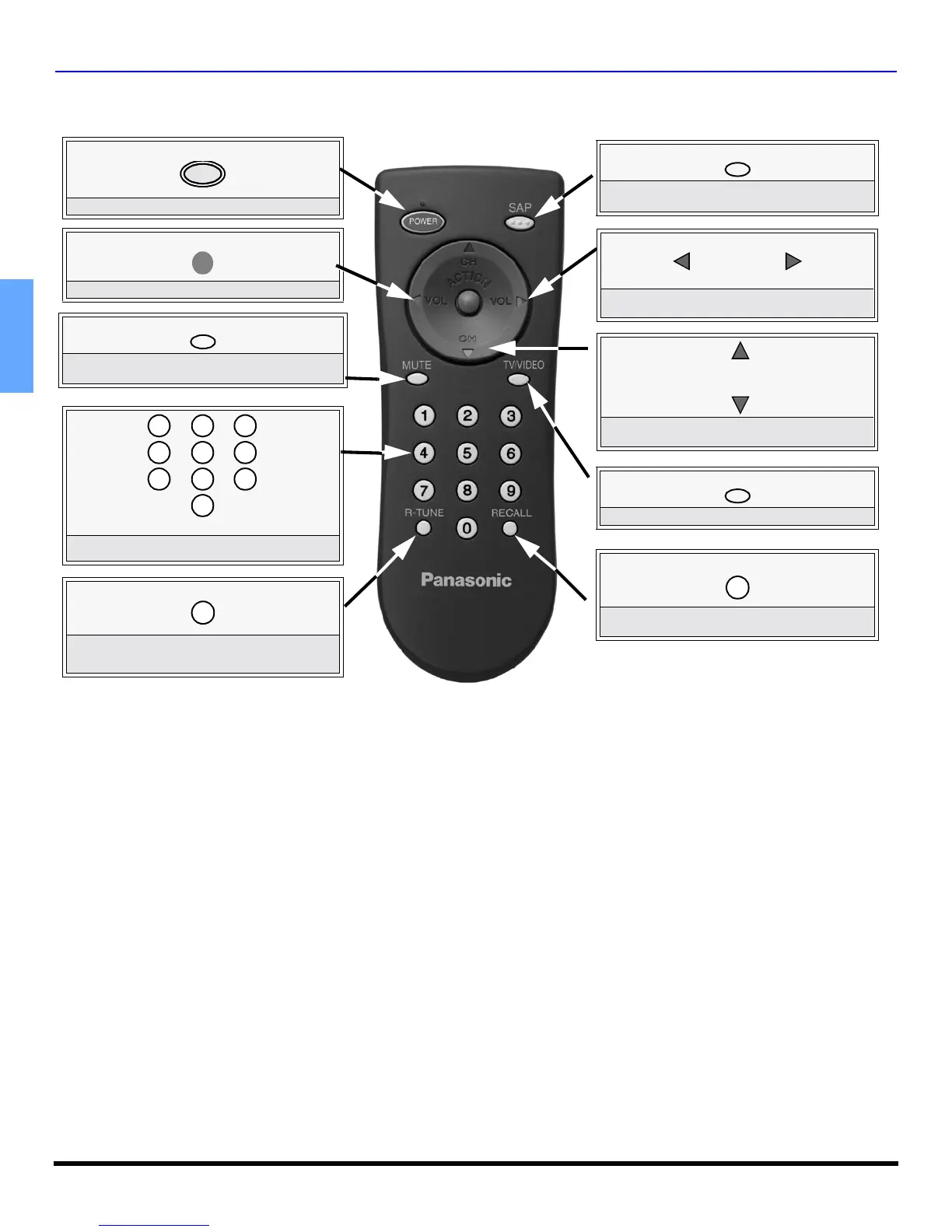
Remote Control Operation
POWER
Press to turn ON and OFF.
POWER
MUTE
Press to mute sound. Press to display and
cancel CC (Closed Caption).
TV/VIDEO
Press to select TV or Video mode.
ACTION
Press to access menus.
Press to select next or previous channel and
navigate in menus.
CH
CH
Press to adjust TV sound and navigate in
menus.
VOL VOL
RECALL
Press to display time, channel, sleep timer,
and other options.
Press numeric keypad to select any channel.
7
4
1 2
5
8
0
9
6
3
R-TUNE
Press to switch to previously viewed
channel or video mode.
Battery Installation
Use two AA batteries:
Remove battery cover by pushing in and up near arrow.
Install batteries matching (+) and (-) polarity signs.
Replace the battery cover.
Note: Incorrect installation can cause battery leakage and
corrosion that will damage the Remote Control.
Precautions
• Replace batteries in pairs.
• Do not mix battery types (zinc carbon with alkaline).
• Do not recharge, heat, short-circuit, disassemble, or
burn batteries.
SAP
Press to select audio modes (Stereo, SAP or
Mono).
EUR7713010
0452E prod doc2.fm Page 6 Wednesday, April 30, 2003 1:36 PM



 To Next Page