85
17.3.2 RESET (RC)
To clear and restore the remote control setting to factory default.
o Press once to clear the memory.
17.3.3 RESET (AC)
To restore the unit’s setting to factory default.
o Press once to restore the unit’s setting.
17.3.4 TIMER ▲
To change indoor unit indicator’s LED intensity.
o Press continuously for 5 seconds.
17.3.5 TIMER ▼
To change remote control display from Degree Celsius (°C) to Degree Fahrenheit (°F).
o Press continuously for 10 seconds.
17.3.6 Special Setting mode
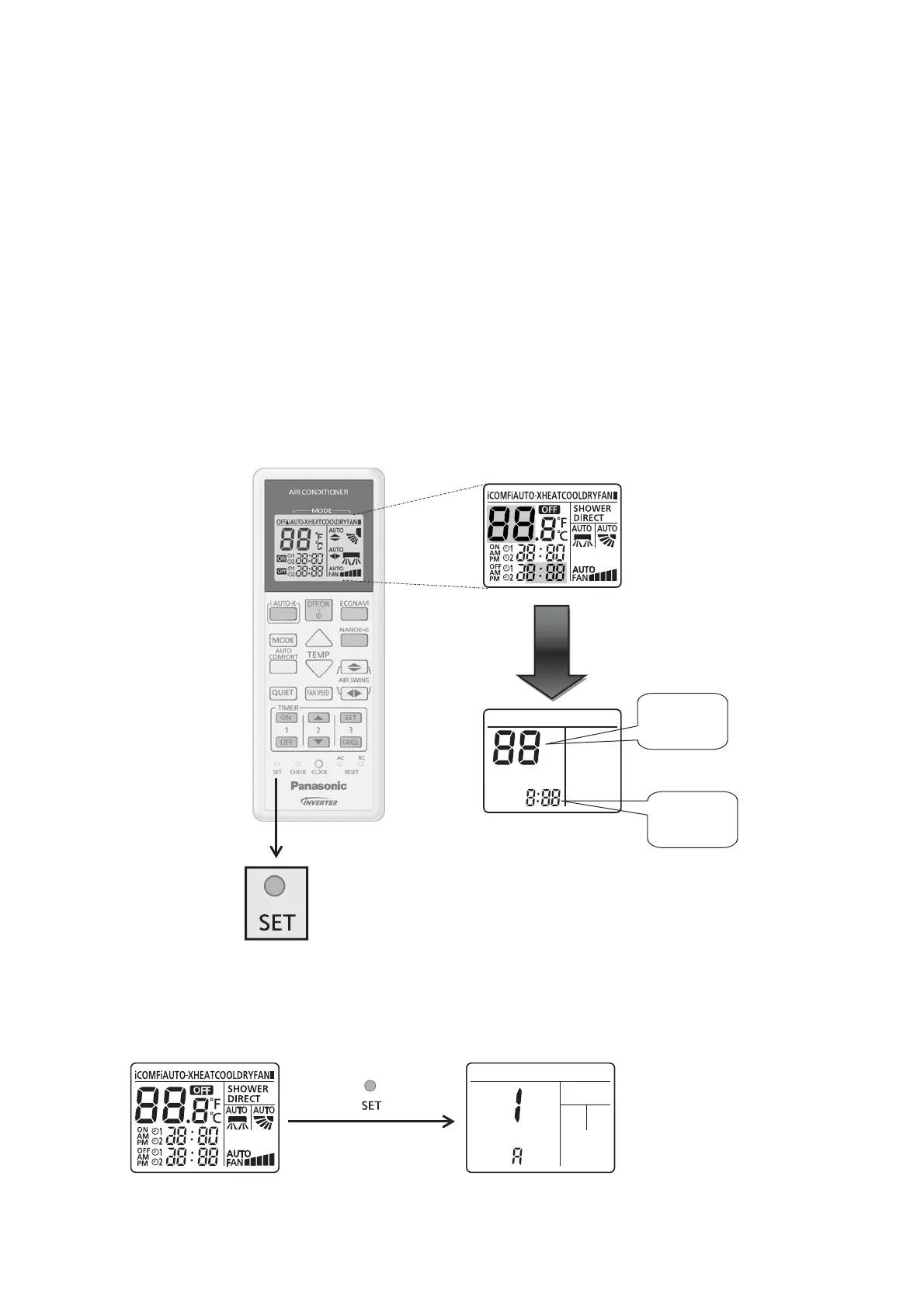
1 LCD display area:
Special setting display area
(highlighted in color)
Function
No.
Options
(If any)
2 Cannot enter this special setting mode under the following conditions:
1 Operation ON.
2 Under [Real/ON/OFF] time setting mode.
3 To enter zone 1 area:
Enter Zone1
[range (1~49)]
Normal display
mode





 To Next Page