EasyManua.ls Logo

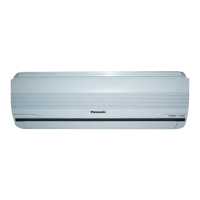
Panasonic CU-S18KKQ - User Manual

Panasonic CU-S18KKQ
16 pages
Print Icon
To Next Page IconTo Next Page
Loading...
© Panasonic HA Air-Conditioning (M) Sdn. Bhd. 2009.
Unauthorized copying and distribution is a violation
of law.
Operating Instructions
Air Conditioner
Model No.
Indoor Unit Outdoor Unit
CS-S9KKQ CU-S9KKQ
CS-S12KKQ CU-S12KKQ
CS-S18KKQ CU-S18KKQ
CS-S24KKQ CU-S24KKQ
CS-S28KKQ CU-S28KKQ
QUICK GUIDE
QUICK GUIDE
GUÍA RÁPIDA
GUÍA RÁPIDA
F567176
ENGLISH 2 ~ 7
Before operating the unit, read these operating
instructions thoroughly and keep them for future
reference.
ESPAÑOL 8 ~ 13
Antes de utilizar la unidad, sírvase leer
atentamente estas instrucciones de
funcionamiento y conservarlas como futuro
elemento de consulta.


Other manuals for Panasonic CU-S18KKQ

Questions and Answers

  • F
    fthomasSep 4, 2025
    Why is my Panasonic CU-S18KKQ Air Conditioner making a water flowing sound during operation?
    • E
      Erica DavisSep 4, 2025
      The water flowing sound you hear during the operation of your Panasonic Air Conditioner is due to the refrigerant flow inside the unit.
  • J
    Jeremy AlvarezSep 18, 2025
    What to do if my Panasonic Air Conditioner stops and the timer indicator blinks?
    • T
      Terry HendersonSep 18, 2025
      Use the remote control to retrieve the error code.
  • A
    Angela ReedSep 16, 2025
    What to do if Patrol sensor or e-ion indicator on the indoor unit of my Panasonic Air Conditioner is blinking?
    • J
      Jennifer JohnsonSep 16, 2025
      Stop Patrol or e-ion operation then restart it. If the patrol sensor or e-ion indicator still blinking, please consult authorized dealer.
  • M
    mthomasSep 14, 2025
    Why is there inconsistent air flow during PATROL operation in my Panasonic CU-S18KKQ?
    • K
      Kristopher SandersSep 14, 2025
      The inconsistent airflow during PATROL operation in your Panasonic Air Conditioner is because the fan speed is adjusted automatically during patrol operation.
  • M
    Michael MeltonSep 12, 2025
    Why is my Panasonic CU-S18KKQ Air Conditioner making a cracking sound during operation?
    • K
      Kimberly CrawfordSep 13, 2025
      The cracking sound you hear during the operation of your Panasonic Air Conditioner is caused by changes in temperature, leading to the expansion and contraction of the unit.
  • M
    Mary MckinneySep 12, 2025
    Why does the power indicator blink on my Panasonic CU-S18KKQ before it is switched on?
    • E
      Emily SmithSep 12, 2025
      The blinking power indicator on your Panasonic Air Conditioner before it's switched on is a preliminary step in preparation for operation when the ON timer has been set.
  • A
    Anthony WyattSep 9, 2025
    Why is there an operation delay after I restart my Panasonic CU-S18KKQ?
    • J
      James HaleSep 9, 2025
      The delay you experience after restarting your Panasonic Air Conditioner is a protection mechanism for the unit’s compressor.
  • B
    Brian AllenSep 7, 2025
    Why does my Panasonic CU-S18KKQ indoor fan stop occasionally during automatic fan speed setting?
    • P
      parkertaraSep 7, 2025
      The indoor fan in your Panasonic Air Conditioner stops occasionally during automatic fan speed setting to remove surrounding odours. Select QUIET operation to maintain consistent air flow.
  • D
    Daniel MarshallSep 5, 2025
    Why does my Panasonic Air Conditioner have a peculiar odour?
    • J
      jenningsparkerSep 6, 2025
      A peculiar odour from your Panasonic Air Conditioner may be due to a damp smell emitted by the wall, carpet, furniture, or clothing.
  • A
    Adam KennedyAug 21, 2025
    What to do if my Panasonic CU-S18KKQ cooling is not working efficiently?
    • H
      hbrockAug 21, 2025
      If your Panasonic Air Conditioner isn't cooling efficiently, make sure you have set the temperature correctly. Also, close all doors and windows, clean or replace the filters, and clear any obstructions at the air inlet and outlet vents.

Summary

Safety Precautions

Warning and Caution Symbols

Explains the meaning of warning and caution signs used in the manual.

Prohibited and Compulsory Actions

Describes symbols indicating forbidden and required actions.

Unit Operation Safety

Safety guidelines for indoor and outdoor units, including child safety.

Remote Control Safety

Safety precautions related to the remote control and its batteries.

Electrical and Unit Safety

Power Supply Precautions

Precautions regarding power cords, outlets, and wet hands to prevent fire and shock.

Electrical Safety Recommendations

Recommendations for cord replacement, ELCB/RCD, and earthing for electrical safety.

Power Supply Shutdown Scenarios

When to switch off power supply for safety during cleaning, non-use, or lightning.

Indoor and Outdoor Unit Cautions

Safety measures for unit operation, cleaning, installation, and environment.

Remote Control Battery Safety

Advice on battery usage and handling for the remote control.

Remote Control Functions

Remote Control Indicators Overview

Explains the various indicators on the remote control display.

Basic Operation Buttons

Details on turning the unit on/off, setting temperature, and selecting modes.

Airflow and Fan Speed Adjustment

Instructions for adjusting vertical/horizontal airflow and fan speed.

Human Presence Energy Saving

How to use the Human Presence & Activity monitor for energy saving.

Advanced Remote Control Features

Air Purification and Freshness Modes

How to use PATROL and e-ion functions for clean and fresh air.

Humidity Control and Quiet Operation

Using MILD DRY mode for humidity and QUIET mode for reduced noise.

Quick Temperature Reach and Timer Settings

How to quickly reach temperature and set timers for unit operation.

Indoor Unit Components and Cleaning

Indoor Unit Parts Identification

Identifies key components of the indoor unit, including the front panel and sensors.

Cleaning the Indoor Unit

Instructions for cleaning the indoor unit, front panel, and e-ion filters.

Special Unit Features

Details on the e-ion system, patrol sensor, and manual airflow adjustment.

Troubleshooting Guide

Normal Operating Symptoms

Symptoms that do not indicate a malfunction during normal operation.

Pre-Servicing Checks

Common issues and checks to perform before calling for servicing.

ECO PATROL Sensor Notes

Important notes regarding the ECO PATROL sensor's detection capabilities.

Error Code Retrieval

Procedure to retrieve error codes from the unit using the remote control.

Quick Guide: Remote Control Setup

Remote Control Preparation

Steps for inserting batteries and preparing the remote control for use.

Basic Operation Modes

How to select the desired operation mode (AUTO, COOL, DRY).

Start;Stop and Temperature Setting

Instructions for starting/stopping the unit and setting the desired temperature.

Panasonic CU-S18KKQ Specifications

General IconGeneral
BrandPanasonic
ModelCU-S18KKQ
CategoryAir Conditioner
LanguageEnglish

Related product manuals