CW-C241SE
– 6 –
°C
HOW TO OPERATE
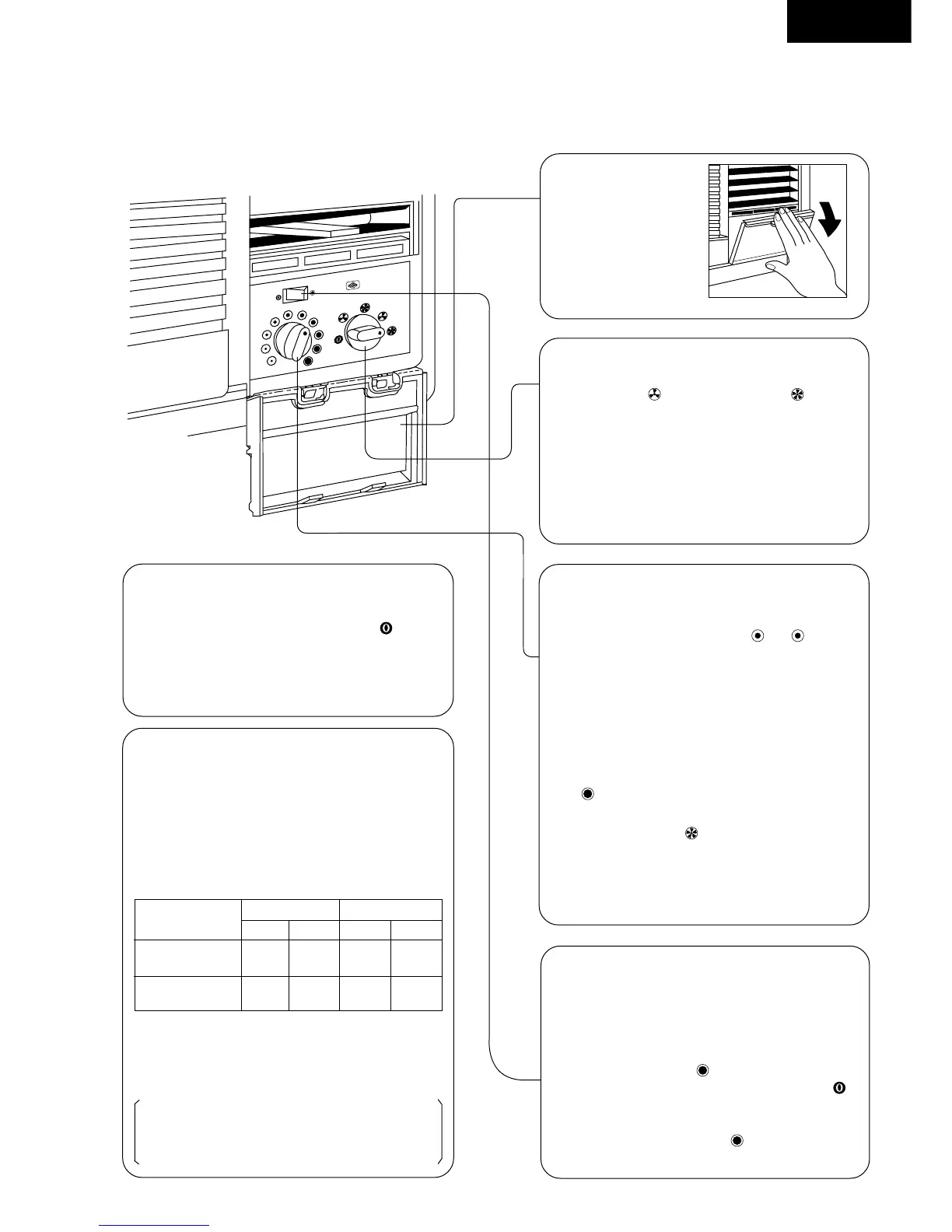
4.Thermostat Control Knob
Set the Thermostat Control Knob at the
desired setting. (Usually “ ~ ” is a
recommended setting position.) If the room
temperature is unsatisfactory after a reasonable
amount of time, turn the control knob clockwise
to cool the room more, or anticlockwise to cool
the room less.
• When the Thermostat Control Knob is set
to “ ”, moisture may freeze onto the coils
and prevent effective cooling. If this happens,
turn the knob to “ ” HIGH FAN, and the
thermostat control knob anticlockwise. This will
quickly defrost the cooling coil so that normal
cooling can be resumed.
5.Air Swing Switch
(Airflow direction adjustment
Side-to-Side)
For fixed side-to-side air direction, set the
Air Swing Switch to “ ” ON until the desired
air direction is obtained, then move it to “ ”
OFF.
For continuous side-to-side air circulation, set
the Air Swing Switch to “ ” ON and leave
it there.
2. Open the
cover
1.Power Supply
Set the Main Control Knob to the “ ” OFF
position; confirm that the power supply cord is
connected to a proper AC outlet.
Recommended
Use the air conditioner under
the following conditions:
• Operating temperature range.
(unit in °C)
Indoor unit Outdoor unit
D.B.T. W.B.T. D.B.T. W.B.T.
Maximum
Temperature
Minimum
Temperature
D.B.T.: Dry Bulb Temperature
W.B.T.: Wet Bulb Temperature
• Humidity does not exceed 90%.
Continuous operation at over 90% humidity
may create condensation and waterdrops on
the intake and outlet vents.
32 23 43 26
21 15 21 15
3.Main Control Knob
Set to either “ ” LOW COOL or “ ” HIGH
COOL as required.
(FAN setting operates the fan only.)
* Caution: If the Main Control Knob is turned off
or changed to a fan setting from a cooling
operation setting, WAIT at least 3 minutes
before resetting to a cooling operation.



 To Next Page