RQT8020
6
Getting started
ENGLISH
Control reference guide
e.g.,
e.g.,
e.g.,
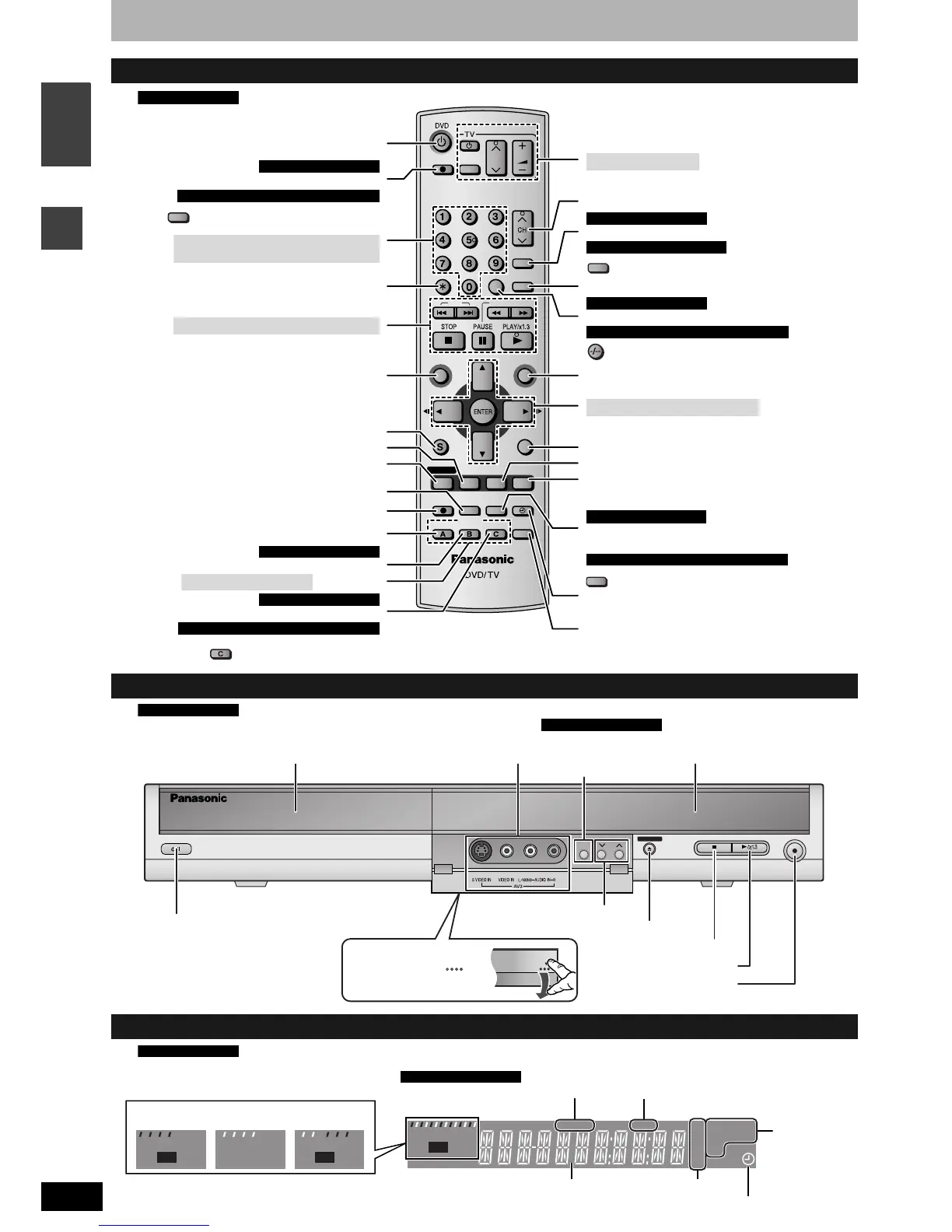
Remote control
Continental Europe
SKIP SLOW/SEARCH
REC MODE
REC
F Rec
TIME SLIP
FUNCTIONSDIRECT NAVIGATOR
TOP MENU
RETURN
VOLUME
CH
STATUS
DISPLAY
SUB MENU
DIRECT TV REC
AV
CANCEL
MANUAL SKIP
INPUT SELECT
AUDIO
ERASE
EXT LINK
CHAPTER
PROG/CHECK
TIMER
ShowView
CREATE
Turn the unit on (➔ page 10, 12)
Direct TV recording (➔ page 16)
Input select (AV1, AV2, AV3 or AV4)
For Continental Europe
For Australia, N.Z., Asia and Middle East
Select channels and title numbers etc./
Enter numbers
Cancel
Basic operations for recording and play
Show Top menu/Direct Navigator
(➔ page 22, 24, 28)
Show sub menu (➔ page 25, 28, 31)
Show on-screen menu (➔ page 26)
Change recording mode (➔ page 15)
Select Audio (➔ page 22)
Create chapter (➔ page 23)
For Continental Europe
(➔ page 14)Television operations
Channel select (➔ page 15)
Show S
HOWVIEW screen (➔ page 18)
Show G-
CODE screen (➔ page 19)
For Continental Europe
For Australia, N.Z. and Asia
Skip 30 seconds forward (➔ page 23)
Input select (AV1, AV2, AV3 or AV4)
Select channels
For Continental Europe
For Australia, N.Z., Asia and Middle East
Show FUNCTIONS window (➔ page 13, 27)
(➔ page 10, 12, 23)
Selection/Enter, Frame-by-frame
Return to previous screen
Show status messages (➔ page 27)
Skip the specified time/Display the television image
as a picture-in-picture (➔ page 16, 23)
Start Flexible Recording (➔ page 17)
Programme recording standby/release
(➔ page 18, 19, 20)
Linked timer recordings with external equipment
(➔ page 21)
Erase items (➔ page 23)
For Continental Europe
For Australia, N.Z., Asia and Middle East
Show timer recording programme screen
(➔ page 20)
(➔ page 38)
Manual tuning operation
Erase items (➔ page 23)
Create chapter (➔ page 23)
For Continental Europe
For Australia, N.Z., Asia and Middle East
INPUT SELECT
G-Code
ERASE
CREATE
CHAPTER
Start recording (➔ page 15)
Main unit
Continental Europe
REC
OPEN/CLOSE
CH
EXT LINK
Display (➔ below)
Disc tray (➔ page 15, 22)
Open/close disc tray (➔ page 15, 22)
Channel select (➔ page 15)
Start recording (➔ page 15)
Connection for camcorder etc.
(➔ page 17)
/Remote control signal sensor
Standby/on switch (8) (➔ page 10)
Press to switch the unit from on to
standby mode or vice versa.
In standby mode, the unit is still
consuming a small amount of power.
Start play (➔ page 22)
Stop (➔ page 16, 23)
Rear panel terminals (➔ page 7, 8)
Linked timer recordings
with external equipment
(➔ page 21)
For Continental Europe
Opening the front panel
Press down on the part
with your finger.
The unit’s display
Continental Europe
EXT Link D.MIX
XP
RW
–
+
RAM
SP
LP
EP
PLAY
VR
REC
REC
PLAY PLAY
REC
AVCD
-
DVD
D. MIX (multi-channel DVD-Audio only)
When lit: down-mixing audio is played.
When off: the disc prevents down-mixing so only
the two front channels can be played.
Recording modeMain display section
Disc type
Recording
Playback
Recording/
Playback
Timer recording indicator
Linked timer recordings with external
equipment indicator
For Continental Europe


 To Next Page
 Loading...