23
(ENG) VQT4E00
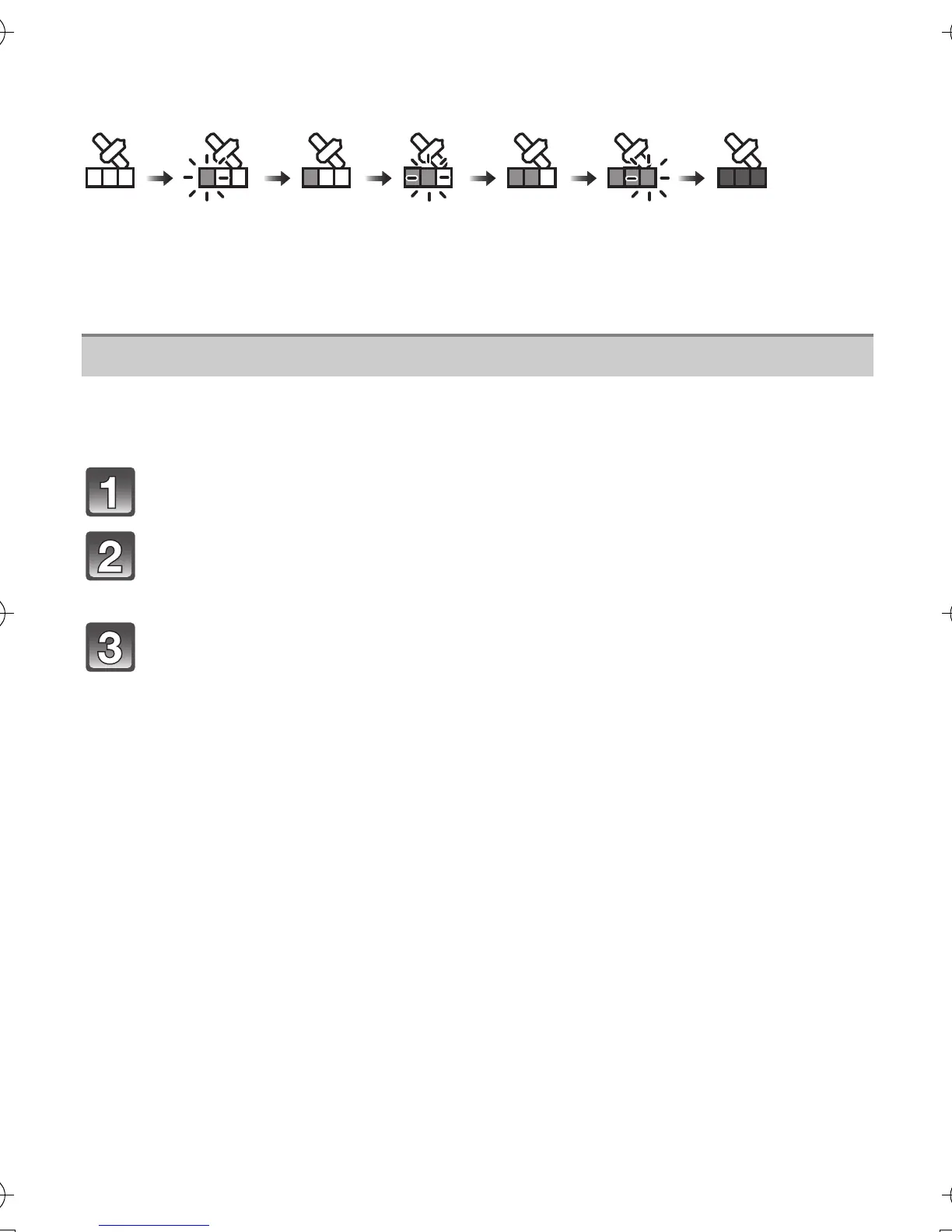
∫ About the Icon indicating positioning status
Positioning is performed by this unit when radio waves from 3 or more GPS satellites
are received.
• The bar moves up the scale according to the number of GPS satellites from which signals are
being received.
When the bar has filled the scale and positioning has been successful, the indicator goes
blue.
When the displayed location name information is different from the current location or
when the positioning is not successful, move to a location where the radio waves from
GPS satellites can be received better and perform the positioning update.
Press [MENU/SET].
Press 3/4/2/1 to select [GPS/Sensor] menu, and then press
[MENU/SET].
Press 3/4 to select [Repositioning], and then press [MENU/
SET].
•
Positioning is started and the current location information is updated once the
positioning is successful.
When used during overseas travel etc.
• The GPS may not operate in China or close to the Chinese border in neighbouring countries.
(As of December 2011)
• The usage of GPS, etc., may be restricted depending on the country or the region. This
camera has a GPS function, so check with the embassies or travel agencies etc. prior to your
overseas travel regarding any restrictions on cameras with a built-in GPS function.
Update the GPS information
DMC-FT4&TS4EB-VQT4E00_mst.book 23 ページ 2012年1月23日 月曜日 午前9時52分



 To Next Page