24
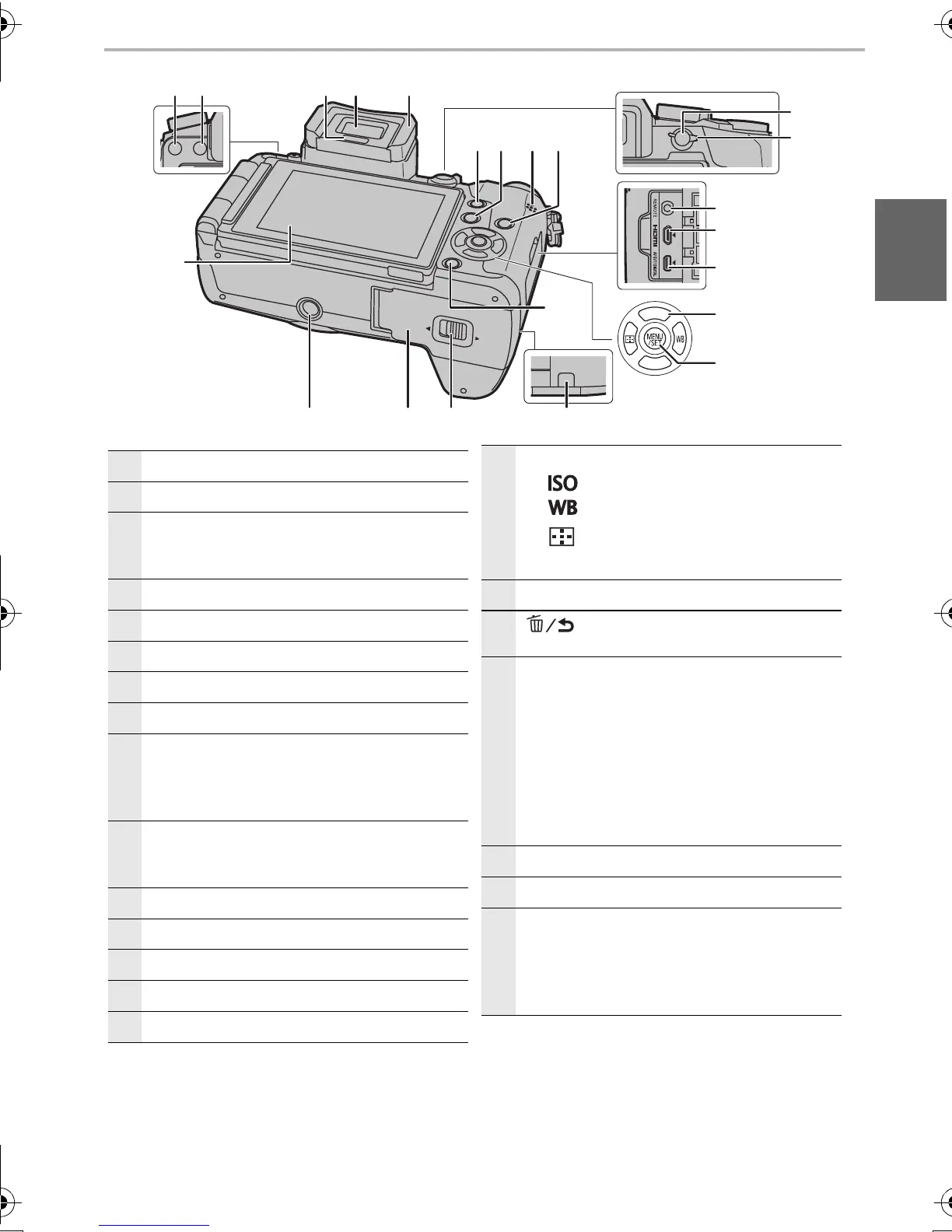
Touch screen (P21)/monitor (P46)
25
[LVF] button (P21)/[Fn5] button (P23)
26
Flash open button
• The flash opens, and recording with the flash
becomes possible.
27
Eye sensor (P21)
28
Viewfinder (P21)
29
Eye Cup
30
[Q.MENU] button (P23)/[Fn2] button (P23)
31
[(] (Playback) button (P36)
32
Speaker (P51)
• Be careful not to cover the speaker with your
finger. Doing so may make sound difficult to
hear.
33
[DISP.] button
• Each time this is pressed, the display on the
monitor is switched.
34
[AF/AE LOCK] button
35
Focus mode lever (P29)
36
[REMOTE] socket
37
[HDMI] socket
38
[AV OUT/DIGITAL] socket
39
Cursor buttons (P19)
3/[ ] (ISO sensitivity)
1/[ ] (White Balance)
2/[ ] (Auto Focus Mode)
4/[Fn3] (P23)
40
[MENU/SET] button (P19, 22)
41
[ ] (Delete/Cancel) button (P37)/
[Fn4] button (P23)
42
DC coupler cover (P65)
• When using an AC adaptor, ensure that the
Panasonic DC coupler (DMW-DCC8:
optional) and AC adaptor (DMW-AC10E:
optional) are used.
• Always use a genuine Panasonic AC
adaptor (DMW-AC10E: optional).
• When using an AC adaptor, use the AC
mains lead supplied with the AC adaptor.
43
Release lever (P14)
44
Card/Battery door (P14)
45
Tripod mount
• It may not be possible to attach and securely
fasten a tripod with a screw length of 5.5 mm
(0.22 inch) or more to the camera. Doing so
may also damage the camera.





 To Next Page