16
• Step 4. Display the INITIAL SETTING:
While pressing [ MENU/SET ] and “[ RIGHT ] of Cursor buttons” simultaneously, turn the Power off.
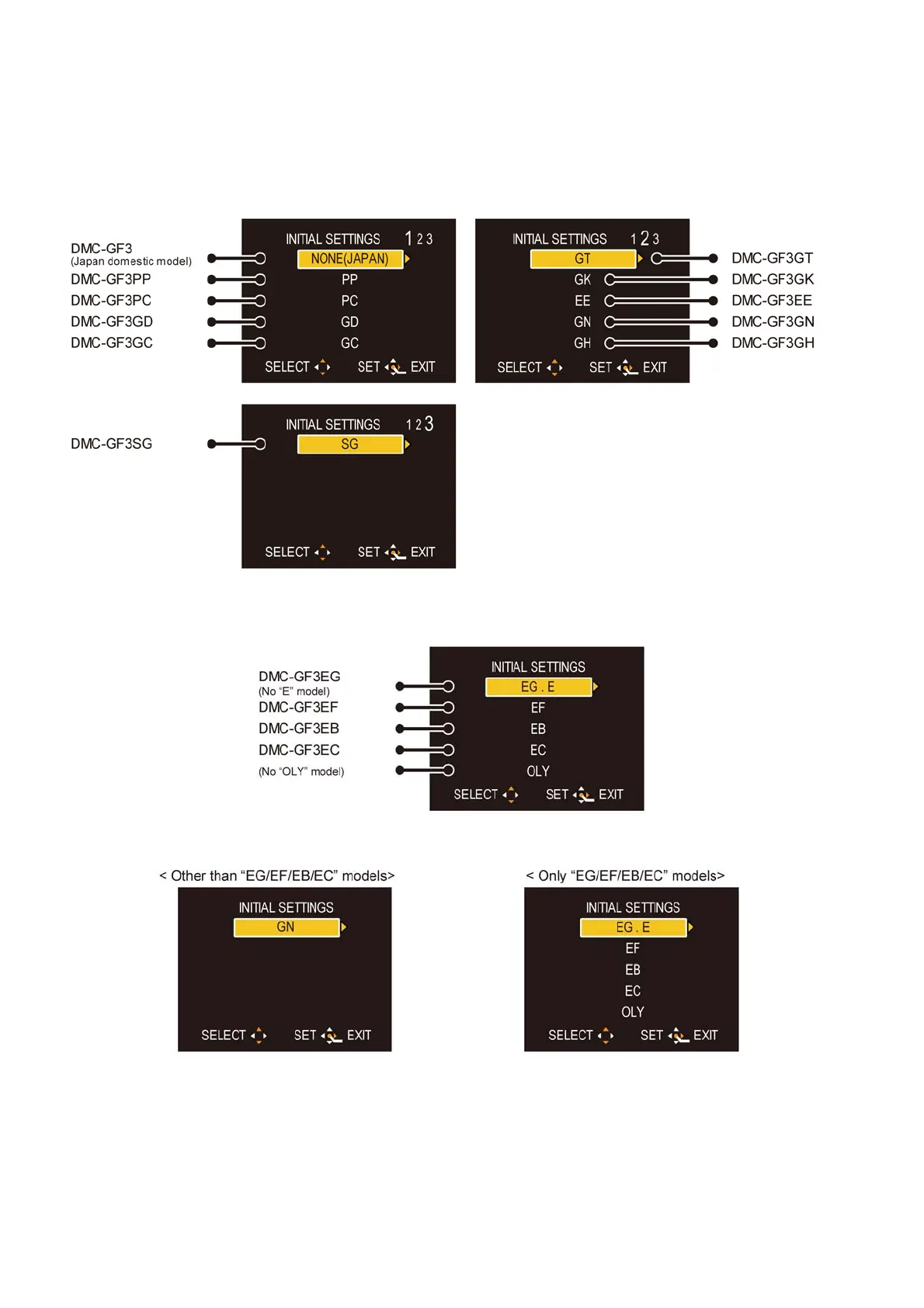
The “INTIAL SETTINGS” menu is displayed.
There are two kinds of “INITIAL SETTINGS” menu form as follows:
[CASE 1. After replacing MAIN P.C.B.]
[Except "EG, EF, EB and EC" models : (VEP56141A is used as a Main P.C.B.)]
When MAIN P.C.B. has just been replaced, all of the model suffix are displayed as follows. (three pages in total)
[Only for "EG, EF, EB and EC" models : (VEP56141B is used as a Main P.C.B.)]
When MAIN P.C.B. has just been replaced, only 5 model suffix are displayed as follows.
[CASE 2. Other than "After replacing MAIN P.C.B."]













 To Next Page