EasyManua.ls Logo

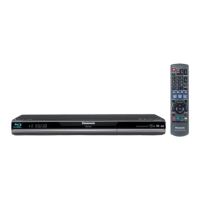
Panasonic DMP-B15 - User Manual

Panasonic DMP-B15
52 pages
Print Icon
To Next Page IconTo Next Page
Loading...
RQT9338-B
Operating Instructions
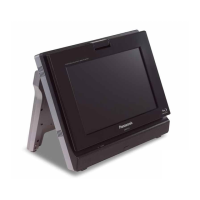
Portable Blu-ray Disc Player
Model No. DMP-B15
Dear customer
Thank you for purchasing this product.
For optimum performance and safety, please read these instructions carefully.
Before connecting, operating or adjusting this product, please read the instructions completely. Please keep this manual for future
reference.
Note: “EB” on the packaging indicates the United Kingdom.
Region management information
BD-Video
This unit plays BD-Video marked with labels containing the region code “A” or “B”.
Region Code
For the United Kingdom and Continental Europe “B
For Asia “A
For Australia and New Zealand “B
Example:For the United Kingdom and
Continental Europe
DVD-Video
This unit plays DVD-Video marked with labels containing the region number or
ALL”.
Region Number
For the United Kingdom and Continental Europe “2
For Asia “3
For Australia and New Zealand “4
Example:For the United Kingdom and
Continental Europe
2 ALL
3
5
2
EB EG GN GA
until
2009/4/27
DMPB15EB-RQT9338_eng.book 1 ージ 009年3月27日 金曜日 午後10時13分

Questions and Answers

  • M
    Megan MorenoAug 10, 2025
    What to do if my Panasonic DMP-B15 won't connect to the internet?
    • J
      jenniferjonesAug 11, 2025
      If your Panasonic Blu-ray Player can't connect to the network, consider the following: * Ensure the LAN cable is properly connected. * Verify that your modem or broadband router is powered on. * Check your network settings and adjust them according to your ISP's instructions. * Confirm that your broadband router settings are correct by consulting its operating instructions. * Ensure your broadband router and/or modem are correctly connected, referring to their respective operating instructions.
  • L
    Laura FosterAug 16, 2025
    Why can't I connect my Panasonic DMP-B15 to the network?
    • B
      Barbara EdwardsAug 16, 2025
      If your Panasonic Blu-ray Player won’t connect to the network or VIERA CAST isn't working, first ensure you have a high-speed internet connection and that your modem or broadband router is powered on. Consult your broadband router’s manual for correct settings. Also, check the 'Network' and 'BD-Live Internet Access' settings in the player's menu. If the video content appears incomplete, the network may be busy; try again later.
  • B
    Brian SmithAug 23, 2025
    What to do if my Panasonic DMP-B15 Blu-ray Player has no power?
    • J
      Joseph JohnsonAug 23, 2025
      There are several reasons why your Panasonic Blu-ray Player might not have power or is turning off. The unit may be overheating or too cold; use it between 5 oC (41 oF) and 35 oC (95 oF). If the unit doesn't turn on immediately after being turned off, wait for the 'BYE' display to disappear, then press the power button. Ensure the unit is closed with the screen facing outwards. If stopped for 15 minutes, the unit turns off to save power; simply turn it on again. If using VIERA Link (HDMI), the unit turns off with the TV; disable VIERA Link in settings if not in use. Avoid rotating the screen while the unit is on. For charging issues, check AC adapter or battery pack connections. If play time is reduced, the battery pack may need replacement.
  • J
    Jimmy CalderonAug 28, 2025
    How to fix a Panasonic DMP-B15 that is on but not working?
    • W
      William GuerraAug 28, 2025
      If your Panasonic Blu-ray Player is on but not responding, ensure it is closed with the screen facing outwards. Check that you've selected the correct playback media or operation function and that the media is inserted correctly with the label facing up. If lightning, static electricity, or another external factor is affecting the unit, turn it off and on again. If condensation has formed, wait 1 to 2 hours for it to evaporate. Clean the media if it's dirty, and ensure you are using playable media. Replace a depleted battery. Start-up can take time after a power failure or when connected with an HDMI cable. If the playback image is distorted, use compatible video. If you cannot set 'On' in '24p Output', connect the unit to a TV supporting 1080/24p output via an HDMI cable.
  • M
    Maureen ZimmermanSep 4, 2025
    Why is there no sound from my Panasonic DMP-B15 Blu-ray Player?
    • K
      kathryn26Sep 4, 2025
      If you're not getting sound from your Panasonic Blu-ray Player's speaker, first ensure headphones are disconnected. For [DivX] files, audio output may vary depending on file creation. Audio may not be changeable for certain discs due to their creation. When using an HDMI cable with an amplifier/receiver, you can't switch audio if 'Dolby D/Dolby D +/Dolby TrueHD' or 'DTS/DTS-HD' is set to 'Bitstream'; change the setting to 'PCM'.

Panasonic DMP-B15 Specifications

General IconGeneral
Weight0.96 kg (2.1 lbs)
HDMI OutputYes
USB PlaybackYes
Wi-FiNo
3DNo
UpscalingYes
Ethernet PortNo
HDMI Output(s)1
USB Port(s)1
SD Card SlotNo
Video OutputHDMI, Composite
TypePortable Blu-ray Player
Disc PlaybackBD, DVD, CD
Audio OutputHDMI, Analog
ConnectivityUSB

Related product manuals