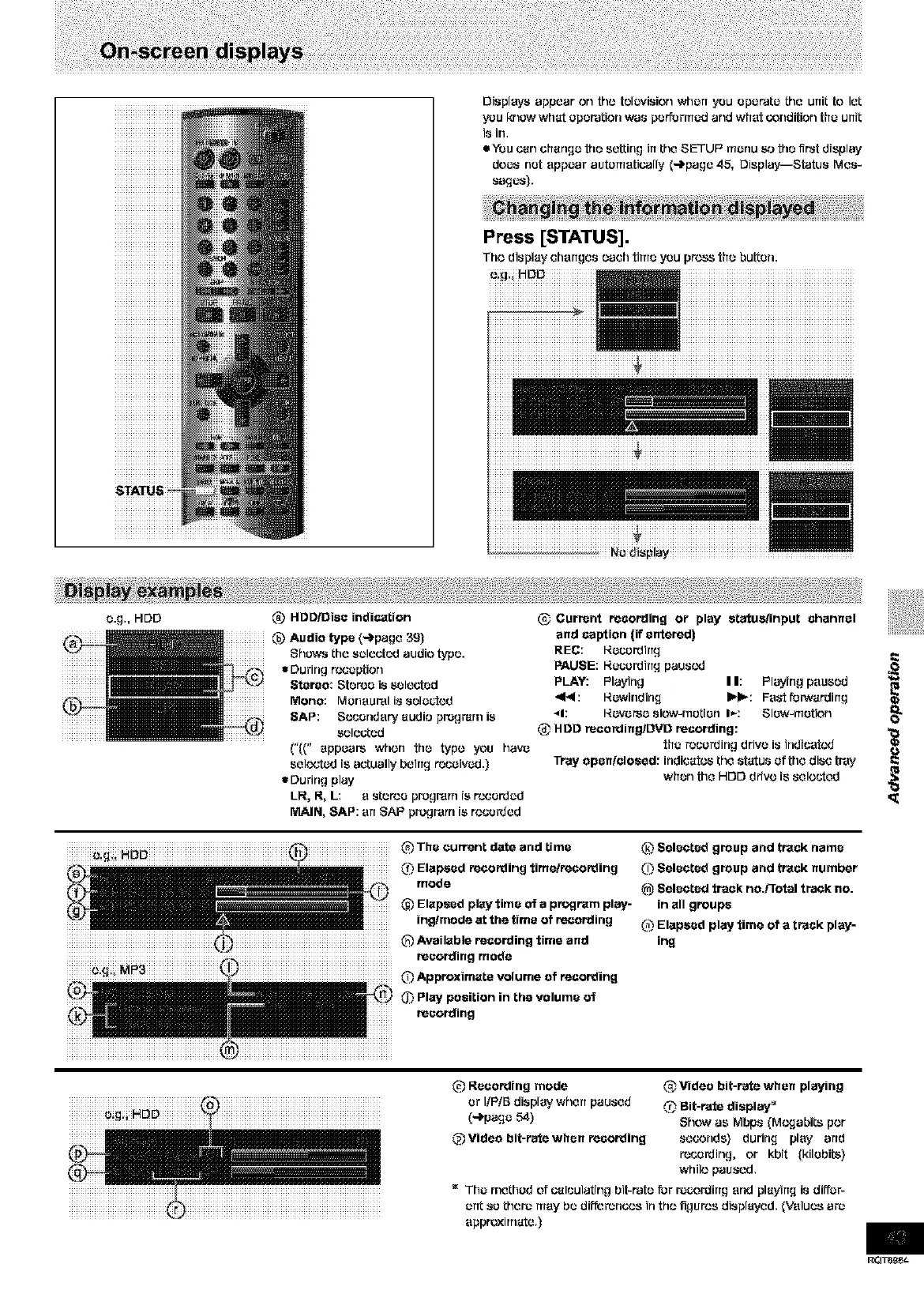
Displeyeappearon _lo telc_/ision when you Operate the unit to let
you krlcw what Operation was performed and what GondiUonthe urfit
is Jr1,
eYeu carl change the setting irtthe SETUI _ menu _o the first display
does net appear automatically (-_page 45, Display--Status Mes-
sages).
Ni0i_ii_lay ..................
e.g., HOD @ Currant recording or play atatusiinput channel
and caption (if entered)
REC: I_ec.vrdirtg
PAUSE: I_ecordirt_ paused
PLAY: Playing I I: Playing paused
_E<: I_ewfflding I_: Fa_-tfurwardirtg
_1: I_everse slow4nctien I_: Slew4rretion 0_
,_ HDD racording/DVD recording:
the raccrdirlg drive i8 trldicetcd
Tray open/closed: indicates the status of the disc tray
when the HDD drive is selected
O:,_:i HDD (_ The current date and time
(_ Elapsed recording time/recording
mode
@ Elapsed play time of a program play-
ing/mode at the time of recording
(2 Available recording time and
recording mode
(_ Approximate volume of recording
0_ Play position in the volume of
recording
(.2 L_elected group and track name
(_ Selected group and track number
_) Selected track no.Frotal track no.
in all groups
_ Elapsed play time of a track play-
ing
@ Reco_ing mode
or I/P/B display whert paused
(-_page 54)
@ Video bit-rate when recording
Video bit-rate when playing
,_ Bit-rate display _
Show as Mbps (M¢,v,-labitsper
seconds) during play arid
recording, or kbit (kilebite)
while paused.
The method of calculating bit-rata fur r_c.ording end playing is diffcr-
ertt so there may be difforonc,.,sin th,.,figures displayed. {Values arJ
appmxirnate.)
RQT6_8_









 To Next Page