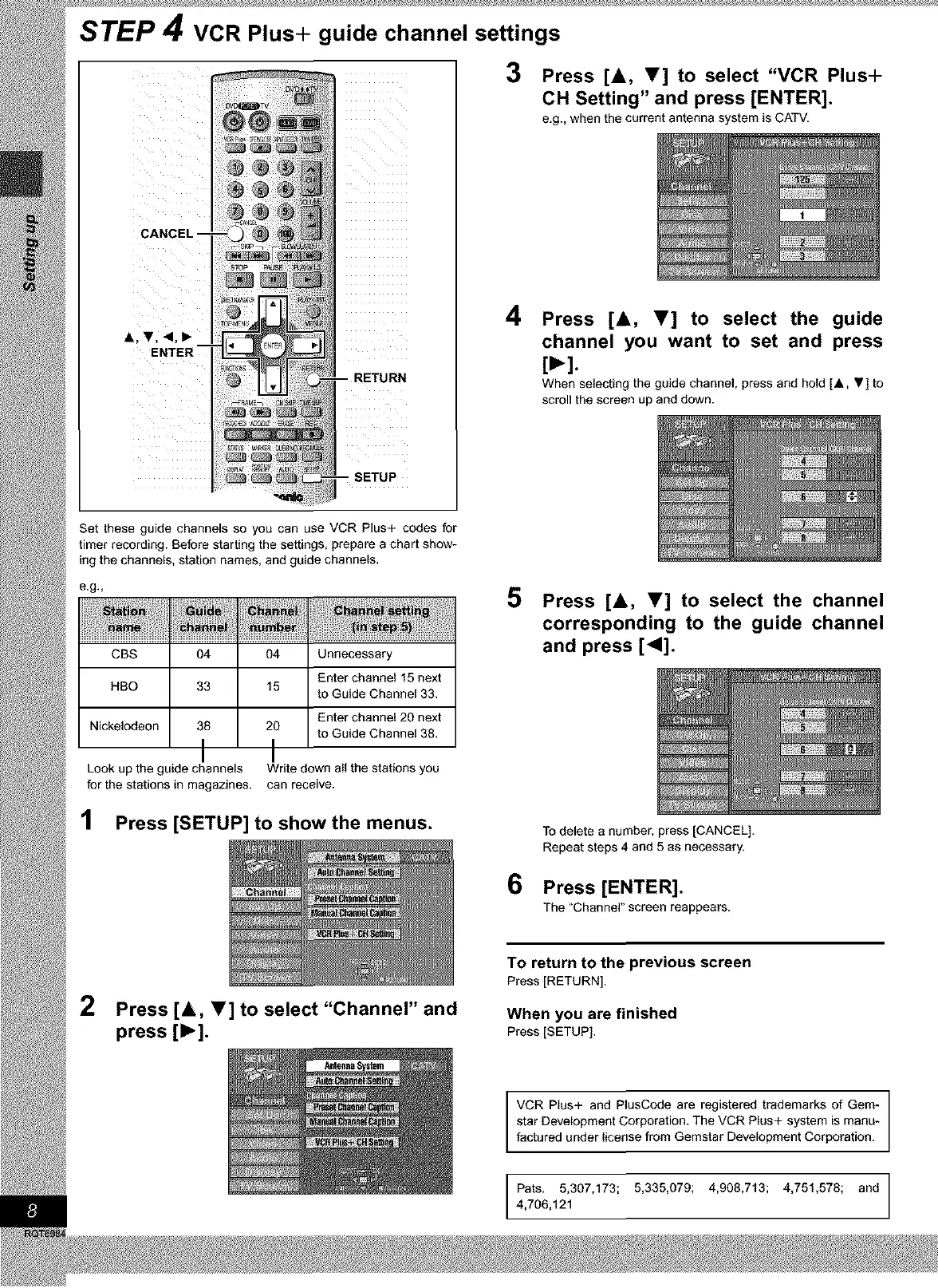
STEP 4 VCR Plus+ guide channel settings
SETUP
3 Press [A, V] to select "VCR Plus+
CH Setting" and press [ENTER].
e.g., when the current antenna system is CATV.
4
Press [A, Y] to select the guide
channel you want to set and press
[_-].
When selecting the guide channel, press and hold [A, .] to
scroll the screen up and down.
Set these guide channels so you can use VCR Plus+ codes for
timer recording. Before starting the settings, prepare a chart show-
ing the channels, station names, and guide channels.
e.g,,
ii i_ !tii¸¸ti_ii_liil
CBS 04
HBO 33
Nickelodeon 38
I
Look up the guide channels
for the stations in magazines.
04 Unnecessary
Enter channel 15 next
15
to Guide Channel 33.
Enter channel 20 next
20
to Guide Channel 38.
I
Write down all the stations you
can receive.
1 Press [SETUP] to showthe menus.
5 Press [A, y] to select the channel
corresponding to the guide channel
and press [41].
6
To delete a number, press [CANCEL].
Repeat steps 4 and 5 as necessary.
Press [ENTER].
The "Channel" screen reappears.
2
Press [A, V] to select "Channel" and
press [1_].
To return to the previous screen
Press [RETURN].
When you are finished
Press [SETUP],
VCR Plus+ and PlusCode are registered trademarks of Gem-
star Development Corporation. The VCR Plus+ system is manu-
factured under license from Gemstar Development Corporation.
Pats. 5,307,173; 5,335,079; 4,908,713; 4,751,578; and
4,706,121









 To Next Page