CONVERSION OF PRESSURE UNITS
13
ە
In the DP2 series, the conversion to different units is automatically done on changing the setting of the pressure unit.
However, this conversion can also be obtained by multiplying the values by the coefficients given in the following table.
࣭
For example, if 2kPa is to be expressed in kgf/cm
2
, since 1kPa=1.0197210
-2
kgf/cm
2
, 2kPa becomes 21.0197210
-2
Ҹ0.020kgf/cm
2
Conversion procedure
Conversion table for pressure units
1.0132510
2
1.0132510
-1
1.03323 1.01325 1.4696010
7.6000010
2
2.992110 1
3.3864 3.386410
-3
3.453110
-2
3.386410
-2
0.4912 2.540010 1 3.34210
-2
1.3332210
-1
1.3332210
-4
1.3595110
-3
1.3332210
-3
1.9336810
-2
1 3.937010
-2
1.3157910
-3
6.89473
6.8947310
-3
7.0306510
-2
6.8947310
-2
1 5.1714710 2.036
6.8045710
-2
110
2
1
10
-1
1.01972 1 1.4503810
7.5006210
2
2.95310
9.8692310
-1
9.8066510
9.8066510
-2
1
9.8066510
-1
1.4223410
7.3555910
2
2.895910
9.6784110
-1
110
3
1 1.0197210 110
1.4503810
2
7.5006210
3
0.295310
3
9.86923
1110
-3
1.0197210
-2
110
-2
1.4503810
-1
7.50062 0.2953
9.8692310
-3
kPa MPa kgf/cm
2
bar
mmHg
(Torr)
inHgpsi atm
1kPa
1MPa
1kgf/ cm
2
1bar
1mmHg
(1Torr)
1inHg
1psi
1atm
KEY-PROTECT FUNCTION
15
ە
Key-protect is a function which prevents any
unintentionalchangeintheconditionswhichhave
beenenteredineachsettingmodebymakingthe
sensornottorespondtothekeyoperations.
࣭
࣭
Since the key-protect information is st ored in an
EEPROM, it is not erased even if t he power supply
is switched off.
Please take care to remember if the key-prot ect
function has been set.
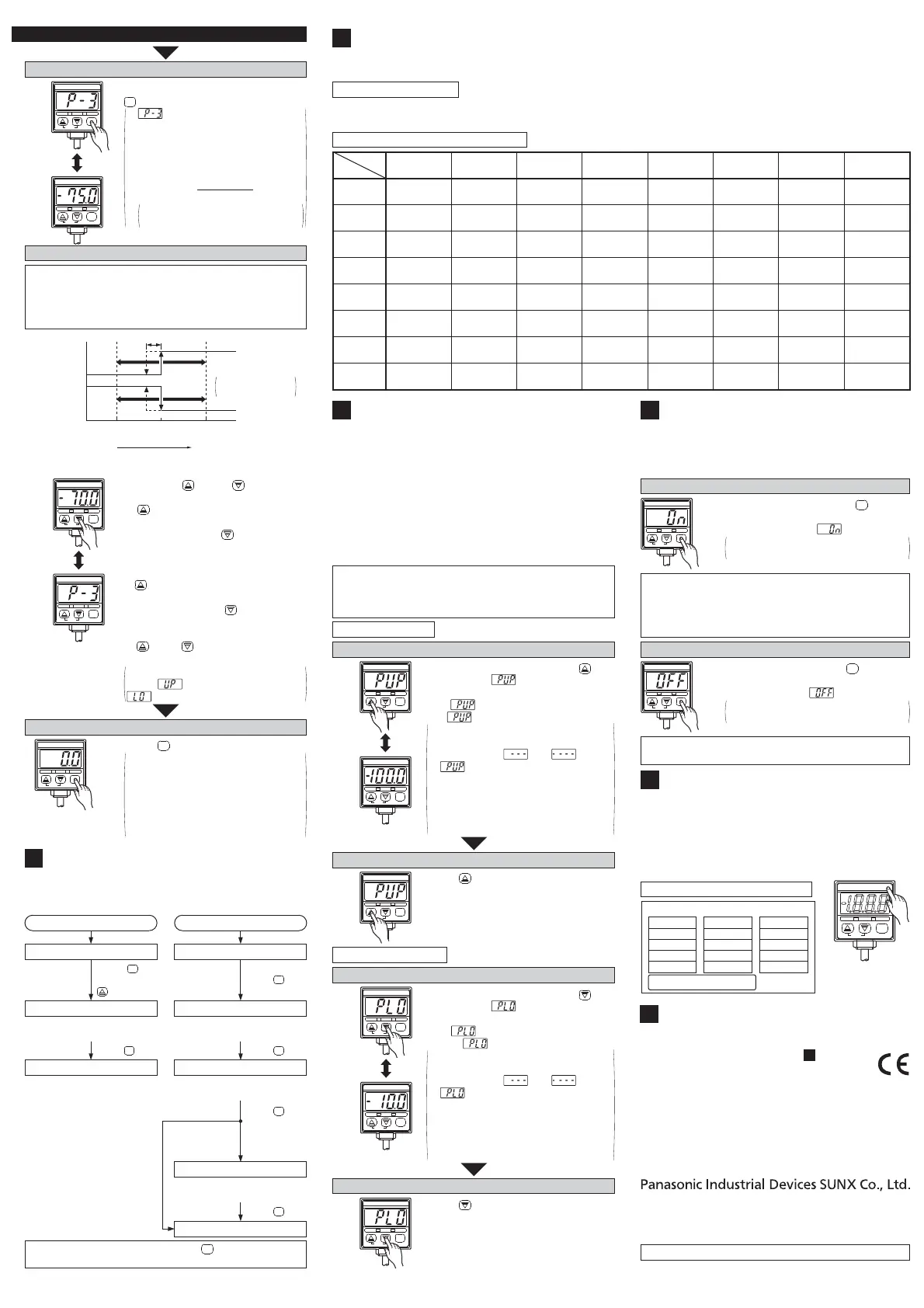
Setting of key-protect
DP2-20
-101.3kPa
OUT2OUT1
MODE
0-ADJ
࣭
In t he sen sin g m o d e, p r ess key con-
t inuously for about 3 sec. and release it
immediately when is displayed.
Key-protect is set and the sensor re-
turns to the sensing mode.
MODE
When t he keys are t o be operated, make sure t hat
key-prot ect is released.
Release of key-protect
࣭
In t he sen sin g m o d e, p r ess key con-
t inuously for about 3 sec. and release it
immediately when is displayed.
Key-prot ect is released and the sen-
sor returns to the sensing mode.
MODE
DP2-20
-101.3kPa
OUT2OUT1
MODE
0-ADJ
Set to Set Value 3 (P3) set mode
࣭
࣭
and the automatically set Set Value
3 (P3) are displayed alt ernat ely.
In case
Set Value 1 (P1) = -50.0kPa
Set Value 2 (P2) = -100.0kPa
then
Set Value 3 (P3) =
=-
75.0kPa
-50.0+(-100.0)
2
Digits smaller than the displayed
digits are discarded.
࣭
In the Set Value 2 (P2) set mode, press
key.
MODE
DP2-20
-101.3kPa
OUT2OUT1
MODE
0-ADJ
DP2-20
-101.3kPa
OUT2OUT1
MODE
0-ADJ
Displayed
alternately
In case Set Value 3 (P3) is to be changed
The automatically set Set Value 3 (P3) can be manually
changed to a value between Set Value 1 (P1) and Set Value 2
(P2). However Set Value 3 (P3) cannot be set to a value on the
vacu u m p ressu r e si d e f or a p osi t i v e p ressu re t ype sen so r o r t o
t h e p osi t ive p ressure si de f or a vacu u m p ressure t yp e sensor.
Comparat ive
Out put 1
Comparat ive
Out put 2
ON
OFF
ON
OFF
0
Set Value 1 (P1) Set Value 2 (P2)
Hysteresis
Changeabl e
range
Hi g h p ressu r e
(Positive pressure type)
High vacuum
(Vacuum pressure type)
Set Value 3 (P3)
Hysteresis: 1 digit
2 digit s when psi
unit is used
࣭
࣭
࣭
Enter using key and key.
In case o f a p osi t i ve p ressure t ype sen so r ,
if key is pressed once, the set val-
ue ch an g es t o w ards t he h i g h p r essu r e
side by 1 digit and if key is pressed
once, the set value changes towards
t h e l ow p ressu r e si d e b y 1 d i gi t .
In case o f a vacu u m p ressure t yp e sensor,
if key is pressed once the set value
chang es t ow ar d s t h e h i g h vacuum
side by 1 digit and if key is press-
ed once the set value changes to-
wards the low vacuum side by 1 digit.
If key or key is pressed contin-
uously, the set value changes quickly.
If the set pressure range is exceeded,
eit her (upper limit exceeded) or
(lower limit exceeded) is displayed.
DP2-20
-101.3kPa
OUT2OUT1
MODE
0-ADJ
DP2-20
-101.3kPa
OUT2OUT1
MODE
0-ADJ
Displayed
alternately
Set to sensing mode
࣭Press key.
࣭
࣭
Thesensorreturnstothesensingmode
after Set Value 1 (P1), Set Value 2 (P2)
andSetValue3(P3)havebeenset.
Sincethevalueswhichhavebeen
setarestoredinanEEPROM,they
arenot erased evenifthe power
supplyisswitchedoff.
MODE
DP2-20
-101.3kPa
OUT2OUT1
MODE
0-ADJ
PROCEDURE FOR CHECKING SET VALUES
12
ە
The conditions which have been set in the initial
setting and the pressure settings can be checked by
thefollowingprocedure.
Please note that if any key, except key, is pressed in
any setting mode, the set conditions shall get changed.
MODE
Procedure to check initial conditions
Set to sensing mode
Sensor returns to sensing mode
Sensor enters initial setting mode
Press key
while pressing
key.
MODE
Initial conditions which have been set
are displayed and can be checked.
Press key.
MODE
Sensor returns to sensing mode
Procedure to check set values
Set to sensing mode
Sensor enters Set Value 2 (P2) set mode
Sensor enters Set Value 1 (P1) set mode
Press key.
MODE
Set Value 1 (P1) which has been set
is displayed and can be checked.
In case of auto-
matic sensitivity
setting mode only
Set Value 2 (P2) which has been set
is displayed and can be checked.
Sensor enters Set Value 3 (P3) set mode
Set Value 3 (P3) which has been set
is displayed and can be checked.
Press key.
MODE
Press key.
MODE
Press key.
MODE
ە
ە
Peak hold and bottom hold functions enable the display
of the peak value (maximum pressure value in case of
t h e p osi t i ve p ressure t ype sen so r and m aximum vacuum
pressu r e v al u e in case of t he vacuum p ressure t ype sen -
sor) and the bot tom value (minimum pressure value in
case of t h e p osi t i ve p ressure t ype sen so r and m i ni m u m
vacu u m p ressu r e val u e i n case o f t h e vacuum pressure
type sensor) of the varying measured pressure.
These functions are convenient for finding t he pres-
sure variation range or for determining the reference
f or p r essure set t in g s.
࣭
࣭
Please note that the peak value and the bottom value
data is erased when it is no longer displayed.
The resp o n se t im e o f t h e comparat i ve o u t p u t s b eco m es
slower during the peak hold and bottom hold display.
PEAK HOLD & BOTTOM HOLD FUNCTIONS
14
Peak hold display
Ending peak hold display
࣭ Press key.
(Sensor returns to sensing mode.)
DP2-20
-101.3kPa
OUT2OUT1
MODE
0-ADJ
Initiating peak hold display
࣭ In t he sensing mode, keep key
pressed until is displayed. (4 sec.
approx.) When t he finger is released
after is displayed, the peak value
and are displayed alt ernately.
࣭
࣭
If the applied pressure exceeds the
displayable pressure range, error
message ( or ) and
are displayed alt ernat ely. In this
case, bring back the applied pressure
to within the rated pressure range.
The figure on the left shows the dis-
play of a vacuum type sensor when
t h e p ressu r e u n i t has b een set t o ' kPa'.
DP2-20
-101.3kPa
OUT2OUT1
MODE
0-ADJ
DP2-20
-101.3kPa
OUT2OUT1
MODE
0-ADJ
Displayed
alternately
Bottom hold display
Ending bottom hold display
࣭ Press key.
(Sensor returns to sensing mode.)
DP2-20
-101.3kPa
OUT2OUT1
MODE
0-ADJ
Initiating bottom hold display
࣭ In t he sensing mode, keep key
pressed until is displayed. (4 sec.
approx.) When t he finger is released
after is displayed, the bottom val-
ue and are displayed alt ernat ely.
࣭
࣭
If the applied pressure exceeds the
displayable pressure range, error
message ( or ) and
are displayed alt ernat ely. In this
case, bring back the applied pressure
to within the rated pressure range.
The figure on the left shows the dis-
play of a vacuum type sensor when
t h e p ressu r e u n i t has b een set t o ' kPa'.
DP2-20
-101.3kPa
OUT2OUT1
MODE
0-ADJ
DP2-20
-101.3kPa
OUT2OUT1
MODE
0-ADJ
Displayed
alternately
LABEL FOR CHANGE IN
PRESSURE UNIT
16
ە When a pressure unit other than 'kPa' or 'MPa' has
been selected in t he init ial set t ing mode, the label
(supplied as accessory) which corresponds to t he
sel ect ed uni t shoul d b e st uck at t h e p o si t i on show n
in the figure below.
Pressure unit label (accessory)
DP2-20
–101.3kPa
OUT2OUT1
MODE
0-ADJ
㸫1.033kgf/ cm
2
㸫101.3kPa⏝
㸫14.70psi
㸫1.013bar
㸫760mmHg
㸫29.9inHg
1.020kgf/ cm
2
100kPa⏝
14.50psi
1.000bar
10.20kgf/ cm
2
1MPa⏝
145.0psi
10.00bar
ᅽຊࢭࣥࢧ⏝ࠉ༢ษࡾ࠼㖭ᯈ
N2L58
St ick t he pressure
unit label at the
posit i on show n .
ە
The models listed under ' SPECIFI-
CATI ONS' come wit h CE Marking.
As for all other models, please contact our
office.
1
INTENDED PRODUCTS FOR
CE MARKING
17
http://panasonic.net/id/pidsx/global
© Panasonic Industrial Devices SUNX Co., Ltd. 2013
PRINTED IN JAPAN
Overseas Sales Division (Head Office)
2431-1 Ushiyama-cho, Kasugai-shi, Aichi, 486-0901, Japan
Phone: +81-568-33-7861 FAX: +81-568-33-8591
About our sale network, please visit our website.
Contact for CE
<Until June 30 ,2013>
Panasonic Electric Works Europe AG
Rudolf-Diesel-Ring 2, D-83607 Holzkirchen, Germany
<From July 1 ,2013>
Panasonic Marketing Europe GmbH Panasonic Testing Center
Winsbergring 15, 22525 Hamburg,Germany


 To Previous Page
 Loading...




