Į Setting of pressure values
SETTING
11
ە The displayed pressure when the pressure port is left
open is adjusted to zero.
ە
ە
If key-protect has been set, make sure to release
key-protectbeforeoperatingthekeys.(Pleasereferto
'KEY-PROTECTFUNCTION'fortheprocedure.)
TheconditionswhicharesetarestoredinanEEPROM.
Please note that the EEPROM has a life span and its
guaranteedlifeis100,000writeoperationcycles.
15
Setting procedure
ձ
Zero-point
adj ust ment
Adjust
zero-p oint
ղ
Initial
setting
Set [Display],
[Output mode],
and [Unit ]
ճ
Pressu re
value setting
En t e r
Set Value 1 (P1)
Set Value 2 (P2)
Set Value 3 (P3)
Measurement
Commence
measurement
on completion
of setting
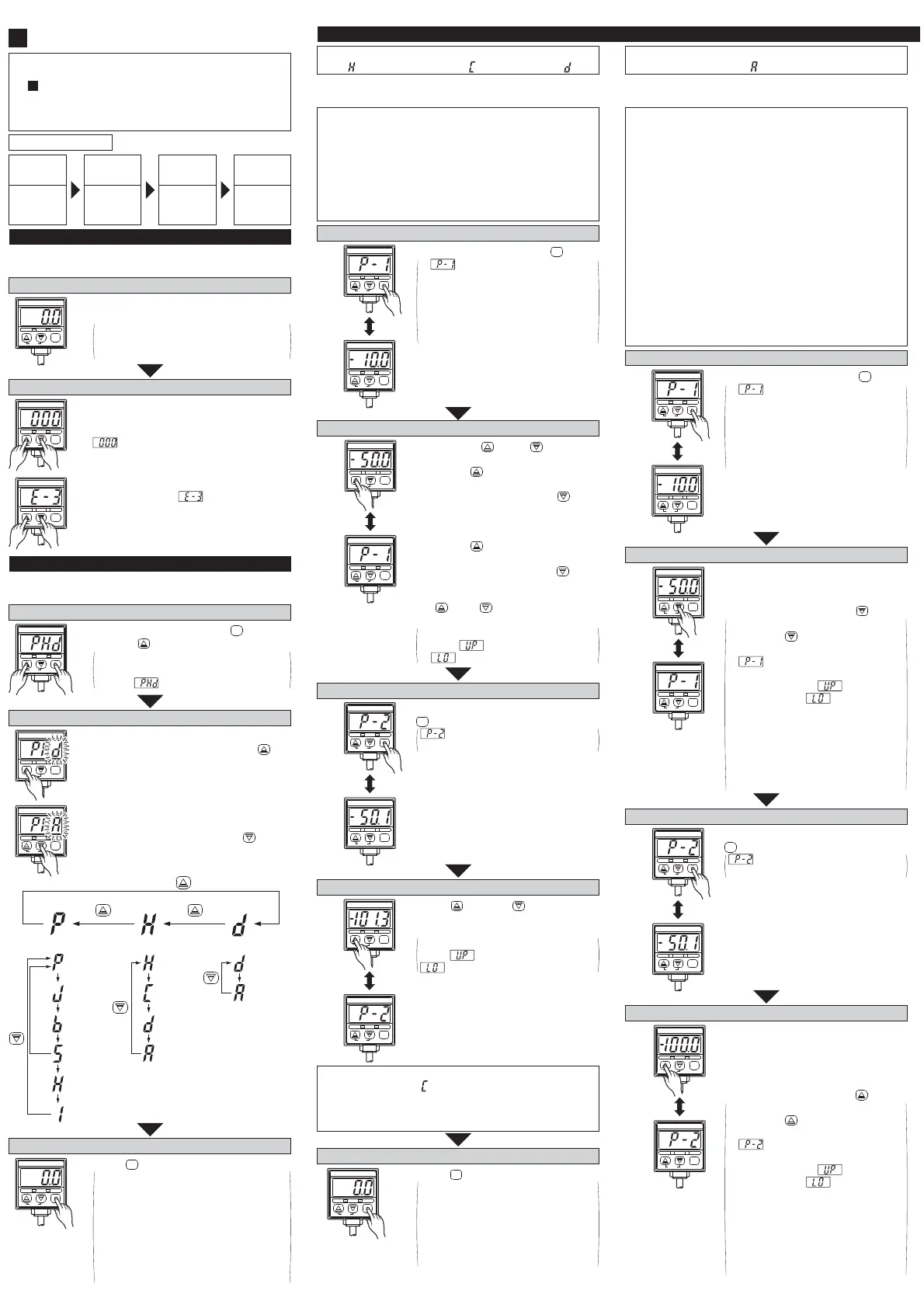
Ĭ Zero-point adjustment
Set to sensing mode
DP2-20
-101.3kPa
OUT2OUT1
MODE
0-ADJ
࣭The sensor will automatically enter the
sensing mode when power is supplied.
The figure on the left shows the display
when the pressure unit and display are set
to 'kPa' and 'digital display', respectively.
ە Pressure [Unit], [Display] and [Output mode] of the
comparative out puts are set .
ĭ Initial setting
Perform zero-point adjustment
DP2-20
-101.3kPa
OUT2OUT1
MODE
0-ADJ
࣭
࣭
Let the pressure port be at atmospheric pressure (i.e.,
no ap p l i ed pressure co n d i t i o n ), and p ress, si m u l t an e-
ously, the increment and decrement keys cont inuously.
is displayed and, when the fingers are
released, zero-point adjustment is completed
and the sensor returns to the sensing mode.
࣭
If pressure has been applied during zero-
poi nt adjust ment, is displayed when
the keys are pressed. Bring the applied
pressu r e t o at m o sp her i c p r essure (i.e., no
applied pressure condition) and carry out
t he zero-point adjustment once again.
DP2-20
-101.3kPa
OUT2OUT1
MODE
0-ADJ
Set to initial setting mode
DP2-20
-101.3kPa
OUT2OUT1
MODE
0-ADJ
࣭
࣭
Initial setting is displayed.
If sensor is being used for the first
time, is displayed.
࣭
In the sensing mode, press key while
pressing key.
MODE
Set to sensing mode
࣭
࣭
࣭
The sen sor ret urns t o sensing mode af -
ter the initial conditions have been set.
Since the initial conditions which
have been set are stored in an EE-
PROM, t hey are not erased even if
the power supply is switched off.
The figure on the left shows the display
when the unit and display are set to
'kPa' and 'digital display', respectively.
࣭ Press key.
MODE
DP2-20
-101.3kPa
OUT2OUT1
MODE
0-ADJ
Set initial conditions
࣭
࣭
The settable digit blinks.
The settable digit changes when key
is pressed.
࣭
࣭
Change the setting of each digit as
desired.
The setting is changed when key is
pressed.
DP2-20
-101.3kPa
OUT2OUT1
MODE
0-ADJ
DP2-20
-101.3kPa
OUT2OUT1
MODE
0-ADJ
3rd digit 2nd digit
Change wit h key.
1st digit
Unit Out put mode Display
: kPa or
MPa
: kgf/ cm
2
: bar
: psi
: Hyst eresis
mode
: Window
comparat or
mode
: Digital
display
: Analog
bar
display
: Dual output
mode
: Automatic
sensitivity
setting mode
: mmHg
: inHg
Po si t i ve
pressure type
Vacuum
pressure type
ە Comparative out puts' [Set Value 1 (P1)], [Set Value 2
(P2)] and [Set Value 3 (P3)] are set.
࣭
࣭
࣭
࣭
The setting of Set Value 2 (P2) with respect to Set Value 1
(P1) can onl y b e t ow ar d s t h e h ig h p ressure si de i n case o f
the positive pressure type sensor and only towards the high
vacu u m si d e i n case o f t h e vacuum pressure t ype sen sor.
Set Value 3 (P3) is automatically set to the mid-value of Set
Value 1 (P1) and Set Value 2 (P2). However, if Set Value 1
(P1) i s set t o a val ue on t he vacuum pressure si de f or a p osi -
t i ve p ressu r e t ype sen so r o r t o t h e posit i ve p r essu r e side f or
a vacuum pressure type sensor, Set Value 3 (P3) is automati-
cally set to t he mid-value of 'zero' (atmospheric pressure) and
Set Value 2 (P2). Further, if bot h, Set Value 1 (P1) and Set
Value 2 (P2) are set t o a value on t he vacuum pressure side
f or a p o si t i ve p ressu r e t ype sen so r o r t o t h e posit i ve p r essu r e
sid e for a vacu u m p ressu r e t ype sensor, Set Val ue 3 (P3) is
automatically set to 'zero' (atmospheric pressure).
The automatically set Set Value 3 (P3) can be changed manually.
Si n ce d i sp l ay of error messag es i s not p ossi b l e during p r essu r e
value setting in the automatic sensitivity setting mode, make
sure that the sensor is used within the rated pressure range.
For the case when the output mode is set to automatic
sensitivity setting mode ( )
Set to Set Value 1 (P1) set mode
࣭
࣭
and Set Value 1 (P1) which
is being set are displayed
alternately.
The figure on the left shows the
di sp l ay of a vacu u m p ressu r e
t ype sen sor when t he p ressure
uni t has been set t o ' kPa'.
࣭In the sensing mode, press key.
MODE
DP2-20
-101.3kPa
OUT2OUT1
MODE
0-ADJ
DP2-20
-101.3kPa
OUT2OUT1
MODE
0-ADJ
Displayed
alternately
Enter Set Value 1 (P1)
࣭ Within t he required permissible pres-
sure range, having created a pres-
sure state which is nearest to the at-
mosp h er i c p ressure, p r ess key.
࣭
࣭
࣭
The pressure value at the time of
pressingkeyis entered as Set
Value1 (P1). Set Value1 (P1) and
aredisplayedalternately.
If the set pressure range is
exceeded,either(upperlimit
exceeded) or(lower limit
exceeded) are displayed and Set
Value1(P1)issetautomaticallyto
theupperorlowerlimitoftheset
pressurerange.
ThesettingofSetValue1(P1)can
be repeated several times in the
SetValue1(P1)setmode.
DP2-20
-101.3kPa
OUT2OUT1
MODE
0-ADJ
DP2-20
-101.3kPa
OUT2OUT1
MODE
0-ADJ
Displayed
alternately
Set to Set Value 2 (P2) set mode
࣭
In the Set Value 1 (P1) set mode, press
key.
and Set Value 2 (P2) which is
being set are displayed alt ernat ely.
MODE
DP2-20
-101.3kPa
OUT2OUT1
MODE
0-ADJ
DP2-20
-101.3kPa
OUT2OUT1
MODE
0-ADJ
Displayed
alternately
Enter Set Value 2 (P2)
࣭
Wit hin t he required permissible pressure
range, having created a pressure state
which is nearest to the high pressure
end (for a p osi t i ve p r essure t ype sen so r )
or the high vacuum end (for a vacuum
pressu r e t yp e sen so r ), p r ess key.
࣭
࣭
࣭
The pressure value at the time of
pressingkeyis entered as Set
Value2 (P2). Set Value2 (P2) and
aredisplayedalternately.
If the set pressure range is
exceeded,either(upperlimit
exceeded) or(lower limit
exceeded) are displayed and Set
Value2(P2)issetautomaticallyto
theupperorlowerlimitoftheset
pressurerange.
ThesettingofSetValue2(P2)can
be repeated several times in the
SetValue2(P2)setmode.
DP2-20
-101.3kPa
OUT2OUT1
MODE
0-ADJ
DP2-20
-101.3kPa
OUT2OUT1
MODE
0-ADJ
Displayed
alternately
Set to sensing mode
࣭Press key.
࣭
࣭
The sen sor ret urns t o sensing
mode after Set Value 1 (P1) and
Set Value 2 (P2) have been set.
Since the values which have been
set ar e st ored in an EEPROM,
they are not erased even if the
power supply is switched off.
MODE
DP2-20
-101.3kPa
OUT2OUT1
MODE
0-ADJ
ە [Set Value 1 (P1)] and [Set Value 2 (P2)] of t he
comparative out puts are set .
࣭
࣭
The setting of Set Value 2 (P2) with respect to Set Value 1
(P1) can onl y b e t ow ar d s t h e h ig h p ressure si de i n case o f
the positive pressure type sensor and only towards the high
vacu u m si d e i n case o f t h e vacuum pressure t ype sen sor.
Set Value 1 (P1) and Set Value 2 (P2) can be made common
for all the output modes. However, when a changeover is
made to the automatic sensitivity setting mode, since Set
Value 3 (P3) has not been set, make sure to carry out the
pressure value settings for the automatic sensitivity mode.
For t he case when out put mode is set to either t he hysteresis
mode ( ), window comparator mode ( ) or dual output mode ( ).
Set to Set Value 1 (P1) set mode
࣭
࣭
and Set Value 1 (P1) which
is being set are displayed
alternately.
The figure on the left shows the
di sp l ay of a vacu u m p ressu r e
type sensor when the pressure
uni t has been set t o ' kPa'.
࣭In t he sensing mode, press key.
MODE
DP2-20
-101.3kPa
OUT2OUT1
MODE
0-ADJ
DP2-20
-101.3kPa
OUT2OUT1
MODE
0-ADJ
Displayed
alternately
Set to Set Value 2 (P2) set mode
࣭
In the Set Value 1 (P1) set mode, press
key.
and Set Value 2 (P2) which is
being set are displayed alt ernat ely.
MODE
DP2-20
-101.3kPa
OUT2OUT1
MODE
0-ADJ
DP2-20
-101.3kPa
OUT2OUT1
MODE
0-ADJ
Displayed
alternately
If the output mode has been set to the window
comparator mode ( ) in the initial setting mode, Set
Value 1 (P1) and Set Value 2 (P2) should be set with a
difference of 3 digits or more. However, when unit is set
to 'psi', the difference should be 6 digits or more.
Enter Set Value 2 (P2)
࣭
Usingkeyandkey,enterina
manner similar to that for entering
SetValue1(P1).
Ifthesetpressurerangeisexceeded,
either(upperlimitexceeded)or
(lowerlimitexceeded)isdisplayed.
DP2-20
-101.3kPa
OUT2OUT1
MODE
0-ADJ
DP2-20
-101.3kPa
OUT2OUT1
MODE
0-ADJ
Displayed
alternately
Enter Set Value 1 (P1)
DP2-20
-101.3kPa
OUT2OUT1
MODE
0-ADJ
DP2-20
-101.3kPa
OUT2OUT1
MODE
0-ADJ
Displayed
alternately
࣭
࣭
࣭
Enter using key and key.
In case o f t h e posit i ve p ressu r e t yp e
sensor, if key is pressed once the
set val u e ch an g es t oward s t he h i gh
pressure side by 1 digit and if key is
pressed once t h e set val ue ch an g es t o-
w ard s t he low p r essure side b y 1 di g it .
In case o f t h e vacu u m p ressu r e t ype
sensor, if key is pressed once the
set val u e ch an g es t oward s t he h i gh
vacuum side by 1 digit and if key is
pressed once t h e set val ue ch an g es t o-
wards the low vacuum side by 1 digit.
If key or key is pressed contin-
uously, the set value changes quickly.
If the set pressure range is exceeded,
eit her (upper limit exceeded) or
(lower limit exceeded) is displayed.


 To Next Page
 Loading...




