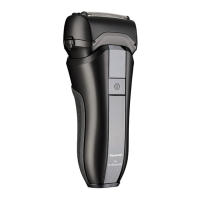
This document describes the Panasonic AC/Rechargeable Professional Shaver, Model No. ER-SP20, an appliance designed for professional use to trim hair and beards. It can be operated using either an AC adaptor or its built-in rechargeable battery.
Function Description
The Panasonic ER-SP20 is a professional shaver that provides efficient and precise trimming of hair and beards. It features an AC/rechargeable operation, offering flexibility for use both corded and cordless. The device is equipped with a system outer foil and inner blades designed for effective hair removal. It also includes a sonic vibration cleaning mode to facilitate easy and thorough cleaning. The shaver incorporates a battery capacity lamp and a charge status lamp to indicate the remaining charge and charging progress.
Usage Features
To use the shaver, first ensure the blades are not damaged or deformed and that the appliance is clean and lubricated. For optimal results, trim long hair shorter (approximately 0.3 mm) before using the shaver. The device can be turned on using the power switch.
Charging:
The shaver can be charged using the supplied AC adaptor (RE9-82) and charging stand (RC9-86).
- Connect the appliance plug to the stand socket.
- Place the appliance on the charging stand.
- Insert the adaptor into a household outlet.
Charging is completed after approximately 1 hour. The display will show the charging status:
- While charging (low battery capacity): The battery capacity lamps will blink.
- While charging: The charge status lamp will glow.
- After charging is completed: All lamps will turn off after 5 seconds.
To check if charging is complete, re-insert the main body after removing it from the charging stand. If the lamps glow and then turn off after 5 seconds, charging is complete.
The recommended ambient temperature for charging is 10 °C – 35 °C. A full charge provides approximately 70 minutes of continuous operation, though this may vary with usage frequency and method. If the appliance has not been used for over 6 months, perform a full charge to prevent battery deterioration. Charging each time does not affect battery life as it uses a lithium-ion battery.
The shaver can also be charged without the charging stand by plugging the AC adaptor directly into the main body and a household outlet.
AC Operation:
The shaver can be used while connected to the AC adaptor. If the battery is too low, the blades may move slowly or stop even with AC operation; in this case, charge the battery for at least 1 minute. The battery will still discharge during AC operation.
Battery Status Indicators:
The battery capacity lamps indicate the approximate remaining charge. When the battery is low, one battery capacity lamp and the charge status lamp will blink, indicating that charging is required. You can trim for approximately 5 minutes after this display. The charge status lamp glows during AC operation.
Safety Precautions during Use:
- Do not use excessive pressure on the system outer foil against your skin.
- Avoid touching the blade section of the inner blade to prevent injury.
- Use the appliance only for trimming beards, hair on the nape of the neck, back of the head, and sides of the head.
- Do not forcefully press the system outer foil or touch it with fingers or nails during use, as this can cause injury or reduce its life.
- Ensure the system outer foil is checked for cracks or deformations before use to prevent skin injury.
- Do not apply the system outer foil directly to blemishes or injured skin.
- Do not allow metal objects or trash to adhere to the power plug, appliance plug, or charging plug to prevent electric shock or fire.
- Disconnect the adaptor from the household outlet when not in use to prevent electric shock or fire due to electrical leakage.
- Do not use the appliance in ambient temperatures lower than approximately 5 °C.
- Avoid contact with permanent wave lotion, hair dyeing, or hair spray, as this can cause cracking or corrosion.
- Do not bring the system outer foil into contact with hard objects, and avoid dropping or hitting the appliance.
- Always place the protective cap on the appliance when carrying or storing it.
Maintenance Features
Regular maintenance ensures the shaver's longevity and optimal performance. Always turn off the main body and remove the AC adaptor before cleaning.
Cleaning with Water:
- Apply hand soap and water to the system outer foil.
- Press the power switch for more than 2 seconds to activate the sonic vibration cleaning mode. This mode suppresses foam splashing, and the battery capacity lamps will blink in order. The mode automatically turns off after about 20 seconds, or you can turn it off by pressing the power switch.
- Remove the outer foil section (refer to the "Removing and mounting the outer foil and the inner blades" section for instructions).
- Rinse the outer foil section and inner blades under running water. Rinsing in sonic vibration cleaning mode reduces splashing.
- Shake the appliance up and down several times to remove water, being careful not to hit it against the sink or other objects.
- Wipe off water with a dry cloth and dry the appliance well. Allow the main body to dry away from direct sunlight; do not use a dryer or fan heater.
- Do not use thinner, benzine, alcohol, or other chemicals, as they can cause failure, cracking, or discoloration.
- Do not use kitchen or bathroom detergents other than hand soap.
Cleaning with the Brush:
- Remove the outer foil section and the inner blades.
- Use the long brush to clean the outer foil section, system outer foil, and the main body.
- Use the short brush to clean the inner blades by moving it in the direction illustrated. Do not move the short brush perpendicularly against the blades, as this can damage them and affect their sharpness.
Lubrication:
Apply lubrication oil to the blade after each use.
- Apply one drop of lubrication oil to each of the system outer foils.
- Turn on the power and let it run for approximately 5 seconds.
- Turn off the power and wipe off any excess lubrication oil from the system outer foil with a soft cloth.
Failure to apply lubrication oil can lead to the appliance becoming blunt, shorter operating time, and louder sound.
Removing and Mounting the Outer Foil and Inner Blades:
- Outer Foil Section: To remove the frame, push the frame release buttons. To attach, align as illustrated and securely attach until it clicks.
- System Outer Foil: To remove, press the system outer foil release buttons and pull down the system outer foil. Do not press the release buttons with excessive force to avoid bending the system outer foil. To attach, align as illustrated and securely attach until it clicks. Do not discard the foil frame.
- Inner Blades: Remove and insert the inner blades one at a time.
Troubleshooting:
- Appliance blunt: Charge the appliance, clean the blade, apply lubrication oil, or replace the blade.
- Short operating time: Charge the appliance, clean the blade, apply lubrication oil, or replace the blade.
- Appliance stopped functioning: Charge the appliance, clean the blade, apply lubrication oil, or replace the blade.
- Appliance cannot be charged: Ensure the main body is pushed fully into the charging stand or appliance plug. Charge within the recommended temperature range (10 °C – 35 °C).
- Loud sound: Apply lubrication oil, confirm the blade is properly attached, or clean the system outer foil with the brush. A high-pitched sound from the linear motor drive is normal.
- Appliance not operating even after charging: Use in an ambient temperature of approximately 5 °C or higher. If the battery has reached the end of its life, the appliance will not operate even with the AC adaptor connected.
- Stronger odor: Clean the appliance after trimming.
- Shavings fly out: Clean the appliance after trimming, especially the inner blades.
- System outer foil gets hot: Apply lubrication oil or replace the system outer foil if damaged or deformed.
If problems persist, contact an authorized service center.
Disposal of the Appliance:
The appliance contains a built-in rechargeable Lithium-ion battery. Before disposing of the appliance, the battery must be removed.
- Remove the appliance from the AC adaptor.
- Press the power switch to turn on the power and keep it on until the battery is completely discharged.
- Follow the provided steps to lift and remove the battery.
- Insulate the positive and negative terminals of the removed battery with tape to prevent short circuits.
The battery must be disposed of safely at an officially assigned location. Do not throw into fire, apply heat, hit, disassemble, modify, or puncture the battery. If battery fluid leaks and contacts eyes, rinse thoroughly with clean water and consult a physician. If it contacts skin or clothes, rinse with clean water.

 Need help?
 General



 To Next Page