13
English
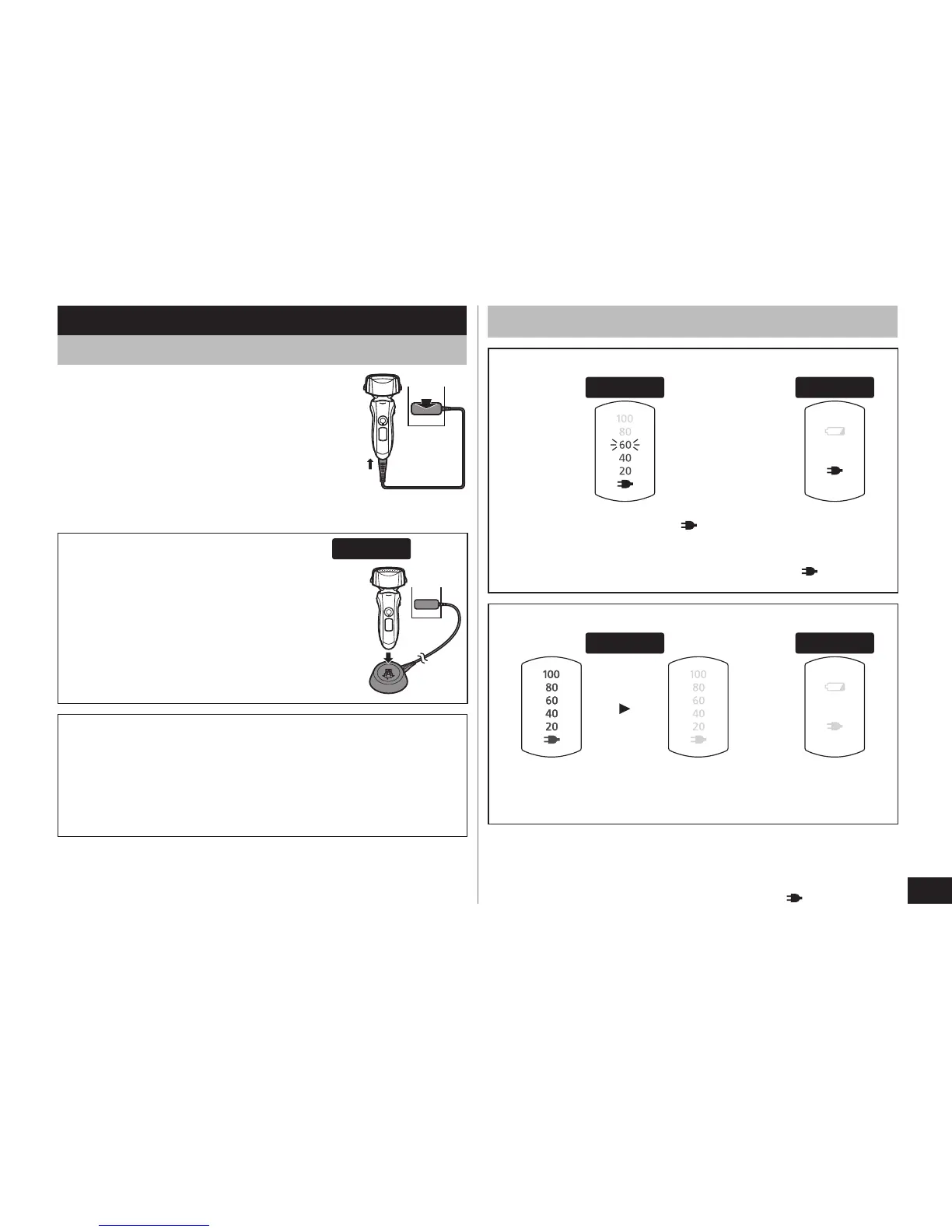
Reading lamps when charging
While charging
ES‑LT50 ES‑LT20
The charge status lamp ( ) glows.
The number of the battery capacity
lamp will increase as charging
progresses.
The charge
status lamp
(
) glows.
After charging is completed
ES‑LT50 ES‑LT20
All the battery capacity lamps will
light up and then turn off after 5
seconds.
All lamps turn
off.
Recommended ambient temperature for charging is
15
‑35 °C. The battery may degrade the performance
or may not charge under extreme low or high
temperatures. The charge status lamp ( ) will blink
when there is a problem with charging.
•
Charge
Charging the shaver
1
1
Insert the appliance plug into
the shaver.
2
2
Plug in the adaptor into a
household outlet.
Turn the shaver off before attaching.
Charging is completed after approx. 1
hour.
•
•
Charging with the charging stand ES‑LT50
1. Inser
t the appliance plug into the
charging stand.
2. Place the sha
ver on the charging
stand and plug in the adaptor into a
household outlet.
Cord shaving
If you insert the appliance plug to the shaver and plug
in the adaptor into a household outlet, you can use it
even if the battery capacity is low.
If the shaver does not work, continue charging it for
approx. 1 minute.
•



 To Next Page