14
English
• Depending on the beard thickness or the amount of
beard trimmings in the shaver head, the shaving
sensor may not react and the driving sound may not
change. This is not abnormal.
• Topreventerroneousoperation,placeyourngerson
the thumb rest while using the shaver.
• The sonic vibration cleaning mode is activated when
the power switch is pressed for more than 2 seconds
while the shaver is not operating. (See page 15.)
You cannot shave in this mode.
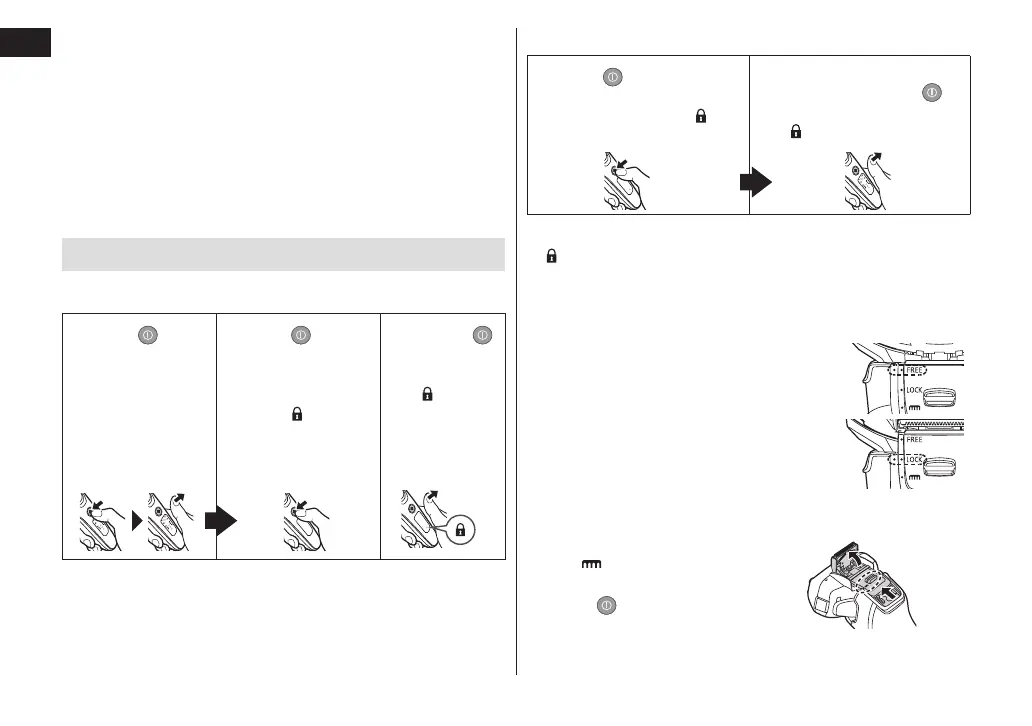
Operation and display of the switch lock
►Locking the power switch
1. Press once
and then
release.
• The shaver
starts
operating.
2. Press
for
more than
2 seconds until
the switch lock
lamp (
) turns
on.
• The shaver will
stop operating.
3.
Release .
• The switch
lock lamp
(
) will
light up for
5 seconds
and turn
off.
►Unlocking the power switch
1. Press for more than
2 seconds until the
switch lock lamp (
)
turns off.
2. Once the shaver starts
operating, release
.
• The switch lock lamp
(
) will turn off.
• The power switch is locked when the switch lock lamp
(
) blinks for 5 seconds and the shaver does not
operate even though the power switch is pressed.
►Switching the shaver head
You can change the pivot action.
FREE
The shaver head is moved to prevent
missed spots.
LOCK
You can lock the shaver head.
►Using the trimmer
1. Slide the trimmer handle up to
the “
” position so that the
trimmer stands upright.
2. Press
and use.






 To Next Page