16
English
5
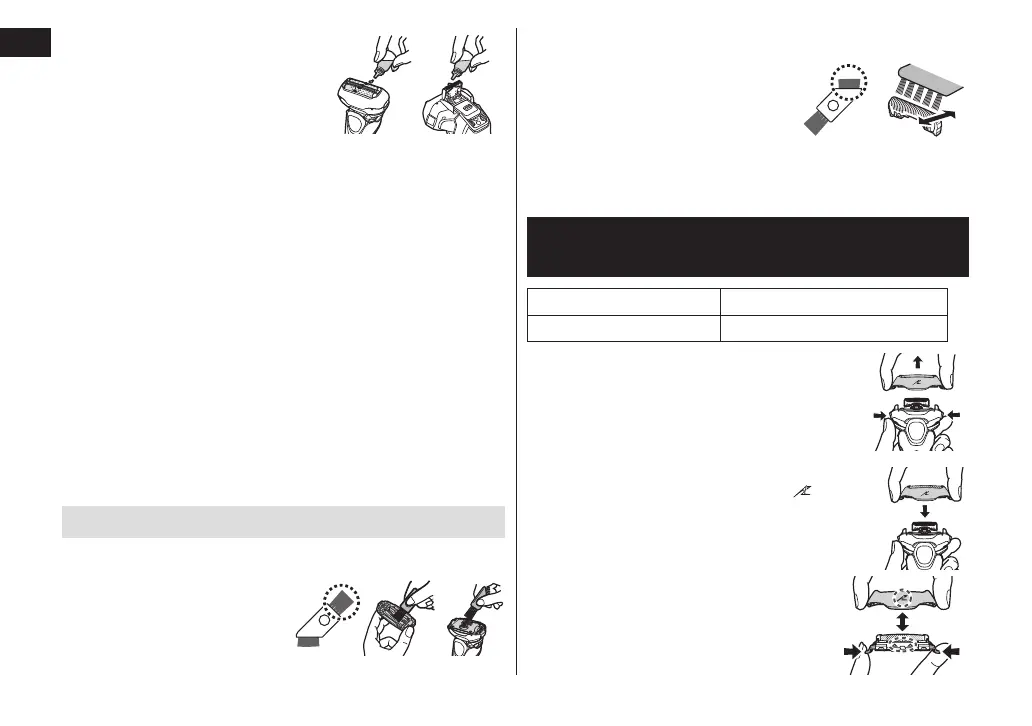
Lubricate the shaver�
It will keep the movement of
the blade smooth and
maintain a comfort shave.
1. Apply one drop of oil to
each of the system outer
foils.
2. Raise the trimmer and apply a drop of oil.
3. Switch the shaver on, and run it for approximately
veseconds.
4. Switch off the shaver, and wipe off any excess oil
from the system outer foil with a soft cloth.
Notes
• Be careful not to hit the main body on the sink or any
other object while draining the water. Failure to do so
may cause malfunction.
• Do not wipe with thinners, benzine, alcohol etc.
Doing so may cause malfunction, or cracking or
discoloration of the parts.
Wipe with diluted soapy water.
• Do not use any kitchen or bathroom detergents other
than hand soap.
Doing so may cause malfunction.
Cleaning with the brush
►Cleaning with the long brush
Clean the foil frame, system
outer foil, the main body
and the trimmer using the
long brush.
►Cleaning with the short brush
• Clean the inner blades using
the short brush by moving it in
direction as illustrated.
• Do not move the short brush
perpendicularly against the
blades as it will damage the inner
blades and affect their sharpness.
Replacing the system outer foil and
the inner blades
system outer foil once every year
inner blades once every two years
►Removing the outer foil section
Press the foil frame release buttons and
lift the outer foil section upwards.
►Attaching the outer foil section
After turning the foil frame mark (
) to the
front, securely attach the outer foil section
to the shaver until it clicks.
►Replacing the system outer foil
1. Press the system outer foil release
buttons and pull down the system
outer foil.






 To Next Page