15
English
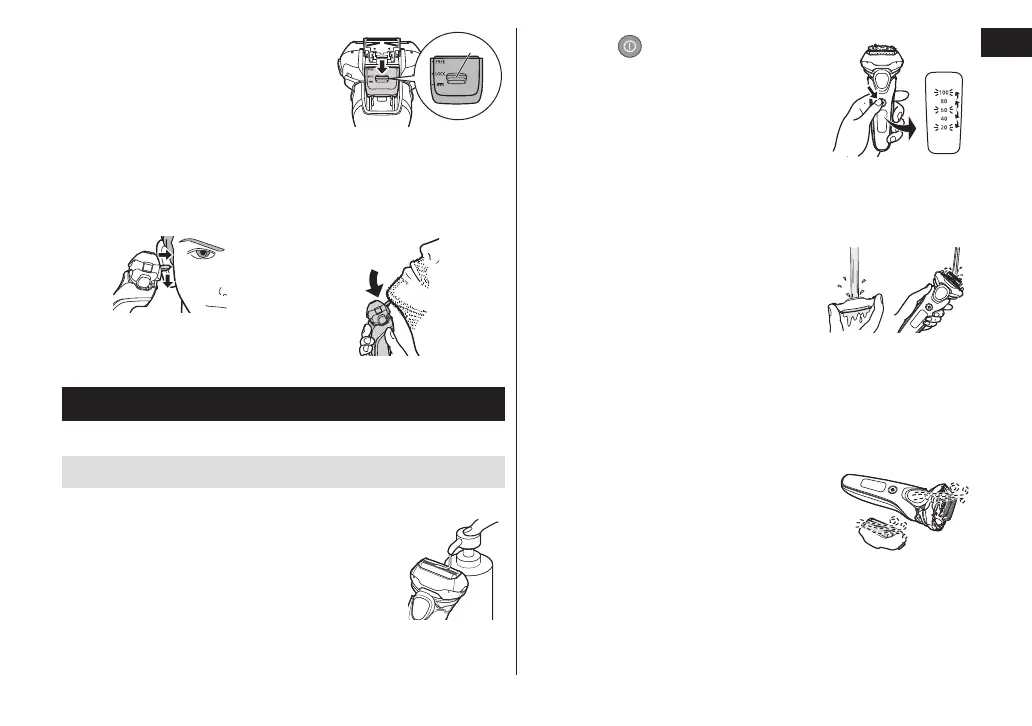
Press and hold the top knob (a)
and slide the trimmer handle
down to lower the trimmer.
Tips for better usage
Apply the trimmer edge perpendicular to skin gently
and move downward slowly.
Trimming sideburns Pre‑shave of long beards
Cleaning the shaver
We recommend cleaning the shaver after each use.
Cleaning with water
• Turn the shaver off and disconnect the AC adaptor.
1
Apply some hand soap and some
water to the system outer foil�
2
Press for more than
2 seconds to activate the
sonic vibration cleaning
mode�
• Splashing of foam is suppressed.
• The battery capacity lamps blink
in order.
• After about 20 seconds, it will be automatically
turned off, or you can turn it off by pressing the
power switch.
3
Remove the outer foil
section and clean with
running water�
• See page 16 for removing the
outer foil section.
• Splashing is reduced by rinsing the shaver in sonic
vibration cleaning mode.
• After rinsing with water, shake the shaver up and
down for a few times to remove excess moisture and
then wipe off any drops of water with a dry cloth.
4
Dry the outer foil section,
the shaver, and the trimmer
completely�
• Allow the shaver to dry in the
shade, avoid direct sunlight.






 To Next Page