7
Before use
► Using the carrying holder
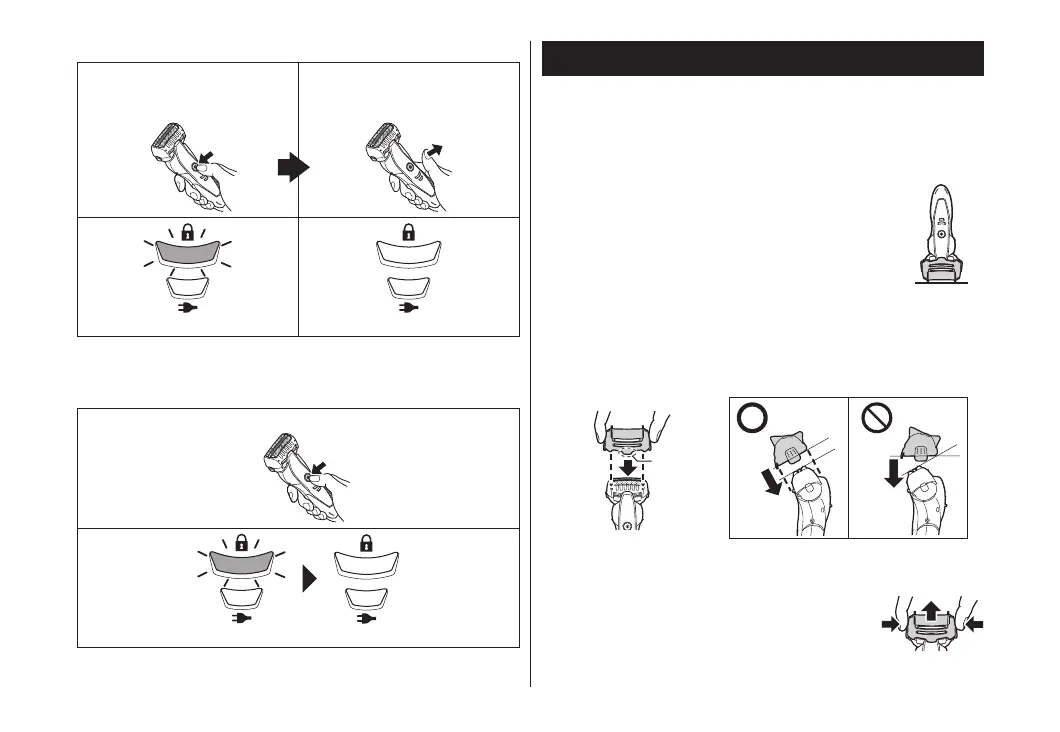
The shaver can be kept vertically. When transporting the shaver,
you can use the carrying holder to protect the outer foil.
• When transporting the shaver, be sure to clean off any shavings
before attaching the carrying holder.
► Attaching the carrying holder
Attach the carrying holder as illustrated.
• With the protrusion (a) facing the front, securely attach the
carrying holder to the shaver aligned to the orientation of the
shaver head until it clicks.
► Removing the carrying holder
Remove the carrying holder while pressing down on both sides.
►Unlocking the power switch
1. Press the power switch for
more than 2 seconds.
2. Once the shaver starts
operating, release the power
switch.
The switch lock lamp will blink.
The switch lock lamp will turn off.
• The power switch cannot be unlocked when the shaver is set into
the charging stand and the charging stand is turned on.
►Checking the power switch is locked
Press the power switch while it is locked.
The switch lock lamp will blink and then turn off after 5 seconds.
• You can also check this after removing the shaver from the
powered charging stand.
ES-ST29_AUS.indd 7 2015/11/17 19:54:09






 To Next Page