EasyManua.ls Logo

Panasonic EY6808 - Page 5

Panasonic EY6808
7 pages
Print Icon
To Next Page IconTo Next Page
To Previous Page IconTo Previous Page
Loading...
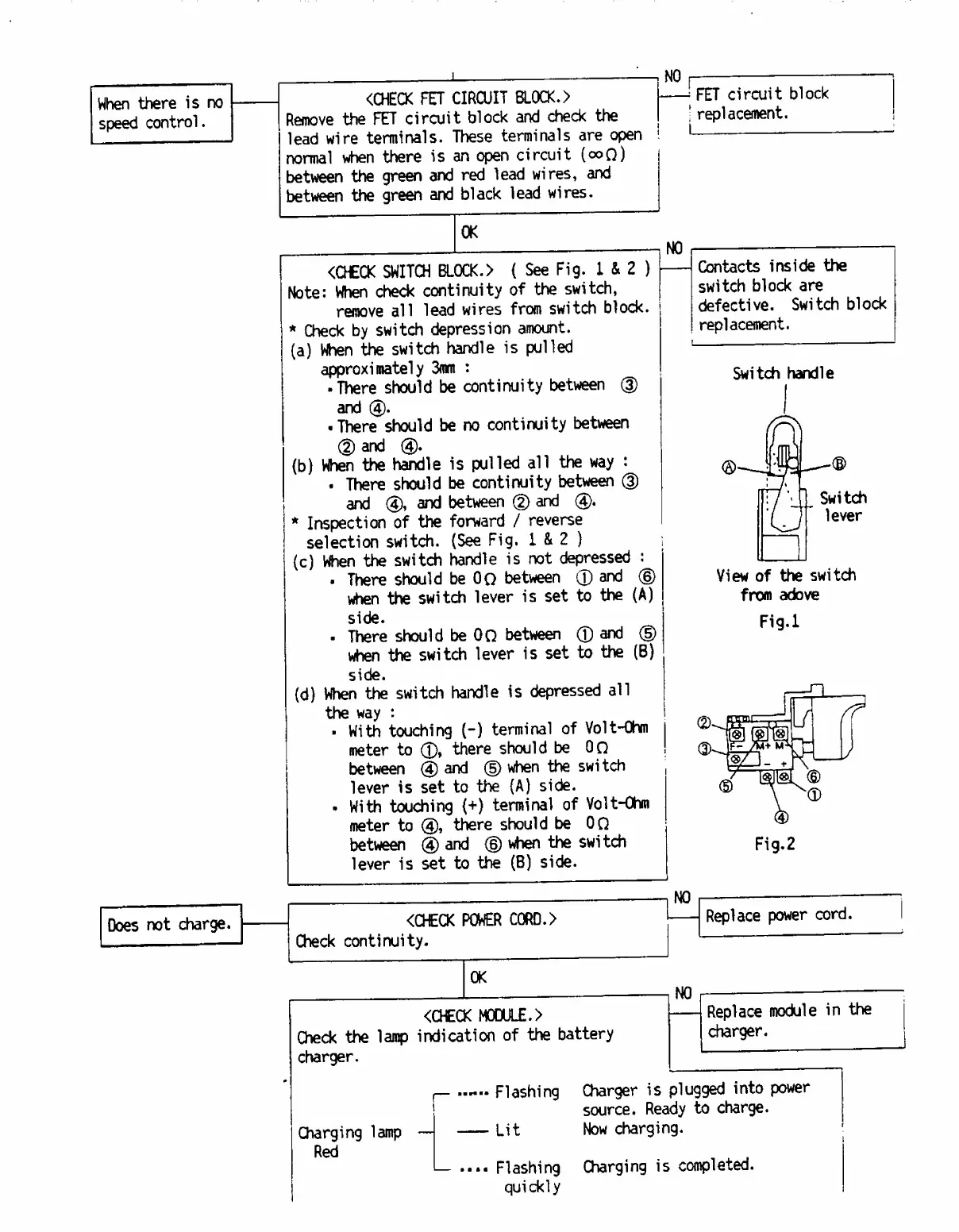
When
there
is
no
speed
control.
Does
not
charge.
-.NO
<CHECK
FET
CIRCUIT
BLOCK.
>
Remove
the
FET
circuit
block
and
check
the
lead
wire
terminals.
These
terminals
are
open
normal
when
there
is
an
open
circuit
(ooQ)
between
the
green
and
red
lead
wires,
and
between
the
green
and
black
lead
wires.
-
FET
circuit
block
j
replacement.
OK
<CHECK
SWITCH
BL0CK.>
{
See
Fig.
I
&
2
)
Note:
When
check
continuity
of
the
switch,
remove
all
lead
wires
from
switch
block.
*
Check
by
switch
depression
amount.
(a)
When
the
switch
handle
is
pulled
approximately
3mm
:
There
should
be
continuity
between
(3)
and
There
should
be
no
continuity
between
(D
and
(b)
When
the
handle
is
pulled
all
the
way
:
There
should
be
continuity
between
(3)
and
(4),
and
between
@
and
(4).
*
Inspection
of
the
forward
/
reverse
selection
switch.
(See
Fig.
1
&
2
)
(c)
When
the
switch
handle
is
not
depressed
:
There
should
be
0Q
between
©
and
®
when
the
switch
lever
is
set
to
the
(A)
side.
There
should
be
OQ
between
©
and
(D
when
the
switch
lever
is
set
to
the
(B)
side.
(d)
When
the
switch
handle
is
depressed
all
the
way
:
With
touching
(-)
terminal
of
Volt-Ohm
meter
to
©,
there
should
be
OQ
between
@
and
(5)
when
the
switch
lever
is
set
to
the
(A)
side.
With
touching
{+)
terminal
of
Volt-Ohm
meter
to
(4),
there
should
be
OQ
between
©and
®
when
the
swi
tch
lever
is
set
to
the
(B)
side.
NO
Contacts
inside
the
switch
block
are
defective.
Switch
block
replacement.
Switch
handle
from
adove
Fig.l
___
<CHECK
POWER
C0RD.>
Check
continuity.
1
OK
NO
Replace
power
cord.
<CHECK
MODULE.>
Check
the
lamp
indication
of
the
battery
charger.
NO
Replace
module
in
the
charger.
Charging
lamp
Red
-
Flashing
Charger
is
plugged
into
power
source.
Ready
to
charge.
-
Lit
Now
charging.
1—
....
Flashing
Charging
is
completed,
quickly

Related product manuals