SETUP
CÀI ĐẶT TRƯỚC KHI VẬN HÀNH
Be sure to read P.2
~
6 before startup.
Hãy chắc chắn đã đọc từ Tr.2~6 trước khi khởi
động.
Before startup
Trước khi khởi động
Install filters
Lắp các bộ lọc
13
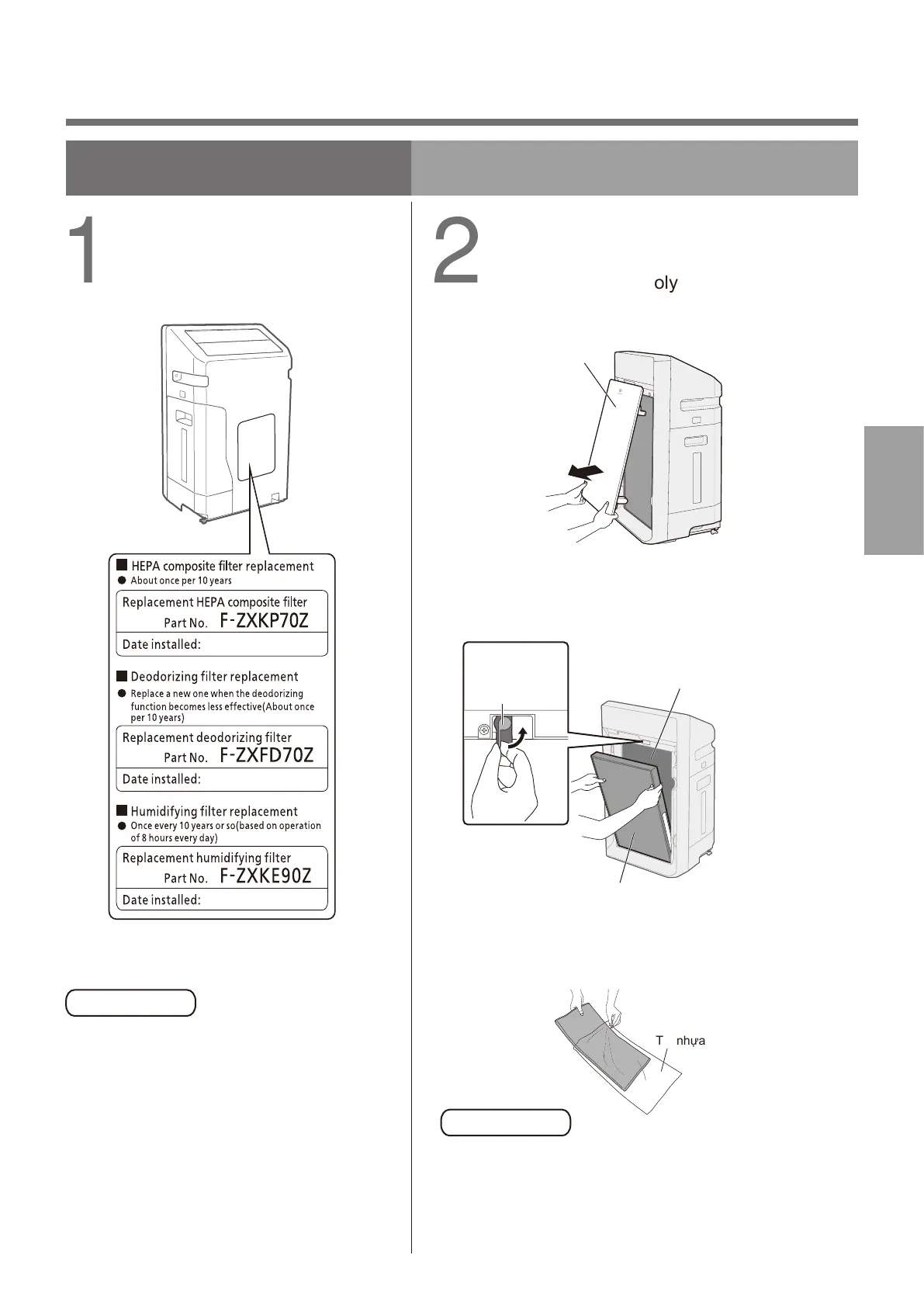
(1)Remove the front panel.
Tháo tấm cản trước.
(2)Toggle the filter hook upward, and remove filters
(2 types).
Đẩy phần móc bộ lọc lên trên và lấy bộ lọc ra. (2 loại).
Poly bag
Túi nhựa
Do not remove the black net of deodorizing filter.
Vui lòng không tháo lưới màu đen của bộ lọc khử mùi.
Fill in the label with the first
date of use.
Điền vào nhãn dán ngày đầu tiên
sử dụng thiết bị.
Remove the deodorizing
filter from poly bag.
Lấy bộ lọc khỏi túi poly.
(3)Remove the deodorizing filter from the poly bag.
Lấy bộ lọc khỏi túi bóng.
Notice Lưu ý
Front panel
Tấm cản trước
Pull it forward
with both hands
Dùng hai tay keo ra phía trước
Pull it forward
with both hands
Dùng hai tay keo
ra phía trước
HEPA composite filter
Bộ lọc khí phức hợp HEPA
Deodorizing filter
(wrapped in a black net)
Bộ lọc khử mùi (Bọc trong lưới màu đen)
Filter hook
(turn up)
Móc bộ lọc
(Xoay lên)
Notice Lưu ý
XÁC NHẬN VÀ THIẾT LẬP
CONFIRMATION
AND SETUP


 To Next Page