file:///C|/U...al/Temp/Rar$EXa0.719/viewing/SGML_VIEW_DATA/ALL/H-E08018PP/SVC/DSC1705017CE/doc/DSC1705017CE_06.xml[11/11/2018 5:09:11 PM]
6 Disassembly and Assembly Instructions
6.1 Outline
Important:
1. It is recommended dealing with Clean Box, to keep maintaining the dustproof environment.
(Refef to " 5.2. Clean Box
" section of this Service Manual for details.)
2. To minimize the possibilities/risk of getting the dust/dirt on the lens surface, keep covering the lens unit with lens caps (front & rear), other
than necessary cases.
3.
4. Blow off the dust on the surface of the lens with a blower brush.
5. Use lens cleaning KIT (BK)(VFK1900BK).
NOTE:
1.
following.
Caution
Keep covering the lens unit with Lens caps (front & rear), other than necessary
cases.
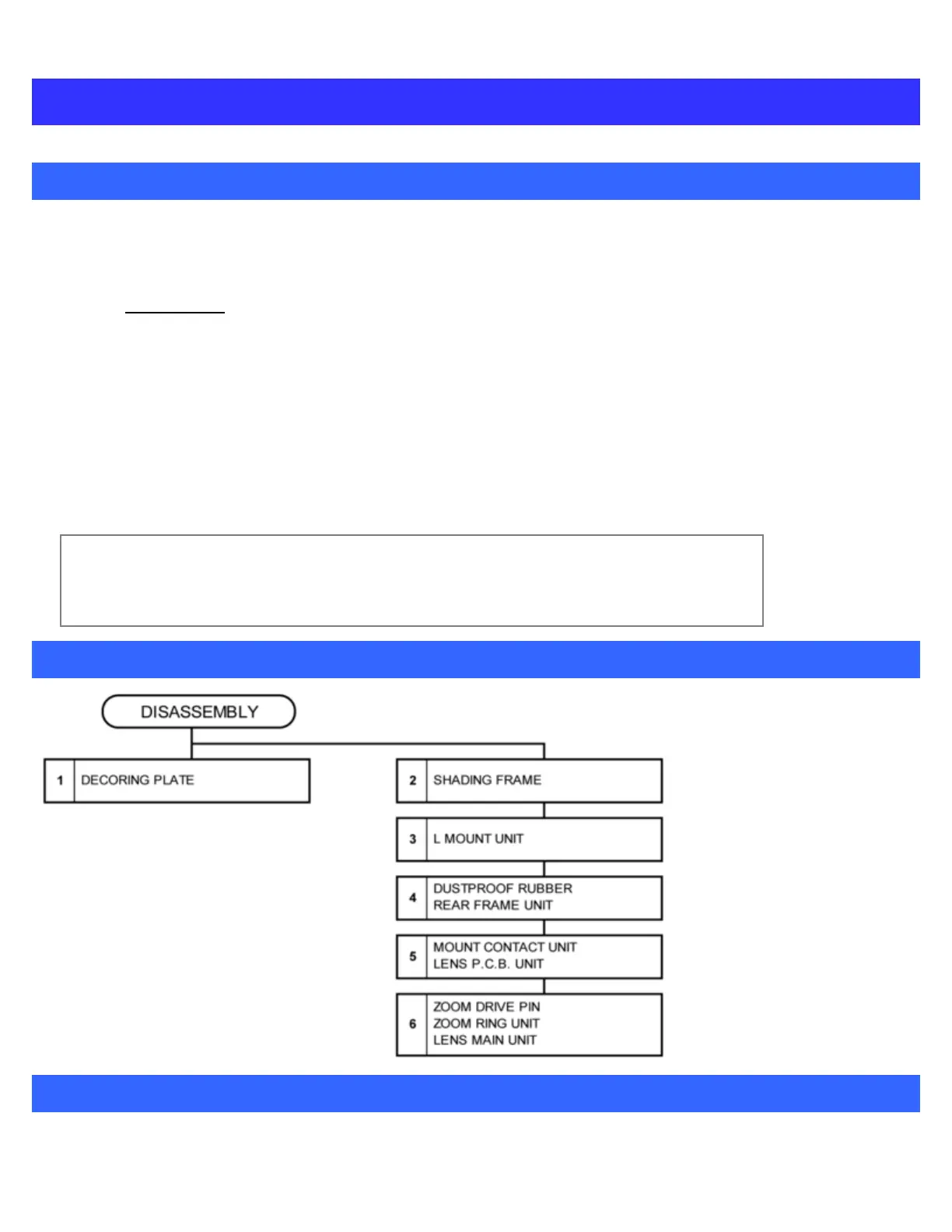
6.2 Disassembly Flow Chart
6.3 Disassembly Procedure
Important:





 To Next Page