84
VQT1Z27
Playback
Playback
1
Motion picture playback
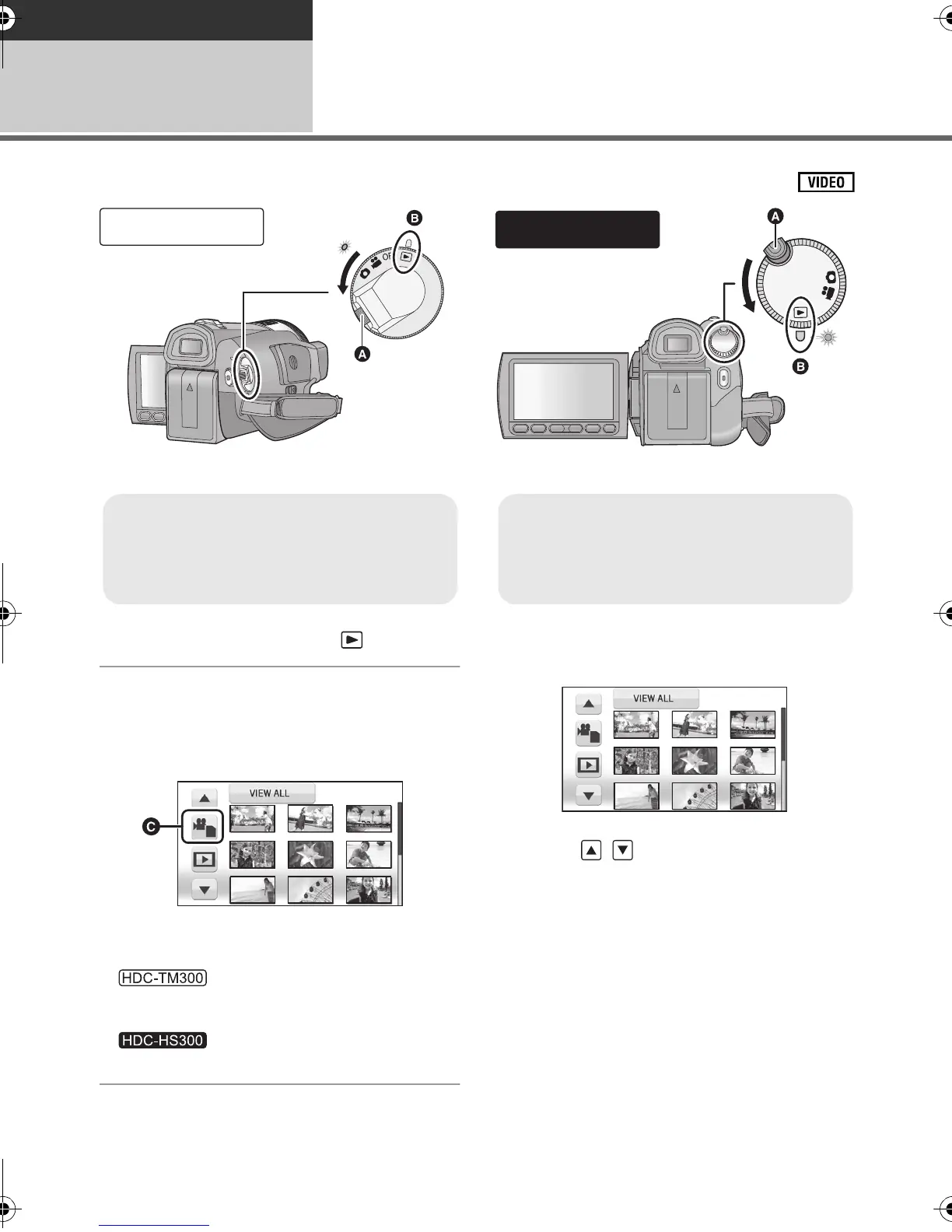
1 Change the mode to .
2 Touch the play mode select icon
C to select desired media to be
played back.
≥ Touch [VIDEO/SD CARD] to play back the SD
card.
Touch [VIDEO/Built-in Memory] to play back
the built-in memory.
Touch [VIDEO/HDD] to play back the HDD.
3 Touch the scene to be played
back.
≥ Next (previous) page can be displayed by
touching / .
≥ Rotate the mode dial while at the same
time pressing in the lock release button A
if changing from OFF to another mode.
≥ Align with the mark B.
≥ Rotate the mode dial while at the same
time pressing in the lock release button A
if changing from OFF to another mode.
≥ Align with the mark B.
HDCTM300&HS300EB-VQT1Z27_mst.book 84 ページ 2009年1月21日 水曜日 午後3時7分






 To Next Page