105
VQT2H52
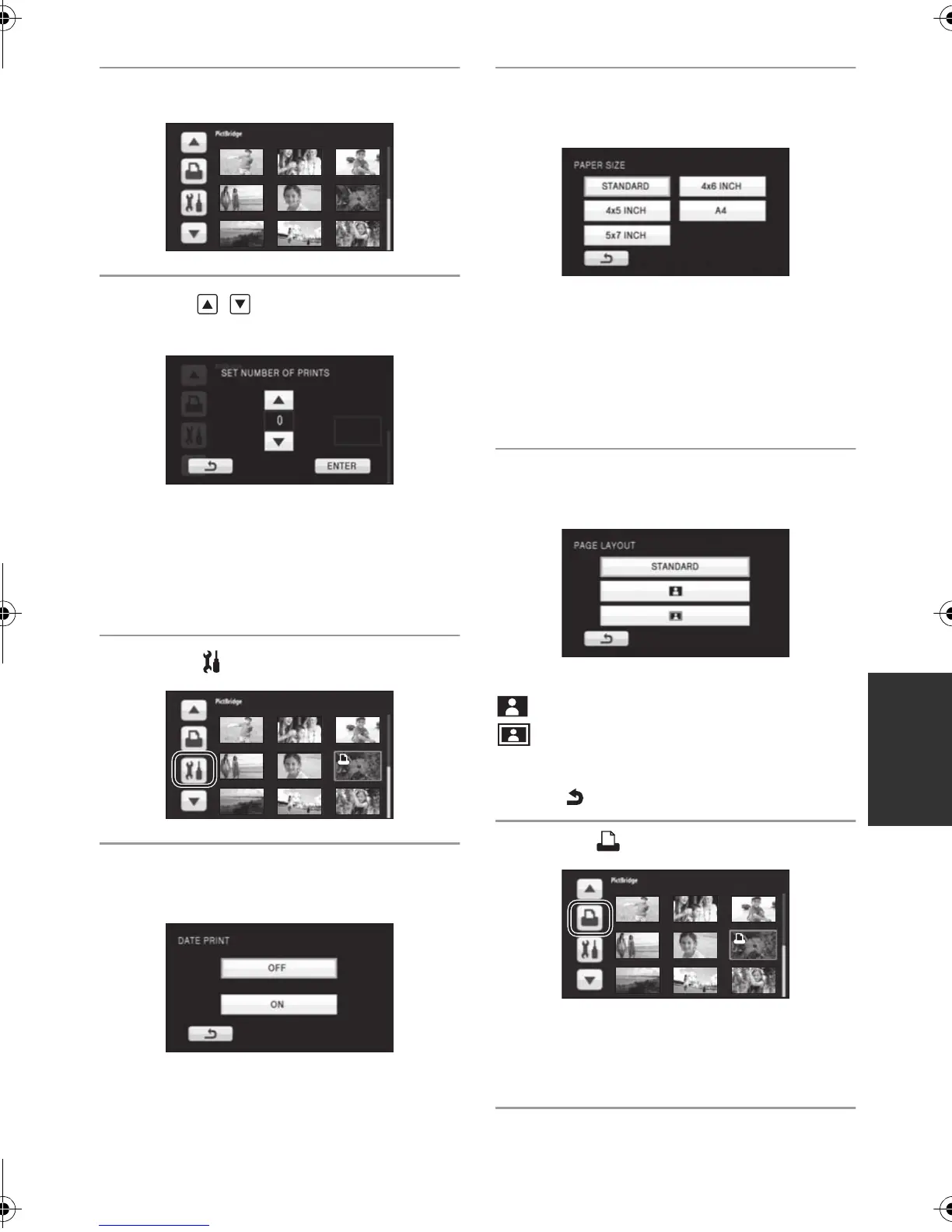
4 Touch a still picture to be printed.
5 Touch / to set the number of
prints.
≥ Touch [ENTER] after the number of prints is
set.
≥ You can set up to 9 prints.
≥ To cancel the setting, set the number of prints
to [0].
≥ Up to 99 files can be set in succession.
6 Touch .
7 Touch [DATE PRINT] to select the
date print setting.
≥ If the printer is not capable of date printing, this
setting is unavailable.
8 Touch [PAPER SIZE] to select the
paper size setting.
[STANDARD]: Size specific to the printer
[4k5 INCH]: L size
[5k7 INCH]: 2L size
[4k6 INCH]: Postcard size
[A4]: A4 size
≥ You cannot set paper sizes not supported on
the printer.
9 Touch [PAGE LAYOUT] to select
the desired layout setting.
[STANDARD]: Layout specific to the printer
: No frame print
:Frame print
≥ You cannot set page layouts not supported on
the printer.
≥ Touch .
10
Touch to print the pictures.
≥ When the confirmation message appears,
touch [START].
≥ Exit PictBridge by disconnecting the USB cable
(supplied) after the pictures have been printed.
HDCSD10_TM10_TM15P-VQT2H52_eng.book 105 ページ 2009年7月6日 月曜日 午後1時46分















 To Next Page