
 Need help?
Do you have a question about the Panasonic KX-PRSA10E and is the answer not in the manual?
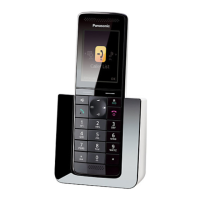
This document serves as an installation manual for the Panasonic Additional Digital Cordless Handset, specifically models KX-PRSA10E and KX-PRWA10E. It provides essential information for setting up and beginning to use the handset, which is designed to be an additional unit compatible with Panasonic Digital Cordless Phone series KX-PRS120 (KX-PRSA10) and KX-PRW120 (KX-PRWA10). The manual emphasizes that the handset must be registered with a base unit before it can be used, and it directs users to the base unit's operating instructions for more detailed information beyond the initial setup.
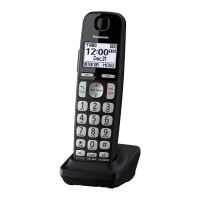
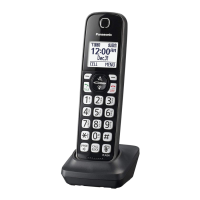
The primary function of this device is to expand an existing Panasonic Digital Cordless Phone system by adding an extra handset. This allows for greater flexibility and convenience, enabling users to place handsets in various rooms without needing additional phone jacks, as long as they are within range of the base unit. The handset itself is a portable communication device, allowing users to make and receive calls, and access other features offered by the base unit, such as phonebook entries and caller ID information.
Key usage features revolve around the initial setup and registration process. The manual details how to connect the charger to a power outlet, ensuring the AC adaptor is properly inserted and the cord is fastened for the KX-PRSA10 model. It highlights the importance of using only the supplied Panasonic AC adaptor (PNLV233E) and notes that the adaptor will remain connected at all times, potentially feeling warm during use. Battery installation is another crucial step, with clear instructions to use only the supplied rechargeable Ni-MH AAA (R03) size batteries. Users are explicitly warned against using Alkaline/Manganese/Ni-Cd batteries and are advised to confirm correct polarities during installation. The initial charging period is approximately 7 hours, and the handset display will indicate "Charging" until fully charged, at which point it will show "Fully charged."
The registration process is outlined in a step-by-step manner. First, users must ensure the handset is switched on; if not, they should press and hold the power button for a few seconds. Then, from the handset, they need to lift it and press the "MENU" button. Concurrently, on the base unit, users must press and hold the "LOCATOR" button for about 5 seconds. If all registered handsets start ringing during this step, the "LOCATOR" button should be pressed again to stop them, and the step repeated. Finally, the handset should be placed on the base unit or charger. The manual advises continuing this operation even if the handset display shows "Please wait for 1 minute." A confirmation tone and a specific icon will appear on the handset display once registration is successful. If an error tone sounds or an error icon is displayed, users are directed to consult the base unit's operating instructions for further guidance on registration.
Maintenance features are also covered to ensure the longevity and proper functioning of the device. For routine care, users are advised to wipe the outer surface of the product with a soft, moist cloth. It is explicitly stated not to use benzine, thinner, or any abrasive powder, as these could damage the device. In cases where the batteries are fully charged but operating time seems shorter, the manual suggests cleaning the battery ends and charge contacts with a dry cloth and then recharging. This helps maintain optimal battery performance.
Safety information is a significant part of the manual, providing warnings and cautions to prevent injury, loss of life, or property damage. Under "WARNING," power connection guidelines emphasize fully inserting the AC adaptor/power plug into the outlet to prevent electric shock or fire. Regular removal of dust from the AC adaptor/power plug is recommended to avoid insulation defects. Users are instructed to unplug the product immediately if it emits smoke, an abnormal smell, or unusual noise, and to contact an authorized service center after confirming the smoke has stopped. For installation, the product should not be exposed to rain or moisture to prevent fire or electrical shock.
Under "CAUTION," installation and location advice states that the AC adaptor is the main disconnect device, so the AC outlet should be easily accessible. Battery-related cautions reiterate the use of only specified rechargeable Ni-MH AAA (R03) batteries and warn against mixing old and new batteries. Opening or mutilating batteries is prohibited due to corrosive electrolyte that can cause burns or injury. Care must be taken when handling batteries to avoid short circuits caused by conductive materials like rings or keys, which could lead to overheating and burns. Batteries should only be charged with the supplied base unit or charger, and tampering with these components is forbidden, as it could cause batteries to swell or explode.
Important safety instructions further reinforce these points, advising against using the product near water sources, to avoid reporting gas leaks with the telephone, and to use only specified power cords and batteries. Batteries should not be disposed of in fire, and local codes for disposal should be checked. The manual also warns against placing the product near automatically controlled devices like automatic doors or fire alarms, as radio waves could cause malfunctions.
Other information includes advice on avoiding interference from other electrical appliances and a caution regarding the risk of explosion if the battery is replaced with an incorrect type. For product disposal, transfer, or return, users are advised to erase any private/confidential information stored on the device, such as phonebook or caller list entries, before disposal. Information for users on the collection and disposal of old equipment and used batteries explains the meaning of symbols indicating that these items should not be mixed with general household waste. It directs users to applicable collection points in accordance with national legislation and European Directives (2002/96/EC and 2006/66/EC) to ensure proper treatment, recovery, and recycling, thereby helping to preserve resources and prevent environmental harm. For business users in the European Union, specific instructions are given to contact their dealer or supplier for disposal. For countries outside the EU, users are advised to contact local authorities or dealers for the correct disposal method. The manual also clarifies that the battery symbol might be used in combination with a chemical symbol, complying with the Directive for the chemical involved.
 General
| Type | DECT Cordless Handset |
|---|---|
| Display | Yes |
| Display Type | LCD |
| Talk Time | Up to 12 hours |
| Phonebook Memory | 100 entries |
| GAP Compatible | Yes |
| WiFi | Yes |
| Bluetooth | Yes |
| Android OS | No |
| Color | Black |
| Answering Machine | No (requires compatible base station) |
| Battery | Rechargeable NiMH |
| Range | Up to 50 meters indoors, up to 300 meters outdoors |


 To Next Page