EasyManua.ls Logo

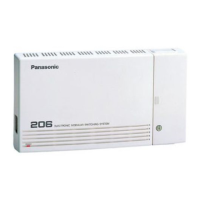
Panasonic KX-T206 - User Manual

Panasonic KX-T206
20 pages
Print Icon
To Next Page IconTo Next Page
Loading...
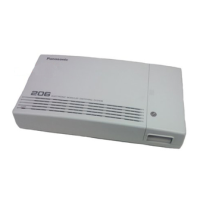
Electronic Modular Switching System
MODEL
KX-T206
Please read this manual before connecting the
Electronic Modular Switching System.
E
L
E
C
T
R
O
N
I
C
M
O
D
U
L
A
R
S
W
IT
CHIN
G SYSTEM
POWER
Question and Answer IconNeed help?

Do you have a question about the Panasonic KX-T206 and is the answer not in the manual?

Summary

System Component

Precaution

Specifications

General Descriptions

Details about the system's capacity, control method, switching, power, dialing, and connectors.

Characteristics

Defines key performance metrics like station loop limits, leak resistance, and environmental requirements.

Before Installation

Safety Installation Instructions

Essential safety precautions for installing telephone wiring and systems to prevent hazards.

Installation Precautions

Guidelines on suitable locations and environmental conditions to avoid for proper system operation.

Wiring Precautions

Important instructions for connecting telephone wires to ensure system integrity and prevent interference.

Unpacking

Name and Location

Wall Mounting

Opening Front Cover

Frame Ground Connection

System Connection Diagram

CO Line Connection

Extension Connection

Paralleled Telephone Connection

Installation of Optional Card and Unit

Doorphone (KX-T30865) Connection

Procedure for connecting the optional doorphone unit to the system.

DISA Card (KX-T20691) Connection

Steps for installing the DISA/FAX Detect card and its programming requirements.

Installation of Lightning Protectors

Installation of Lightning Protectors

External Installation Precautions

Precautions for installing extension wiring outside the main building, including underground and conduit use.

Earth Rod Installation for Protection

Detailed guide on installing an earth rod for lightning protection, covering location, composition, and depth.

Installation of Lightning Protectors

KX-A207 Protector Installation

Detailed steps for securing the KX-A207 protector and connecting wires for lightning protection.

Power Failure Transfer

Starting the System

General Programming Instructions

Programming Prerequisites and Data Check

Covers default settings, required telephones, extensions, and how to check programmed data.

System Programming Mode Entry;Exit

Instructions on how to enter and exit the system programming mode using specific codes.

System Programming

System Speed Dialing Number Set

Guide to programming system-wide speed dial numbers for extension users.

Dial Type Selection

Procedure for assigning dial type (tone or pulse) to CO lines.

Outgoing Permitted CO1 Assignment (Day;Night)

Configuration to determine which extensions can access CO line 1 during day and night modes.

System Programming

Outgoing Permitted CO2 Assignment (Day;Night)

Configuration to determine which extensions can access CO line 2 during day and night modes.

CO1 Ringing Assignment (Day;Night)

Assigns which extensions will ring for incoming calls on CO line 1 in day/night modes.

CO2 Ringing Assignment (Day;Night)

Assigns which extensions will ring for incoming calls on CO line 2 in day/night modes.

Summary

System Component

Precaution

Specifications

General Descriptions

Details about the system's capacity, control method, switching, power, dialing, and connectors.

Characteristics

Defines key performance metrics like station loop limits, leak resistance, and environmental requirements.

Before Installation

Safety Installation Instructions

Essential safety precautions for installing telephone wiring and systems to prevent hazards.

Installation Precautions

Guidelines on suitable locations and environmental conditions to avoid for proper system operation.

Wiring Precautions

Important instructions for connecting telephone wires to ensure system integrity and prevent interference.

Unpacking

Name and Location

Wall Mounting

Opening Front Cover

Frame Ground Connection

System Connection Diagram

CO Line Connection

Extension Connection

Paralleled Telephone Connection

Installation of Optional Card and Unit

Doorphone (KX-T30865) Connection

Procedure for connecting the optional doorphone unit to the system.

DISA Card (KX-T20691) Connection

Steps for installing the DISA/FAX Detect card and its programming requirements.

Installation of Lightning Protectors

Installation of Lightning Protectors

External Installation Precautions

Precautions for installing extension wiring outside the main building, including underground and conduit use.

Earth Rod Installation for Protection

Detailed guide on installing an earth rod for lightning protection, covering location, composition, and depth.

Installation of Lightning Protectors

KX-A207 Protector Installation

Detailed steps for securing the KX-A207 protector and connecting wires for lightning protection.

Power Failure Transfer

Starting the System

General Programming Instructions

Programming Prerequisites and Data Check

Covers default settings, required telephones, extensions, and how to check programmed data.

System Programming Mode Entry;Exit

Instructions on how to enter and exit the system programming mode using specific codes.

System Programming

System Speed Dialing Number Set

Guide to programming system-wide speed dial numbers for extension users.

Dial Type Selection

Procedure for assigning dial type (tone or pulse) to CO lines.

Outgoing Permitted CO1 Assignment (Day;Night)

Configuration to determine which extensions can access CO line 1 during day and night modes.

System Programming

Outgoing Permitted CO2 Assignment (Day;Night)

Configuration to determine which extensions can access CO line 2 during day and night modes.

CO1 Ringing Assignment (Day;Night)

Assigns which extensions will ring for incoming calls on CO line 1 in day/night modes.

CO2 Ringing Assignment (Day;Night)

Assigns which extensions will ring for incoming calls on CO line 2 in day/night modes.

Panasonic KX-T206 Specifications

General IconGeneral
IntercomYes
DisplayNo
Programmable KeysNo
Headset CompatibilityYes
Power Failure TransferYes
CompatibilityProprietary Telephones
Speed DialYes

Related product manuals