EasyManua.ls Logo

Panasonic KX-TCA385 - User Manual

Panasonic KX-TCA385
88 pages
Print Icon
To Next Page IconTo Next Page
Loading...
Operating Instructions
DECT Portable Station
Model No. KX-TCA185/KX-TCA285/KX-TCA385
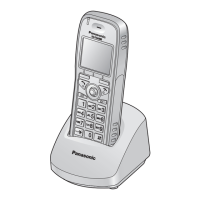
KX-TCA185
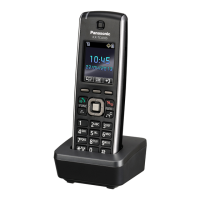
KX-TCA385
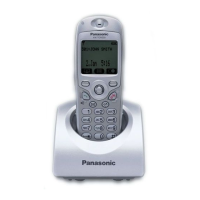
KX-TCA285
Thank you for purchasing this Panasonic product.
Please read this manual carefully before using this product and save this manual for future
use.
KX-TCA385’s handset meets IP65 classification.
For KX-TCA185:
Please use only the batteries provided and charge the batteries for about 7 hours before using
the handset for the first time. For details, see "Charging the Battery/Batteries" on Page 74
in this manual.
For KX-TCA285/KX-TCA385:
Please use only the battery provided and charge the battery for about 3 hours before using
the handset for the first time. For details, see "Charging the Battery/Batteries" on Page 74
in this manual.
Document Version: 2013-10

Table of Contents

Other manuals for Panasonic KX-TCA385

Questions and Answers

  • C
    Christopher KnoxSep 9, 2025
    Why is there noise frequently heard on my Panasonic KX-TCA385?
    • M
      Mark WoodSep 9, 2025
      If you are experiencing noise frequently with your Panasonic Cordless Telephone, it may be due to nearby electrical appliances causing interference, or you are too far from the CS. Place the handset and CS away from other electrical appliances or move closer to the CS.
  • N
    Nathan BrownSep 7, 2025
    What to do if I cannot make or receive a call on my Panasonic Cordless Telephone?
    • S
      Sara AndersenSep 7, 2025
      If you cannot make or receive calls on your Panasonic Cordless Telephone, it could be because the handset is out of range, or the CS is busy. Try moving closer to the CS or try again later. Another reason could be that the radio channel is busy, or a radio communication error occurred. In this case, try again later.
  • R
    Robert MaxwellAug 22, 2025
    What to do if my Panasonic Cordless Telephone handset does not work?
    • M
      Matthew AvilaAug 22, 2025
      If your Panasonic Cordless Telephone handset isn't working, the battery may be drained. Charge the battery fully. Alternatively, the power might be off. Turn it on, or re-insert the battery and place the handset on the charger.
  • A
    Alexis OlsonSep 5, 2025
    Why is there noise during a call on the Bluetooth headset of my Panasonic KX-TCA385 Cordless Telephone?
    • C
      cheryl01Sep 5, 2025
      If you hear noise during a call on the Bluetooth headset of your Panasonic Cordless Telephone, the Bluetooth headset might be too far away from the handset. Move closer to the handset.
  • A
    Ann WattsSep 4, 2025
    What to do if I cannot have a conversation using a Bluetooth headset with my Panasonic KX-TCA385?
    • L
      Lisa RamirezSep 4, 2025
      If you cannot have a conversation using a Bluetooth headset with your Panasonic Cordless Telephone, register the Bluetooth headset to the handset. If a connection error has occurred, turn the Bluetooth headset off, and then turn it on and try again. Also, the Bluetooth headset might be out of range of the handset, so move closer to the handset and try again.
  • G
    garcialisaSep 2, 2025
    Why I cannot connect a Bluetooth headset to the handset of my Panasonic Cordless Telephone?
    • J
      jeffreybuckSep 2, 2025
      If you cannot connect a Bluetooth headset to the handset of your Panasonic Cordless Telephone, confirm that the Bluetooth headset is turned on and that the Bluetooth setting of the handset is turned on. If the Bluetooth headset is already registered to another Bluetooth device such as a cell phone, disconnect the Bluetooth headset from the cell phone, and then perform the connection procedure from the handset. Also, the Bluetooth headset might not be registered to the handset. Register the Bluetooth headset.
  • K
    kelly44Sep 1, 2025
    What to do if it is difficult to have a conversation when in Hands-free mode on Panasonic KX-TCA385?
    • M
      michaelgomezSep 1, 2025
      If it's difficult to have a conversation in Hands-free mode on your Panasonic Cordless Telephone, ensure the front of the handset is facing you and the microphone is not covered.
  • L
    littlejacobAug 31, 2025
    What to do if the "Delete All" operation to delete all phonebook entries is not functioning on my Panasonic KX-TCA385?
    • R
      Ryan ChristianAug 31, 2025
      If the "Delete All" operation to delete all phonebook entries is not functioning on your Panasonic Cordless Telephone, the batteries might be drained, which prevents the operation from being completed. Charge the battery fully, and then try again.
  • J
    Jonathon KerrAug 30, 2025
    Why is the LED indicator blinking rapidly and the handset beeping rapidly while charging the battery of my Panasonic KX-TCA385?
    • A
      Anthony AllenAug 30, 2025
      If the LED indicator blinks rapidly and the handset beeps rapidly while charging the battery of your Panasonic Cordless Telephone, the battery is not charging correctly due to an electrical failure. Unplug the AC adaptor from the AC outlet, remove the battery from the handset, and consult your dealer.
  • S
    Stephanie AguirreAug 29, 2025
    What to do if I cannot dial on my Panasonic KX-TCA385?
    • H
      hsmithAug 29, 2025
      If you cannot dial on your Panasonic Cordless Telephone, the number you dialed might be restricted by your phone system, so consult your administrator or dealer. Another possibility is that Key lock mode is on. To cancel the mode, press and hold for about 2 seconds. The radio channel might be busy or a radio communication error occurred, try again later.

Summary

Product Overview and Safety

Operating Instructions

The main title of the user manual, introducing the DECT portable station.

Introduction

Provides an overview of the manual's content and purpose, outlining what the manual covers.

Important Information

Contains crucial details regarding product usage, safety, and warnings.

For Your Safety

Details essential safety precautions to reduce risks of injury, fire, and equipment damage.

Installation and Setup

Before Operating the Telephone

Prepares users for operation by covering accessories and initial checks.

Included Accessories

Lists all components provided with the telephone for different models.

Installation and Setup

Guides users through the initial physical setup of the telephone system.

Battery Installation

Step-by-step instructions for inserting the battery into the handset.

Charger Connection

Explains how to connect the AC adaptor to the charger unit.

Charging the Battery

Provides guidance on initial battery charging for optimal performance.

Core Operations and Features

Location of Controls

Identifies and describes the physical buttons and features on the handset.

Handset Functions

Explains key handset features such as setting passwords and key lock.

Display Information

Details pictographs, status icons, and time display on the handset screen.

Basic Operations

Outlines fundamental operations like navigating menus and accessing logs.

Feature Operations

Covers essential call handling, logging, and dialing features.

Making Calls

Explains how to initiate calls to extensions, outside parties, and via call logs.

Receiving Calls

Details how to answer intercom, outside, and group calls.

Bluetooth Functionality

Explains how to use Bluetooth for headsets and phonebook transfer (KX-TCA285/KX-TCA385 only).

Handset Phonebook Usage

Details storing, editing, searching, and managing contacts in the handset phonebook.

Entering Characters

Guides users on inputting text and numbers using the dialling keys and character modes.

Customisation and Advanced Settings

Customising the Telephone

Introduces the section for personalizing telephone settings.

Changing Initial Settings

Guides on configuring basic handset and system settings like alarms.

Changing Handset Settings

Outlines the menu structure for various handset customisation options.

Display Options

Covers settings for language, backlight, brightness, standby display, and color scheme.

System Options

Includes settings for registering/cancelling handsets, base selection, and system lock.

Bluetooth Options

Configures Bluetooth function, PIN, and headset connection for specific models.

Appendix and Troubleshooting

Appendix

Contains supplementary information including specifications and system requirements.

Technical Specifications

Provides detailed technical data for different models including display, battery, and dimensions.

System Requirements

Specifies compatible CS, PBX models, and software versions for the system.

Troubleshooting

Offers solutions for common problems like handset not working, no ring, or connection issues.

Error Messages

Lists potential error messages and their causes and solutions for quick reference.

Panasonic KX-TCA385 Specifications

General IconGeneral
Standby time200 h
Charging time3 h
Number of batteries supported1
Display typeLCD
Product colorBlack
Display diagonal1.8 \
TypeDECT telephone handset
SpeakerphoneYes
CompatibilityKX-TDA/TDE/NCP/NS
LED indicatorsCharging, Ring
Call log entries10
Phonebook capacity500 entries
Brand compatibilityPanasonic
Harmonized System (HS) code85177900
Weight and Dimensions IconWeight and Dimensions
Depth23 mm
Width55 mm
Height151.5 mm
Weight150 g

Related product manuals