Helpline Tel.No. :U.K. 08700 100 076 R.O.I. 01289 8333 47
Cordless Telephone
Handset Settings
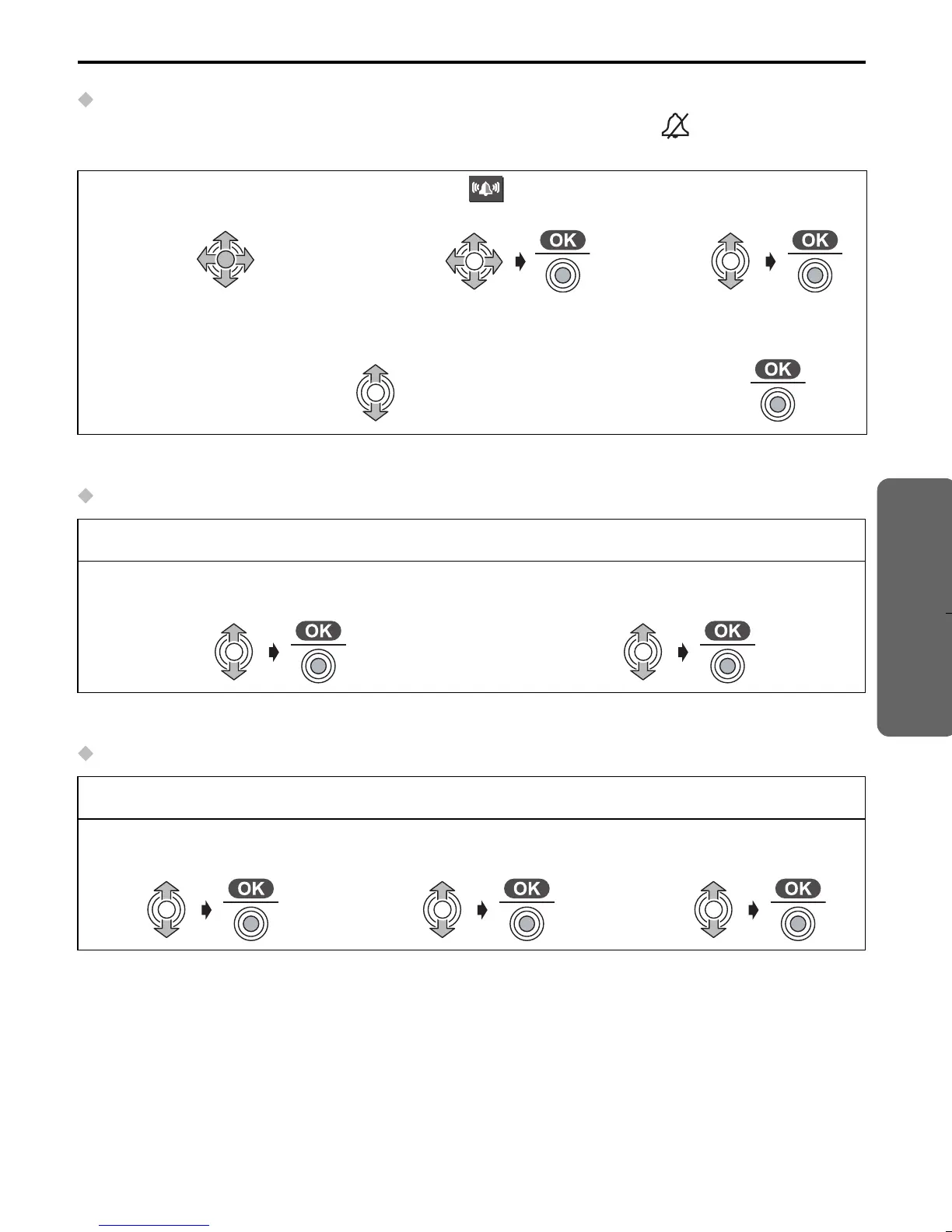
Setting the Ringer Volume
The choices are 6 levels and off. If you set the volume to OFF, “ ” is displayed,
however, still the volume of a paging and intercom call are level 1.
• The factory preset is 6.
Selecting the Ringer Pattern for External Call/Internal Call/Paging
• The factory preset is 1.
Selecting the Ringer Pattern for Private Ring
• The factory preset of each ringer pattern is 1.
1
Press JOYSTICK
(or move).
2
Select “ Ringer
Option”.
3
Select “Ringer
Volume”.
4
To increase volume, move JOYSTICK up.
To decrease volume, move JOYSTICK down.
5
Press
JOYSTICK.
Follow steps 1 to 2 shown above, then:
3
Select “EXT Ringer Type”, “INT
Ringer Type” or “Paging Tone”.
4
Select the desired ringer pattern.
Follow steps 1 to 2 shown above, then:
3
Select “Private
Ring”.
4
Select the desired
category.
5
Select the desired
ringer pattern.
505E_E.book Page 47 Friday, May 23, 2003 2:54 PM










 To Next Page