EasyManua.ls Logo

Panasonic KX-TG1311BX - User Manual

Panasonic KX-TG1311BX
24 pages
Print Icon
To Next Page IconTo Next Page
Loading...
This unit is compatible with Caller ID. You must subscribe to the
appropriate service offered by your service provider/telephone
company.
Please read these operating instructions before using the unit and
save them for future reference.
Table of Contents
Introduction ......................................................... 2
Preparation .......................................................... 4
Making/Answering Calls ..................................... 9
Phonebook......................................................... 11
Useful Telephone Settings ............................... 12
Caller ID Service ................................................ 16
Multi-unit Operation .......................................... 17
Useful Information............................................. 18
Charge the batteries for about 7 hours before initial use.
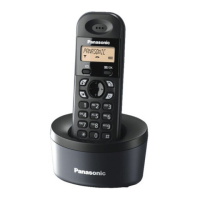
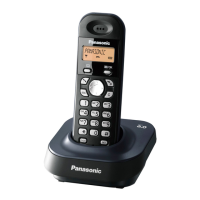
Model shown is KX-TG1311.
Operating Instructions
Model No. KX-TG1311BX
KX-TG1312BX
KX-TG1313BX
Digital Cordless Phone
PNQX1123ZA DC0908DQ0
TG1311_1312_1313BX(e).book Page 1 Tuesday, September 2, 2008 10:36 AM
Question and Answer IconNeed help?

Do you have a question about the Panasonic KX-TG1311BX and is the answer not in the manual?

Overview

This document is an operating manual for the Panasonic Digital Cordless Phone, specifically models KX-TG1311BX, KX-TG1312BX, and KX-TG1313BX. The manual provides detailed instructions on the phone's functions, technical specifications, usage, and maintenance.

Function Description

The Panasonic Digital Cordless Phone is designed for making and answering calls, with features such as a phonebook, caller ID service, intercommunication between multiple units, and call transferring. It operates using DECT (Digital Enhanced Cordless Telecommunications) technology, ensuring clear communication. The phone supports up to 120 duplex channels and has a frequency range of 1.88 GHz to 1.90 GHz.

Key functions include:

  • Making/Answering Calls: Basic call functionality, including redialing, storing, and editing numbers.
  • Phonebook: Allows users to add, edit, and erase entries, storing up to 50 names and phone numbers. It supports one-touch dialling (Hot key) for frequently called numbers.
  • Caller ID Service: Displays information about incoming calls, including the number of new calls. This feature requires a subscription to a Caller ID service from your service provider/telephone company.
  • Intercom: Enables communication between multiple handsets registered to the same base unit.
  • Call Transferring and Conference Calls: Facilitates transferring calls between handsets and setting up conference calls with an outside party.
  • Voice Mail Service: An automatic answering service offered by your service provider/telephone company. Messages are recorded by the service provider/telephone company, not your telephone.
  • Alarm: An alarm function that can be set for a specific time.
  • Key Lock: Prevents accidental dialing or changes to settings.
  • Dialling Mode: Supports both tone and pulse dialling.

Important Technical Specifications

  • Standard: DECT (Digital Enhanced Cordless Telecommunications)
  • Number of Channels: 120 Duplex Channels
  • Frequency Range: 1.88 GHz to 1.90 GHz
  • Duplex Procedure: TDMA (Time Division Multiple Access)
  • Channel Spacing: 1.728 kHz
  • Bit Rate: 1.152 kbit/s
  • Modulation: GFSK (Gaussian Frequency Shift Keying)
  • RF Transmission Power: Approx. 10 mW (average power per channel)
  • Voice Coding: ADPCM 32 kbit/s
  • Power Source: 220-240 V AC, 50/60 Hz
  • Power Consumption:
    • Base Unit: Standby: Approx. 2.1 W, Maximum: Approx. 5.7 W
    • Charger: Standby: Approx. 1.1 W, Maximum: Approx. 5.3 W
  • Operating Conditions: 5 °C–40 °C, 20 %–80 % relative air humidity (dry)
  • Dimensions:
    • Base Unit: Approx. 103 mm x 104 mm x 58 mm
    • Handset: Approx. 148 mm x 50 mm x 33 mm
    • Charger: Approx. 87 mm x 75 mm x 53 mm
  • Mass (weight):
    • Base Unit: Approx. 120 g
    • Handset: Approx. 120 g
    • Charger: Approx. 80 g (for KX-TG1312/KX-TG1313)
  • Battery Type: Rechargeable Ni-MH batteries (AAA R03 size). The phone requires 2 AAA (R03) batteries for every handset.

Usage Features

  • Easy Setup: The manual provides clear instructions for initial setup, including battery installation and connecting the base unit.
  • Display Language: Users can select their desired display language from a list of options.
  • Customizable Settings: Various settings can be customized, including ringtone volume, alarm settings, and call bar options.
  • PIN Protection: The base unit and handset PINs can be changed for security. If forgotten, there are procedures to reset them.
  • Call Restriction: Allows users to restrict outgoing calls to specific numbers or types of calls.
  • Emergency Number: Users can program an emergency number that can be dialed even with call restriction enabled.
  • DTMF Mode Setting: For certain service providers/telephone companies, DTMF mode settings can be adjusted.
  • Multi-unit Operation: The system supports multiple handsets, enabling intercommunication and call transferring between them.
  • Long Battery Life: Panasonic Ni-MH batteries offer approximately 17 hours of continuous use and 150 hours in standby mode.

Maintenance Features

  • Battery Care:
    • Use only the supplied rechargeable batteries (Part No. HHR-55AAAB).
    • Ensure correct polarity when installing batteries.
    • Avoid touching the battery ends or the unit contacts.
    • Do not open or mutilate the batteries.
    • Do not use a combination of new and old batteries or different types of batteries.
    • If the handset does not automatically turn on after installing batteries, place it on the base unit or charger for about 1 second.
    • The battery level is indicated on the display, with flashing icons indicating low battery or needing charging.
    • Clean the battery ends and the charge contacts with a dry cloth and charge again if the handset does not charge.
  • Cleaning:
    • Do not use benzine, thinner, or abrasive powder.
    • Wipe the unit with a soft, dry cloth.
    • For stubborn dirt, use a soft cloth dampened with a small amount of mild soap and water, then wipe dry.
  • Environmental Considerations:
    • Avoid placing the unit in areas with high electrical interference, such as near refrigerators, microwave ovens, or fluorescent lights.
    • Keep the unit away from heat sources, direct sunlight, and excessive moisture.
    • Do not spill liquids on the unit.
    • Do not place heavy objects on the unit.
    • If the unit is dropped, check for damage.
    • Do not use the unit near water.
  • Troubleshooting: The manual includes a comprehensive troubleshooting section to address common issues such as no dial tone, display blank, noise, and charging problems.
  • Disposal: When disposing of the unit or batteries, follow local waste management codes for special disposal instructions. The symbols on the product indicate that it should not be disposed of with general household waste.

Panasonic KX-TG1311BX Specifications

General IconGeneral
BrandPanasonic
ModelKX-TG1311BX
CategoryCordless Telephone
LanguageEnglish

Related product manuals