EasyManua.ls Logo

Panasonic KX-TG2000B - RESET Button; Adding Another Phone

Panasonic KX-TG2000B
108 pages
Print Icon
To Next Page IconTo Next Page
To Previous Page IconTo Previous Page
Loading...
91
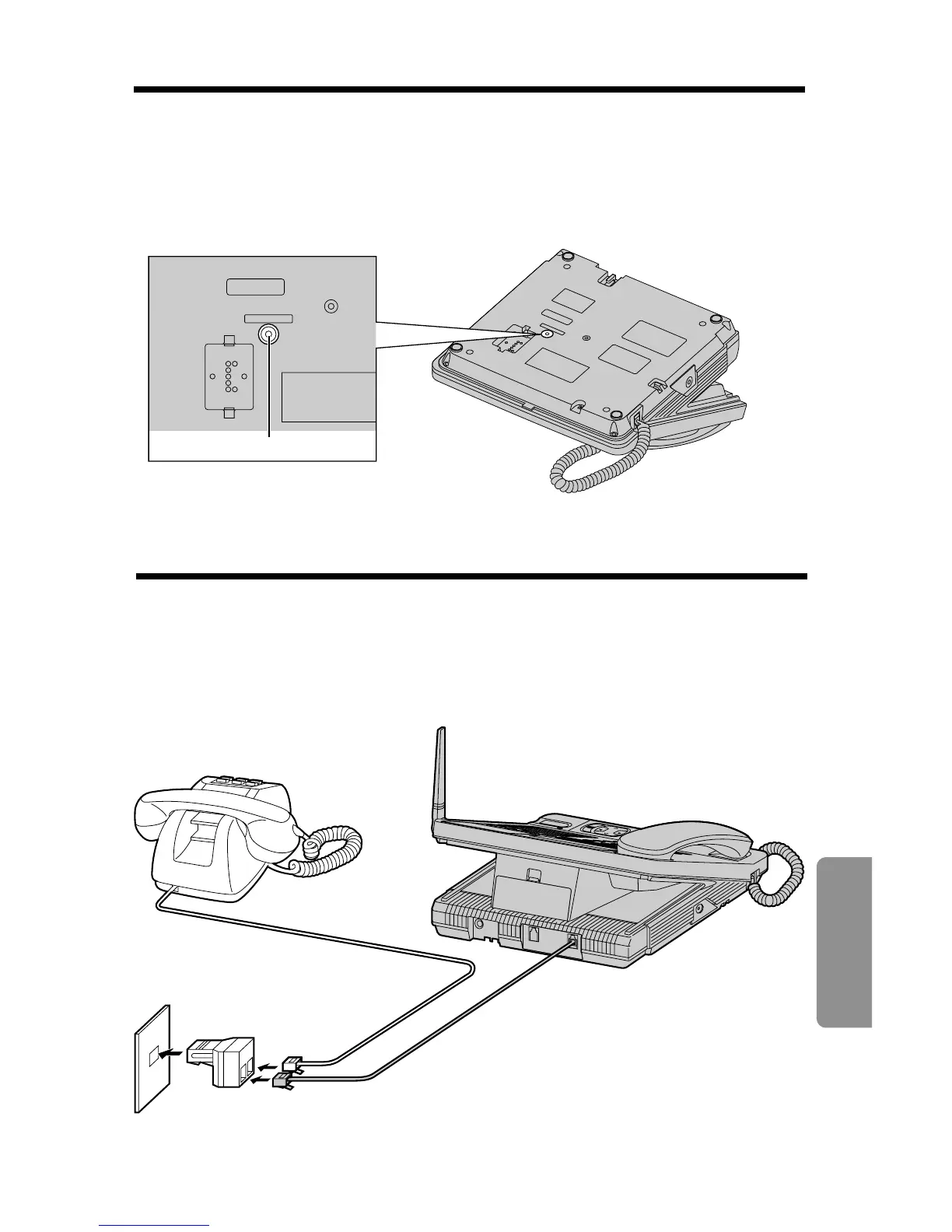
RESET Button
Chapter 5
Useful Information
If the unit does not work, press (RESET) on the bottom of the base unit with
a pointed object, such as a pen.
After pressing
(RESET)
, the adjusted date/time will be erased. Readjust the
date/time (p. 20).
RESET
R
ES
ET
RESET Button
Adding Another Phone
If the backup battery has been discharged during a power failure, the unit
will not work. If required, you can connect a standard telephone on the
same line using the Panasonic T-adaptor KX-J66.
To order, call the accessories telephone number on page 3.
T-Adaptor (KX-J66)
Telephone Line
Jack
Telephone
Line Cord
Standard Telephone

Table of Contents