EasyManua.ls Logo

Panasonic KX-TGH722E - User Manual

Panasonic KX-TGH722E
60 pages
Print Icon
To Next Page IconTo Next Page
Loading...
Operating Instructions
Digital Cordless Answering System
Model No.
KX-TGH720E
KX-TGH722E
KX-TGH723E
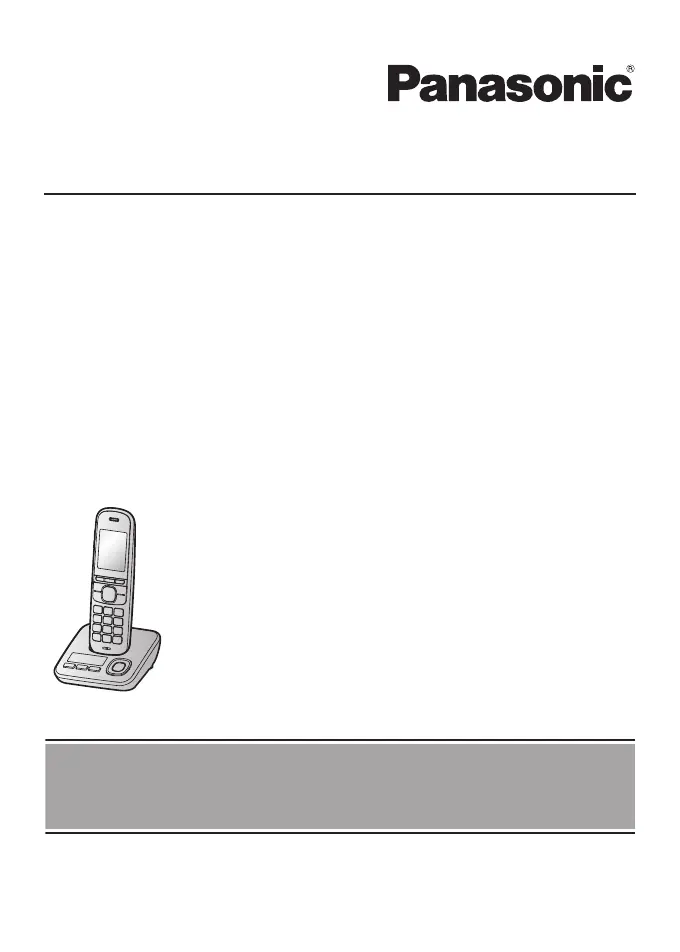
Model shown is KX-TGH720.
Before initial use, see “Getting Started”
on page 10.
Thank you for purchasing a Panasonic product.
Please read these operating instructions before using the unit and save them for
future reference.

Questions and Answers

Summary

Important Information

For Your Safety

Crucial safety warnings and precautions to prevent injury and property loss.

Battery Safety and Handling

Details on using and handling rechargeable Ni-MH batteries for the unit, including safety warnings.

Operating Safeguards

Precautions for safe operation, cleaning, and avoiding damage.

Getting Started

Setting Up Connections

Step-by-step guide for connecting the base unit, charger, and telephone line.

Battery Installation

Instructions on how to correctly install rechargeable batteries into the handset.

Battery Charging

Information on charging the handset batteries and indicators for charge status.

Recording Greeting Message

Instructions for recording a personalized greeting message for the answering system.

Making;Answering Calls

Making Calls

Steps to dial numbers, correct digits, and end calls.

Intercom Calls

Instructions for making and answering intercom calls between handsets.

Transferring Calls, Conference Calls

Guides on transferring calls and setting up conference calls between units.

Nuisance Call Block

Nuisance Call Block Overview

How to disconnect calls and add numbers to the block list.

Viewing;Editing;Erasing Call Block Numbers

Procedures for managing entries in the call block list.

Storing Unwanted Callers

Methods to block specific numbers, ranges, or withheld numbers.

Erasing All Call Block Numbers

How to clear all stored numbers from the call block list.

Blocking Incoming Calls with No Phone Number

How to block calls identified as "Withheld" or private.

Automated Call Block

Automated Call Block Function

How the unit screens incoming calls to identify and block automated calls.

Recording a Personalised Greeting Message

Steps to record your own greeting message for the automated call block feature.

Adding to Allow Name List

How to add specific callers to an allow list to bypass automated call blocking.

Greeting Message for Automated Call Block

Information on using greeting messages for automated call block.

Phonebook

Phonebook Capacity and Features

Details on storing contacts, names, numbers, labels, and categories.

Searching Phonebook Entries

Methods to find contacts by scrolling, first character, query, or category.

Speed Dial and Memory Dial

How to assign numbers to speed dial keys (1-9) and memory dial keys (A, B).

Adding Phonebook Entries

Step-by-step guide to entering new contacts into the phonebook.

Editing Phonebook Entries

How to modify existing contact details such as name, number, or category.

Adding Phone Numbers to Desired Keys

Guide to setting up speed dial and memory dial entries manually or from the phonebook.

Erasing Phonebook Entries

Procedures for deleting individual or all entries from the phonebook.

Programming

Programming - Answering System Settings

Configuration options for new message alerts, number of rings, and recording time.

Programming - Automated Call Block Settings

Options to block/unblock, manage allow list, access code, and greetings.

Alarm Settings

How to set up and configure alarms with time, memo, and snooze options.

Do Not Disturb Mode

Turning the mode on/off, setting start/end times, and ring delay.

Registering Handset to Base Unit

Re-registering a handset to the base unit if it loses its connection.

Programming - Do Not Disturb Mode

How to set periods when the handset will not ring for outside calls.

Programming - Initial Setup - Do Not Disturb Mode

Configuration of start/end times, ring delay, and category bypass for Do Not Disturb.

Programming - Nuisance Call Block Settings

Settings for single numbers, ranges, withheld calls, and blocked call count.

Programming - Nuisance Call Block

Settings for single number, range of numbers, and withheld number blocking.

Programming - Memory Dial and Speed Dial

Settings for memory dial and speed dial functionality.

Baby Monitor Feature

How to activate and use the baby monitor function between handsets.

Programming - Baby Monitor

Settings for activating and configuring the baby monitor feature.

Changing Base Unit PIN

How to change the Personal Identification Number for base unit security.

Caller ID Service

Using Caller ID Service

Requirements and benefits of using the Caller ID service.

Answering System

Using Answering System Remotely

Detailed steps for calling in and controlling the answering system remotely.

Useful Information

Troubleshooting - General Use

Solutions for common problems like handset not turning on, blank display, or no dial tone.

Troubleshooting - Intercom and Ringing Issues

Resolving issues with intercom features, incorrect ring counts, and base unit ringing.

Troubleshooting - Making Calls and Noise

Solutions for problems like poor sound quality, noise, and inability to make calls.

Troubleshooting - Answering System

Solutions for problems with the answering system not recording messages or remote operation.

Error Messages

Lists common error messages and their causes/solutions.

Troubleshooting - Menu List and PIN

Problems related to language display, eco mode, registration, and forgotten PIN.

Troubleshooting - Caller ID

Issues related to caller information not displaying or being slow.

Troubleshooting - Liquid Damage

Instructions for handling units exposed to liquid or moisture.

Summary

Important Information

For Your Safety

Crucial safety warnings and precautions to prevent injury and property loss.

Battery Safety and Handling

Details on using and handling rechargeable Ni-MH batteries for the unit, including safety warnings.

Operating Safeguards

Precautions for safe operation, cleaning, and avoiding damage.

Getting Started

Setting Up Connections

Step-by-step guide for connecting the base unit, charger, and telephone line.

Battery Installation

Instructions on how to correctly install rechargeable batteries into the handset.

Battery Charging

Information on charging the handset batteries and indicators for charge status.

Recording Greeting Message

Instructions for recording a personalized greeting message for the answering system.

Making;Answering Calls

Making Calls

Steps to dial numbers, correct digits, and end calls.

Intercom Calls

Instructions for making and answering intercom calls between handsets.

Transferring Calls, Conference Calls

Guides on transferring calls and setting up conference calls between units.

Nuisance Call Block

Nuisance Call Block Overview

How to disconnect calls and add numbers to the block list.

Viewing;Editing;Erasing Call Block Numbers

Procedures for managing entries in the call block list.

Storing Unwanted Callers

Methods to block specific numbers, ranges, or withheld numbers.

Erasing All Call Block Numbers

How to clear all stored numbers from the call block list.

Blocking Incoming Calls with No Phone Number

How to block calls identified as "Withheld" or private.

Automated Call Block

Automated Call Block Function

How the unit screens incoming calls to identify and block automated calls.

Recording a Personalised Greeting Message

Steps to record your own greeting message for the automated call block feature.

Adding to Allow Name List

How to add specific callers to an allow list to bypass automated call blocking.

Greeting Message for Automated Call Block

Information on using greeting messages for automated call block.

Phonebook

Phonebook Capacity and Features

Details on storing contacts, names, numbers, labels, and categories.

Searching Phonebook Entries

Methods to find contacts by scrolling, first character, query, or category.

Speed Dial and Memory Dial

How to assign numbers to speed dial keys (1-9) and memory dial keys (A, B).

Adding Phonebook Entries

Step-by-step guide to entering new contacts into the phonebook.

Editing Phonebook Entries

How to modify existing contact details such as name, number, or category.

Adding Phone Numbers to Desired Keys

Guide to setting up speed dial and memory dial entries manually or from the phonebook.

Erasing Phonebook Entries

Procedures for deleting individual or all entries from the phonebook.

Programming

Programming - Answering System Settings

Configuration options for new message alerts, number of rings, and recording time.

Programming - Automated Call Block Settings

Options to block/unblock, manage allow list, access code, and greetings.

Alarm Settings

How to set up and configure alarms with time, memo, and snooze options.

Do Not Disturb Mode

Turning the mode on/off, setting start/end times, and ring delay.

Registering Handset to Base Unit

Re-registering a handset to the base unit if it loses its connection.

Programming - Do Not Disturb Mode

How to set periods when the handset will not ring for outside calls.

Programming - Initial Setup - Do Not Disturb Mode

Configuration of start/end times, ring delay, and category bypass for Do Not Disturb.

Programming - Nuisance Call Block Settings

Settings for single numbers, ranges, withheld calls, and blocked call count.

Programming - Nuisance Call Block

Settings for single number, range of numbers, and withheld number blocking.

Programming - Memory Dial and Speed Dial

Settings for memory dial and speed dial functionality.

Baby Monitor Feature

How to activate and use the baby monitor function between handsets.

Programming - Baby Monitor

Settings for activating and configuring the baby monitor feature.

Changing Base Unit PIN

How to change the Personal Identification Number for base unit security.

Caller ID Service

Using Caller ID Service

Requirements and benefits of using the Caller ID service.

Answering System

Using Answering System Remotely

Detailed steps for calling in and controlling the answering system remotely.

Useful Information

Troubleshooting - General Use

Solutions for common problems like handset not turning on, blank display, or no dial tone.

Troubleshooting - Intercom and Ringing Issues

Resolving issues with intercom features, incorrect ring counts, and base unit ringing.

Troubleshooting - Making Calls and Noise

Solutions for problems like poor sound quality, noise, and inability to make calls.

Troubleshooting - Answering System

Solutions for problems with the answering system not recording messages or remote operation.

Error Messages

Lists common error messages and their causes/solutions.

Troubleshooting - Menu List and PIN

Problems related to language display, eco mode, registration, and forgotten PIN.

Troubleshooting - Caller ID

Issues related to caller information not displaying or being slow.

Troubleshooting - Liquid Damage

Instructions for handling units exposed to liquid or moisture.

Panasonic KX-TGH722E Specifications

General IconGeneral
TypeCordless Telephone
Number of Handsets2
DisplayLCD
Battery TypeNi-MH
Standby Time200 hours
Caller IDYes
DECT TechnologyYes
GAP compatibleYes
Answering machineYes
Frequency1.9 GHz
Handsets2
Call WaitingYes
Conference CallYes
IntercomYes
Headset JackYes
Power BackupNo
Special featuresCall Blocking
RangeUp to 50m indoor, 300m outdoor
Weight150 grams

Related product manuals