EasyManua.ls Logo

Panasonic KX-TGL462 - User Manual

Panasonic KX-TGL462
92 pages
Print Icon
To Next Page IconTo Next Page
Loading...
Operating Instructions
Cordless Telephone with Bluetooth
and Digital Answering Machine
Model No.
KX-TGL460
KX-TGL462
KX-TGL463
KX-TG673SK
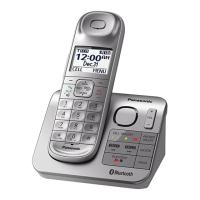
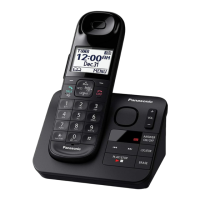
Model shown is KX-TGL460.
Before initial use, see “Getting Started”
on page 10.
Thank you for purchasing a Panasonic product.
Please read these operating instructions before using the unit and save them for
future reference.
Consulte “Guía Rápida Española”, página 74.
For assistance, visit our Web site: http://shop.panasonic.com/support for
customers in the U.S.A.
Please register your product: http://shop.panasonic.com/support
TGL46x(en)_1007_ver003.pdf 1 2015/10/07 14:36:36

Table of Contents

Other manuals for Panasonic KX-TGL462

Questions and Answers

Summary

Operating Instructions

Important Information

Safety Precautions

Essential safety precautions for using the product to prevent injury or damage.

Safety Instructions

Basic safety precautions for using the product.

Power and Installation Safety

Safety guidelines for power connection, installation, and location.

Battery Usage and Care

Instructions and warnings regarding battery usage, charging, and handling.

Operating and Medical Safeguards

Safeguards for operation, cleaning, and medical device considerations.

Getting Started

Setup and Connections

Step-by-step instructions for setting up the base unit, charger, and connections.

Battery Charging and Notes

Instructions on charging batteries, setup notes, and power failure info.

Controls Overview

Identifies and explains the controls on the handset and base unit.

Battery Installation

Instructions for correctly installing the handset batteries.

Handset Controls

Diagram and labels for handset controls, including soft keys.

Base Unit Controls

Diagram and labels for base unit controls and indicators.

Getting Started

Greeting Message Recording

Instructions for recording a custom greeting message for the answering system.

Link to Cell

Link to Cell Feature Overview

Overview of connecting a cellular phone to the base unit via Bluetooth.

Cellular Line Only Mode

Instructions for operating the unit using only the cellular line.

Pairing a Cellular Phone

Step-by-step guide for pairing a cellular phone to the base unit.

Link to Cell

Bluetooth PIN Management

Procedure to change the Bluetooth pairing PIN for security.

Making;Answering Calls

Making Calls

Instructions for making cellular and landline calls.

Call Features During Call

Using pause, adjusting volume, and redialing during calls.

Answering Calls

Instructions on how to answer incoming calls.

Making;Answering Calls

Handset Audio Enhancements

Features for noise reduction and handset equalizer.

Call Transfer

How to transfer calls between handset and cellular phone.

Useful Call Features

Details on hold, mute, flash, call waiting, and clarity booster.

Call Sharing and Conferencing

Allows joining calls and establishing conference calls.

Answering Second Calls

How to answer a second incoming call during an existing call.

Call Block

Call Block Feature Overview

How to block unwanted calls by adding numbers to the call block list.

Storing Unwanted Callers

Methods to block specific numbers, number ranges, or unknown CID.

Phonebook

Finding and Calling Contacts

Methods to find and call contacts from the phonebook.

Phonebook

Viewing Entries and Making Calls

How to view phonebook entries and make calls using speed dial.

Programming

Call Blocking Options

Settings for blocking single numbers, number ranges, or unknown CID.

Programming

Remote Monitoring Setup

Instructions for monitoring a room using another handset or via phone call.

Handset Re-registration

Procedure to re-register a handset if it loses connection.

Caller ID Service

Caller List Management

Viewing the caller list, calling back, and editing entries.

Using Bluetooth Devices

Phonebook Transfer

How to copy phonebook entries from a cellular phone to the unit.

Turning Alerts On;Off

Enables or disables alerts for phone notifications.

Using Bluetooth Devices

Bluetooth Headset Usage

How to use a Bluetooth headset for hands-free landline calls.

Headset Pairing and Management

Steps for pairing, connecting, unpairing, and operating a Bluetooth headset.

Answering System for Landline

Remote Answering System Activation

How to turn on the answering system remotely.

Turning Answering System On;Off

Instructions to activate or deactivate the answering system.

Setting Up New Message Alerts

How to set a number for alert calls, turn alerts on/off, edit, and erase.

Base Unit and Handset Message Playback

How to listen to messages using the base unit and handset.

Answering System for Landline

Remote Operation of Answering System

How to remotely operate the answering system via phone.

Remote Access Code Management

Setting a 3-digit code to prevent unauthorized remote access.

Useful Information

Listening to Voicemail Messages

How to listen to voicemail messages.

Useful Information

Useful Information

Error Message Troubleshooting

Lists error messages and their causes/solutions.

General Troubleshooting

General troubleshooting steps for common problems.

Connection and Dial Tone Troubleshooting

Troubleshooting for cellular connection, dial tone, and base unit beeps.

Call and Intercom Troubleshooting

Troubleshooting for call issues like displayed symbols, noise, and ringing.

Caller ID and Call Troubleshooting

Troubleshooting for caller information display, announcements, and call issues.

Caller Information Announcement Issues

Troubleshooting for issues with caller information announcements and list editing.

Bluetooth Device Troubleshooting

Troubleshooting for Bluetooth device connectivity and features.

Answering System Troubleshooting

Troubleshooting for the answering system not recording messages or remote operation.

Handset and Unit Operation Issues

Troubleshooting for handset power, unit operation, and phone pairing.

Appendix

Limited Warranty Details (USA)

Details of the limited warranty coverage, parts, and labor for USA products.

Warranty Limits and Exclusions

Details exclusions and limitations of the product warranty.

IMPORTANT!

Product Not Working Properly

Basic troubleshooting steps before contacting support.

Summary

Operating Instructions

Important Information

Safety Precautions

Essential safety precautions for using the product to prevent injury or damage.

Safety Instructions

Basic safety precautions for using the product.

Power and Installation Safety

Safety guidelines for power connection, installation, and location.

Battery Usage and Care

Instructions and warnings regarding battery usage, charging, and handling.

Operating and Medical Safeguards

Safeguards for operation, cleaning, and medical device considerations.

Getting Started

Setup and Connections

Step-by-step instructions for setting up the base unit, charger, and connections.

Battery Charging and Notes

Instructions on charging batteries, setup notes, and power failure info.

Controls Overview

Identifies and explains the controls on the handset and base unit.

Battery Installation

Instructions for correctly installing the handset batteries.

Handset Controls

Diagram and labels for handset controls, including soft keys.

Base Unit Controls

Diagram and labels for base unit controls and indicators.

Getting Started

Greeting Message Recording

Instructions for recording a custom greeting message for the answering system.

Link to Cell

Link to Cell Feature Overview

Overview of connecting a cellular phone to the base unit via Bluetooth.

Cellular Line Only Mode

Instructions for operating the unit using only the cellular line.

Pairing a Cellular Phone

Step-by-step guide for pairing a cellular phone to the base unit.

Link to Cell

Bluetooth PIN Management

Procedure to change the Bluetooth pairing PIN for security.

Making;Answering Calls

Making Calls

Instructions for making cellular and landline calls.

Call Features During Call

Using pause, adjusting volume, and redialing during calls.

Answering Calls

Instructions on how to answer incoming calls.

Making;Answering Calls

Handset Audio Enhancements

Features for noise reduction and handset equalizer.

Call Transfer

How to transfer calls between handset and cellular phone.

Useful Call Features

Details on hold, mute, flash, call waiting, and clarity booster.

Call Sharing and Conferencing

Allows joining calls and establishing conference calls.

Answering Second Calls

How to answer a second incoming call during an existing call.

Call Block

Call Block Feature Overview

How to block unwanted calls by adding numbers to the call block list.

Storing Unwanted Callers

Methods to block specific numbers, number ranges, or unknown CID.

Phonebook

Finding and Calling Contacts

Methods to find and call contacts from the phonebook.

Phonebook

Viewing Entries and Making Calls

How to view phonebook entries and make calls using speed dial.

Programming

Call Blocking Options

Settings for blocking single numbers, number ranges, or unknown CID.

Programming

Remote Monitoring Setup

Instructions for monitoring a room using another handset or via phone call.

Handset Re-registration

Procedure to re-register a handset if it loses connection.

Caller ID Service

Caller List Management

Viewing the caller list, calling back, and editing entries.

Using Bluetooth Devices

Phonebook Transfer

How to copy phonebook entries from a cellular phone to the unit.

Turning Alerts On;Off

Enables or disables alerts for phone notifications.

Using Bluetooth Devices

Bluetooth Headset Usage

How to use a Bluetooth headset for hands-free landline calls.

Headset Pairing and Management

Steps for pairing, connecting, unpairing, and operating a Bluetooth headset.

Answering System for Landline

Remote Answering System Activation

How to turn on the answering system remotely.

Turning Answering System On;Off

Instructions to activate or deactivate the answering system.

Setting Up New Message Alerts

How to set a number for alert calls, turn alerts on/off, edit, and erase.

Base Unit and Handset Message Playback

How to listen to messages using the base unit and handset.

Answering System for Landline

Remote Operation of Answering System

How to remotely operate the answering system via phone.

Remote Access Code Management

Setting a 3-digit code to prevent unauthorized remote access.

Useful Information

Listening to Voicemail Messages

How to listen to voicemail messages.

Useful Information

Useful Information

Error Message Troubleshooting

Lists error messages and their causes/solutions.

General Troubleshooting

General troubleshooting steps for common problems.

Connection and Dial Tone Troubleshooting

Troubleshooting for cellular connection, dial tone, and base unit beeps.

Call and Intercom Troubleshooting

Troubleshooting for call issues like displayed symbols, noise, and ringing.

Caller ID and Call Troubleshooting

Troubleshooting for caller information display, announcements, and call issues.

Caller Information Announcement Issues

Troubleshooting for issues with caller information announcements and list editing.

Bluetooth Device Troubleshooting

Troubleshooting for Bluetooth device connectivity and features.

Answering System Troubleshooting

Troubleshooting for the answering system not recording messages or remote operation.

Handset and Unit Operation Issues

Troubleshooting for handset power, unit operation, and phone pairing.

Appendix

Limited Warranty Details (USA)

Details of the limited warranty coverage, parts, and labor for USA products.

Warranty Limits and Exclusions

Details exclusions and limitations of the product warranty.

IMPORTANT!

Product Not Working Properly

Basic troubleshooting steps before contacting support.

Panasonic KX-TGL462 Specifications

General IconGeneral
BrandPanasonic
ModelKX-TGL462
TypeCordless Telephone
Number of Handsets2
Answering SystemYes
Digital Answering System Recording Time18 minutes
SpeakerphoneYes
Caller IDYes
Call BlockYes
Keypad on Base UnitYes
ExpandableYes
Handsets Included2
DisplayLCD
Backlit KeypadYes
Power BackupYes
Ringer IDYes
Talking Caller IDYes
Low Battery IndicatorYes
Frequency1.9 GHz
Call WaitingYes
IntercomYes
Power SourceAC Adapter
RangeUp to 1000 feet
Battery Life10 hours talk time/7 days standby

Related product manuals