
 Need help?
Do you have a question about the Panasonic KX-TGL430 and is the answer not in the manual?
Identifies the model numbers covered by these instructions.
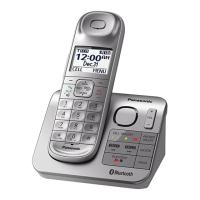
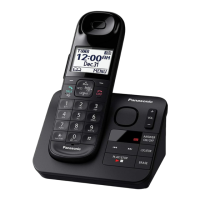
Details the base unit and handset parts included for each model number.
Lists and describes the supplied accessories with the product.
Information on optional accessories and where to purchase them.
How to add optional handsets to the base unit.
Safety precautions to prevent injury and property loss.
Precautions for safe installation and placement of the telephone.
Guidelines for safe operation and maintenance of the product.
Consult manufacturer for medical device compatibility with RF energy.
Recommendations and precautions for using and charging batteries.
Essential safety precautions to reduce risks during product use.
Tips for optimal base unit placement and avoiding interference.
Guidelines for product placement and protection from environmental factors.
Instructions for cleaning and maintaining the product's appearance.
Recommendations for protecting privacy before disposing or transferring the product.
Technical details of the product, including standard, frequency, and power.
Instructions for connecting the base unit and charger.
Guidance on correctly inserting rechargeable batteries into the handset.
Procedure and duration for charging the handset batteries.
Feature description for reducing handset power consumption.
Identification and function of handset and base unit controls.
Explanation of icons displayed on the handset screen.
Instructions for changing display and voice announcement languages.
Procedure for setting the unit's date and time.
Steps to record a custom greeting for the answering system.
How to set the dialing mode (Tone/Pulse) for telephone line compatibility.
Steps to initiate a phone call using the handset.
How to make calls using the redial list and change redial mode.
How to adjust audio volume during a call.
How to insert a pause when making calls requiring it.
Methods to answer incoming calls on the handset or speakerphone.
Functions like Hold, Mute, and Flash available during calls.
How to adjust the ringer volume on handset and base unit.
How to use tone dialing with rotary/pulse service.
Feature to improve sound clarity in noisy environments.
Feature to reduce surrounding noise for clearer voice.
Feature to clarify voice and make it sound more natural.
How to join an existing outside call with other units.
Procedures for transferring calls and setting up conference calls.
How to make intercom calls between handsets.
How to enable automatic answering of intercom calls.
How to block calls by disconnecting and adding numbers to the list.
How to store numbers or ranges to block calls proactively.
How to add numbers from the caller list to the block list.
How to manually add numbers to the call block list.
How to block calls based on a range of numbers.
How to block calls from private or unknown callers.
How to enable or disable the first ring for calls.
How to manage entries in the call block list.
How to clear the entire call block list.
Step-by-step guide to adding new contacts to the phonebook.
How to input names and characters using the dial pad.
How to save incoming call details into the phonebook.
How to use groups for organizing contacts and identifying callers.
How to customize group names and assign ringer IDs.
How to delete specific or all entries from the phonebook.
How to dial phone numbers from the phonebook during an active call.
How to assign and manage phone numbers for quick dialing.
How to view speed dial entries and make calls.
Methods to assign numbers to speed dial keys.
How to modify existing speed dial entries.
How to remove speed dial entries.
Overview of accessing features via menus and direct codes.
Detailed breakdown of menu options and their corresponding codes.
How to configure alerts for new messages.
Various settings for ring count, recording time, remote code, and screen call.
Accessing voicemail messages via the unit.
Functionality for paging and communicating between units.
Settings related to date, time, memo alarms, and time adjustment.
Adjusting ringer volume and tones for incoming calls and intercom.
Setting periods when the handset will not ring for outside calls.
Feature to announce caller's name or number.
Settings for managing key detectors, including registration and naming.
Options for blocking single numbers, number ranges, and unknown CID.
Setting up and managing speed dial entries.
Recording a custom greeting message for the answering system.
Settings for voicemail access number, VM tone detection, and message listening.
Adjusting the display contrast level.
Setting custom names for handsets.
Selecting whether to display the handset name in standby mode.
Changing the order of entries in the redial list.
Enabling automatic answering of intercom calls.
Setting the audible feedback for key presses.
Options for editing Caller ID information, including auto-edit.
Enabling automatic answering of calls by lifting the handset.
Settings for dial mode, flash time, and line mode.
How to join or manage call sharing and conference calls.
Registering or deregistering handsets and other units.
Changing display and announcement languages.
Displaying customer support web address.
Settings for the baby monitor feature, including on/off and sensitivity.
Searching for key detectors and checking battery status.
Checking the battery status of the unit.
Setting and managing multiple alarms with text memos and snooze.
Setting periods when the handset will not ring for outside calls.
How to activate or deactivate the silent mode feature.
Configuring the baby monitor feature on the handset.
Using another handset to monitor a room.
Monitoring a room remotely via phone call.
How to deactivate the baby monitor feature.
Modifying the phone number for remote monitoring.
Removing a number used for remote monitoring.
Adjusting the sensitivity level for sound detection.
How to answer a baby monitor call from a monitoring unit or remotely.
Overview of Caller ID compatibility and service requirements.
Information on displayed caller information and PBX compatibility.
Feature to announce caller's name or number.
Viewing the caller list and calling back entries.
How to edit phone numbers in the caller list, removing area codes.
How the unit automatically edits numbers based on learned patterns.
How to delete specific entries from the caller list.
How to clear the entire caller list.
Overview of the answering system's functions.
Information on the total recording capacity and message limit.
How to turn the answering system on or off via base unit and handset.
Steps to record a custom greeting for the answering system.
Information on the unit's built-in greeting messages.
How to listen to new or all messages using handset or base unit.
Operating the answering system via the base unit controls.
How to erase all recorded messages.
Features for notifying users of new messages.
Setting the base unit to beep for new messages.
Receiving phone notifications for new messages.
Setting a number for remote message notification.
Setting up a code for secure remote message access.
Accessing unit functions remotely via phone.
Information about the 3-digit code for remote operation.
How to turn on the answering system by calling the unit.
Using voice prompts for remote operation.
Using dial keys for direct control of answering system functions.
Listening to callers leaving messages, with volume adjustment.
Setting how many times the phone rings before answering.
Adjusting the maximum time allowed for caller messages.
Setting the unit to play greetings without recording messages.
Using voicemail service instead of or alongside the unit's answering system.
Entering the number to access voicemail messages.
Removing the stored voicemail access number.
How the unit detects voicemail tones and notification.
Enabling or disabling voicemail tone detection.
How to access voicemail messages.
Instructions for mounting the base unit on a wall.
Steps to detach the wall mounting adaptor.
Instructions for installing the charger for wall mounting.
List of error messages and their causes/solutions.
Common problems and their solutions for general use and menu list.
Troubleshooting for handset power, unit operation, and dial tone.
Troubleshooting display language and handset registration issues.
Troubleshooting for low battery indicators.
Troubleshooting for noise, no ring, call issues, and voice paging.
Troubleshooting for Caller ID display, announcement, and editing issues.
Troubleshooting for recording issues, remote operation, and ring counts.
Troubleshooting for voicemail message display and removal.
Cause and solution for moisture damage to the unit.
Compliance statements, registration, REN, and FCC rules.
Compliance with RF exposure limits and installation guidelines.
Information on hearing aid compatibility.
Instructions for connecting the base unit and charger.
Steps for installing batteries and initial charging.
Explanation of function keys, volume, and navigator keys.
How to change display and voice announcement languages.
Steps to set the date and time on the handset.
How to record a custom greeting message.
Procedures for making calls, answering, redialing, and adjusting volume.
Common questions about adding accessories, battery charging, and call waiting.
Information on shopping for accessories and contacting customer support.
Details of the product's limited warranty coverage and terms.
How to submit repair requests online or via mail.
Specific exclusions and limitations of the product warranty.
 General
| Type | Cordless Telephone |
|---|---|
| DECT 6.0 Technology | Yes |
| Frequency | 1.9 GHz |
| Number of Handsets Included | 1 |
| Expandable Up To | 6 handsets |
| Answering System | Yes |
| Answering System Recording Time | Up to 18 minutes |
| Call Block | Yes |
| Caller ID | Yes |
| Keypad on Base Unit | Yes |
| Speakerphone | Yes |
| Ringer ID | Yes |
| Power Backup Operation | Yes |
| Call Waiting | Yes |
| Intercom | Yes |
| Display | LCD |
| Power Source | AC Adapter |
| Range | Up to 1000 feet |
| Battery Life | 7 days (Standby) |








 To Next Page