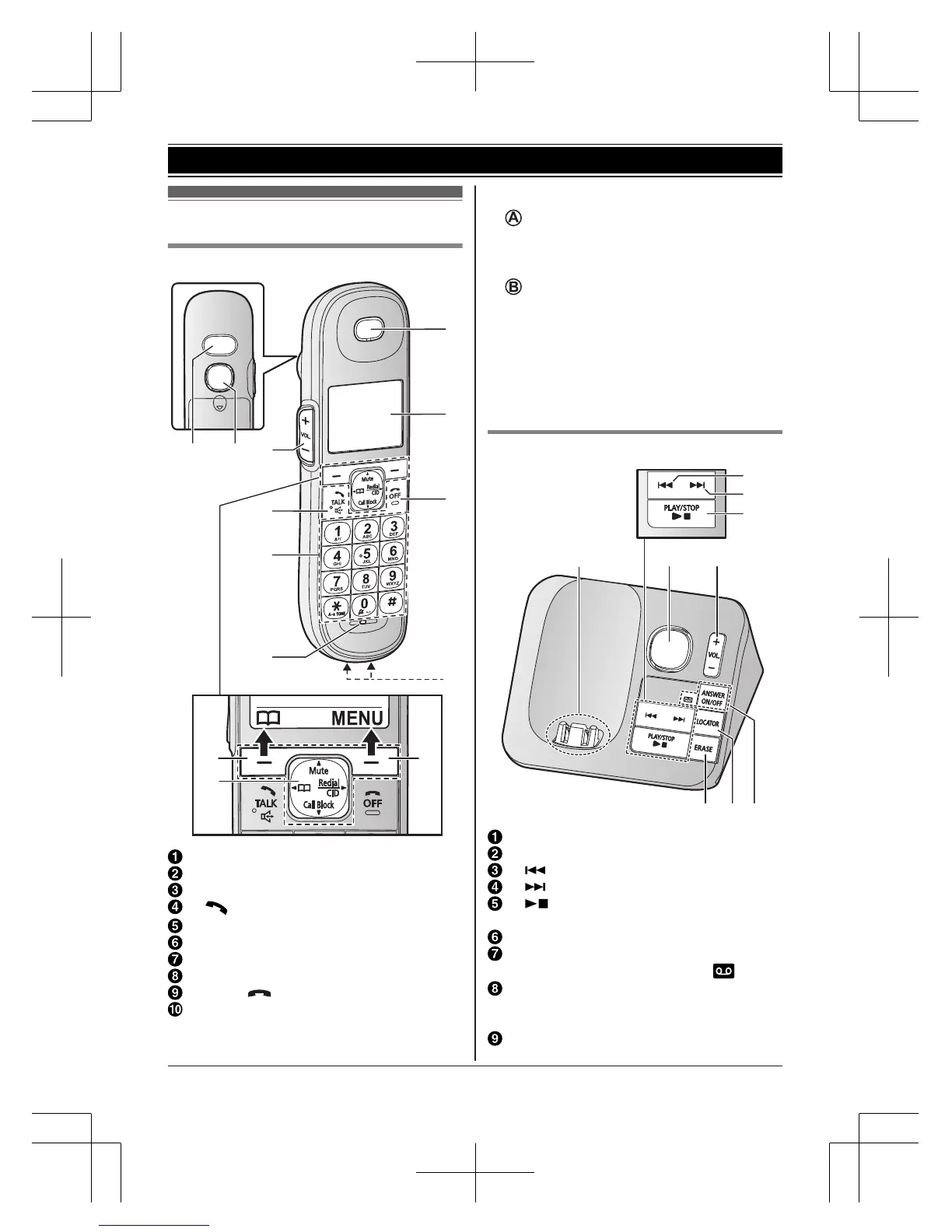
Shoulder grip
Speaker
MjN/MkN (VOL.: Volume up/down)
M /ZN (TALK/Speakerphone)
Dial keypad (*: TONE)
Microphone
Receiver
Display
MOFFN ( )
Charge contacts
n Control type
Soft keys
By pressing a soft key, you can select the
feature shown directly above it on the
display.
Navigator key
– MDN, MCN, MFN, or MEN: Scroll through
various lists and items.
– MDN (Mute): Put the call on mute.
– MFN W: View the phonebook entry.
– MEN (Redial/CID: Caller ID): View the
redial list or caller list.
– MCN (Call Block): View the call block list.
Base unit
Charge contacts
Speaker
M N (Repeat)
M N (Skip)
M N (PLAY/STOP)
Message indicator
MjN/MkN (VOL.: Volume up/down)
MANSWER ON/OFFN
ANSWER ON/OFF indicator (
)
MLOCATORN
R You can locate a misplaced handset
by pressing MLOCATORN.
MERASEN
For assistance, please visit http://shop.panasonic.com/support
11
Getting Started









 To Next Page