
EasyManua.ls Logo

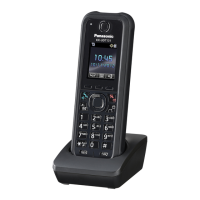
Panasonic KX-UDT131 - User Manual

Panasonic KX-UDT131
66 pages
Print Icon
To Next Page IconTo Next Page
Loading...
Model No.
KX-UDT131
Operating Instructions
DECT Portable Station
Document Version: 2012-11
Thank you for purchasing this Panasonic product.
Please read this manual carefully before using this product and save this manual for future use.
Please use only the battery provided and charge the battery for about 3 hours before using the handset for
the first time. For details, see "Charging the Battery" in this manual.
This product meets IP65 classification (handset only).
Note
In this manual, the suffix of each model number is omitted unless necessary.

Table of Contents

Other manuals for Panasonic KX-UDT131

Questions and Answers

Summary

Introduction

Outline

Describes installation and operation of the PS handset and charger.

Related Documentation

Lists other relevant manuals and supporting information for the product.

Other Information

For Future Reference

Section to record product information like serial number for future reference.

Trademarks

Lists trademarks associated with the product and its components.

Important Information

For Your Safety

Provides essential safety precautions to reduce risks of injury, shock, fire, and damage.

General Safety

General safety guidelines and warnings for product operation and maintenance.

Installation and Placement

Installation Guidelines

Guidance on proper installation procedures for the telephone equipment.

Product Placement Recommendations

Recommendations for placing the product to ensure safe operation and prevent damage.

Data Security

Protecting Your Information

Advice on keeping passwords secret and protecting private information on the device.

Additional Information

Important Safety Precautions

Basic safety precautions for using telephone equipment to prevent hazards.

Equipment Disposal Guidelines

Information on proper collection, recovery, and recycling of old equipment and batteries.

For Best Performance

Operating Range Factors

Details on factors affecting the operational range and signal quality.

Noise and Environment

Guidelines for operating in suitable environments and mitigating noise interference.

Routine Care and Maintenance

Instructions for cleaning and maintaining the product.

Battery Information

Low Battery Warning

Indicates when the battery is low and the handset's operational status.

Replacing the Battery

Procedure for replacing the handset battery when it is depleted.

Before Operating the Telephone

Accessory Information

Lists the included accessories with the product and their part numbers.

Location of Controls

Handset Control Descriptions

Detailed description of buttons and indicators on the handset's front and back.

Handset Functions

Setting the Password

Instructions for setting a 4-digit password for handset security and feature access.

Key Lock and Silent Mode

How to lock keys and use Silent Mode for quiet operation.

Noise Reduction

Managing Noise Reduction

Steps to activate or deactivate noise reduction for improved call quality.

Power Save Mode

Power Save Mode Functionality

Description of how Power Save Mode conserves battery by dimming the display and turning off backlights.

Display Information

Pictographs and Status Indicators

Explanation of icons and symbols shown on the handset display.

Soft Keys Overview

Overview of the handset's soft keys and their functions.

Soft Key Functions

Detailed Soft Key Operations

Detailed descriptions of various soft key functions available on the handset.

Other Icons

Additional Display Icons

Explanation of additional icons that may appear on the handset display.

Flexible Keys

Directory Number (DN) Keys

Explanation of Directory Number flexible keys and their status indications.

Basic Operations

Operation Outline

Overview of accessing handset functions via display menus and soft keys.

Function Menus and Keys

Menu Navigation Structure

Navigation structure for accessing various handset functions and settings.

Function Key Usage

How to use function keys to quickly access features like redial or noise reduction.

Customising Display Settings

Selecting Display Language

Steps to select the desired language for the handset display.

Customising Ringing Settings

Adjusting Ringer Volume and Vibrate

Instructions for adjusting ringer volume, turning it off, and setting vibration mode.

Adjusting Audio Volume

Receiver, Speaker, and Headset Volume

How to adjust audio volume during a conversation.

Feature Operations

Making Calls

Methods for making calls, including dialling, predialling, and using logs.

Using Phonebook and Speed Dial

Instructions for accessing phonebook, one-touch, and hot key dialling.

Receiving Calls

Answering and Rejecting Calls

How to answer incoming calls and reject unwanted ones.

Caller ID Information

Information displayed for incoming calls, including caller name and number.

During a Conversation

Holding and Transferring Calls

How to place calls on hold and transfer them to other parties.

Conference Calls

Making and Managing Conference Calls

Instructions for initiating, managing, and ending multi-party conference calls.

Useful Features

Call Forwarding and Do Not Disturb

Setting up call forwarding and enabling Do Not Disturb mode.

Call Waiting and Voice Mail

Handling incoming calls during conversations and accessing voice messages.

Bluetooth Overview

Introduction to Bluetooth connectivity for headsets and phonebook transfer.

Bluetooth Operations

Managing Bluetooth Power and PIN

Steps to enable/disable Bluetooth and set/change the PIN number.

Registering Bluetooth Headsets

Procedure to register a Bluetooth headset with the handset.

Connecting and Disconnecting Bluetooth Headset

Connecting and Disconnecting

Steps to connect and disconnect a registered Bluetooth headset.

Call Handling with Headset

How to make and answer calls using a Bluetooth headset.

Switching Conversation and Volume

Handset;Headset Conversation Switching

How to switch active calls between handset and Bluetooth headset.

Adjusting Headset Microphone Volume

How to adjust the microphone volume for a Bluetooth headset.

Customising the Telephone

Using the Handset Phonebook

Guide to storing, managing, and using phonebook entries.

Private Ring Settings

Setting custom ringtones and patterns for different call categories.

Storing and Editing Phonebook Entries

Storing New and Editing Items

Detailed steps for adding new entries and modifying existing ones in the phonebook.

Storing from Call Logs and Predialling

Adding entries from call logs and numbers dialed via predialling.

Phonebook Management

Editing Category Names

Customizing names for phonebook categories.

Locking and Unlocking Phonebook

Securing the phonebook by locking and unlocking it with a password.

Phonebook and vCard Transfer

Transferring Phonebook Data via Bluetooth

Steps to transfer phonebook data from a cell phone using Bluetooth.

Assigning Hot Keys

Assigning and Selecting Hot Keys

Setting up speed dial numbers for quick access using Hot Keys.

Memo Alarm Setting

Setting Memo Alarms

Instructions for setting alarms with optional text messages and recurring options.

Managing Memo Alarms

Deleting and Stopping Memo Alarms

Procedure to remove or stop active memo alarms.

Entering Characters

Character Entry Modes and Usage

Guide to using dial keys and character modes for text input.

Deleting Stored Items

Deleting Phonebook, Hot Keys, and Call Logs

How to remove entries from the phonebook, hot keys, and call logs.

Changing Handset Settings

Handset Setting Menu Layout

Overview of the menu structure for configuring handset settings.

Customising Telephone Settings

Incoming Option Settings

Settings for ringer volume, type, vibration, and memo alarms.

Talk and Answer Options

Speaker, Receiver Volume, and Talk on Charger

Adjusting audio volumes and call continuity when on charger.

Answer Modes Configuration

Configuring Any Key Answer, Quick Answer, and Auto Answer Delay.

Key Option Settings

Soft Key Configuration and Naming

Editing soft keys and their names for custom shortcuts.

Key Lock Type and Auto Lock Time

Setting key lock types and automatic activation times.

Display Option Settings

Language, Backlight, and Brightness

Configuring display language, backlight, and LCD brightness.

Standby Display and Category Names

Customizing standby display information and category names.

Tone and System Options

Key Tone and Range Alarm Settings

Enabling or disabling key tones and range alarm notifications.

System Registration and Lock Settings

Registering handsets to bases and managing system lock settings.

Bluetooth and Other Options

Bluetooth Functionality Management

Managing Bluetooth on/off, cell phone pairing, and headset connection.

Changing Handset Password

Procedure to change the handset's security password.

Installation and Setup

Battery Installation and Charger Connection

Step-by-step guide to inserting the battery and connecting the charger.

Battery Charging and Wall Mounting

Initial Battery Charging Procedure

Guidance on charging the battery for the first time before use.

Charger Wall Mounting Instructions

Instructions and considerations for securely mounting the charger on a wall.

Removing the Belt Clip

Detaching the Belt Clip

Steps to remove the belt clip from the handset.

Specifications

General, DECT, and Bluetooth RF Specs

Technical details including display, battery, dimensions, and radio frequency specifications.

Troubleshooting Common Issues

Handset, Ringing, and Call Problems

Solutions for common issues like the handset not working, not ringing, or call problems.

Troubleshooting Power and Noise

Power Failure, Noise, and Battery Issues

Resolving issues related to power failures, noise, and battery status.

Bluetooth Troubleshooting

Phonebook Transfer and Headset Communication Issues

Solutions for problems copying phonebook entries and Bluetooth headset communication.

Advanced Bluetooth Troubleshooting

Connection, PIN, and Download Errors

Resolving errors related to Bluetooth connections, PINs, and phonebook downloads.

Error Messages and Solutions

Common Error Messages and Their Fixes

List of error messages and their corresponding causes and solutions.

Further Error Message Troubleshooting

Phonebook and Bluetooth Error Resolution

Troubleshooting errors related to phonebook downloads and Bluetooth connections.

Summary

Introduction

Outline

Describes installation and operation of the PS handset and charger.

Related Documentation

Lists other relevant manuals and supporting information for the product.

Other Information

For Future Reference

Section to record product information like serial number for future reference.

Trademarks

Lists trademarks associated with the product and its components.

Important Information

For Your Safety

Provides essential safety precautions to reduce risks of injury, shock, fire, and damage.

General Safety

General safety guidelines and warnings for product operation and maintenance.

Installation and Placement

Installation Guidelines

Guidance on proper installation procedures for the telephone equipment.

Product Placement Recommendations

Recommendations for placing the product to ensure safe operation and prevent damage.

Data Security

Protecting Your Information

Advice on keeping passwords secret and protecting private information on the device.

Additional Information

Important Safety Precautions

Basic safety precautions for using telephone equipment to prevent hazards.

Equipment Disposal Guidelines

Information on proper collection, recovery, and recycling of old equipment and batteries.

For Best Performance

Operating Range Factors

Details on factors affecting the operational range and signal quality.

Noise and Environment

Guidelines for operating in suitable environments and mitigating noise interference.

Routine Care and Maintenance

Instructions for cleaning and maintaining the product.

Battery Information

Low Battery Warning

Indicates when the battery is low and the handset's operational status.

Replacing the Battery

Procedure for replacing the handset battery when it is depleted.

Before Operating the Telephone

Accessory Information

Lists the included accessories with the product and their part numbers.

Location of Controls

Handset Control Descriptions

Detailed description of buttons and indicators on the handset's front and back.

Handset Functions

Setting the Password

Instructions for setting a 4-digit password for handset security and feature access.

Key Lock and Silent Mode

How to lock keys and use Silent Mode for quiet operation.

Noise Reduction

Managing Noise Reduction

Steps to activate or deactivate noise reduction for improved call quality.

Power Save Mode

Power Save Mode Functionality

Description of how Power Save Mode conserves battery by dimming the display and turning off backlights.

Display Information

Pictographs and Status Indicators

Explanation of icons and symbols shown on the handset display.

Soft Keys Overview

Overview of the handset's soft keys and their functions.

Soft Key Functions

Detailed Soft Key Operations

Detailed descriptions of various soft key functions available on the handset.

Other Icons

Additional Display Icons

Explanation of additional icons that may appear on the handset display.

Flexible Keys

Directory Number (DN) Keys

Explanation of Directory Number flexible keys and their status indications.

Basic Operations

Operation Outline

Overview of accessing handset functions via display menus and soft keys.

Function Menus and Keys

Menu Navigation Structure

Navigation structure for accessing various handset functions and settings.

Function Key Usage

How to use function keys to quickly access features like redial or noise reduction.

Customising Display Settings

Selecting Display Language

Steps to select the desired language for the handset display.

Customising Ringing Settings

Adjusting Ringer Volume and Vibrate

Instructions for adjusting ringer volume, turning it off, and setting vibration mode.

Adjusting Audio Volume

Receiver, Speaker, and Headset Volume

How to adjust audio volume during a conversation.

Feature Operations

Making Calls

Methods for making calls, including dialling, predialling, and using logs.

Using Phonebook and Speed Dial

Instructions for accessing phonebook, one-touch, and hot key dialling.

Receiving Calls

Answering and Rejecting Calls

How to answer incoming calls and reject unwanted ones.

Caller ID Information

Information displayed for incoming calls, including caller name and number.

During a Conversation

Holding and Transferring Calls

How to place calls on hold and transfer them to other parties.

Conference Calls

Making and Managing Conference Calls

Instructions for initiating, managing, and ending multi-party conference calls.

Useful Features

Call Forwarding and Do Not Disturb

Setting up call forwarding and enabling Do Not Disturb mode.

Call Waiting and Voice Mail

Handling incoming calls during conversations and accessing voice messages.

Bluetooth Overview

Introduction to Bluetooth connectivity for headsets and phonebook transfer.

Bluetooth Operations

Managing Bluetooth Power and PIN

Steps to enable/disable Bluetooth and set/change the PIN number.

Registering Bluetooth Headsets

Procedure to register a Bluetooth headset with the handset.

Connecting and Disconnecting Bluetooth Headset

Connecting and Disconnecting

Steps to connect and disconnect a registered Bluetooth headset.

Call Handling with Headset

How to make and answer calls using a Bluetooth headset.

Switching Conversation and Volume

Handset;Headset Conversation Switching

How to switch active calls between handset and Bluetooth headset.

Adjusting Headset Microphone Volume

How to adjust the microphone volume for a Bluetooth headset.

Customising the Telephone

Using the Handset Phonebook

Guide to storing, managing, and using phonebook entries.

Private Ring Settings

Setting custom ringtones and patterns for different call categories.

Storing and Editing Phonebook Entries

Storing New and Editing Items

Detailed steps for adding new entries and modifying existing ones in the phonebook.

Storing from Call Logs and Predialling

Adding entries from call logs and numbers dialed via predialling.

Phonebook Management

Editing Category Names

Customizing names for phonebook categories.

Locking and Unlocking Phonebook

Securing the phonebook by locking and unlocking it with a password.

Phonebook and vCard Transfer

Transferring Phonebook Data via Bluetooth

Steps to transfer phonebook data from a cell phone using Bluetooth.

Assigning Hot Keys

Assigning and Selecting Hot Keys

Setting up speed dial numbers for quick access using Hot Keys.

Memo Alarm Setting

Setting Memo Alarms

Instructions for setting alarms with optional text messages and recurring options.

Managing Memo Alarms

Deleting and Stopping Memo Alarms

Procedure to remove or stop active memo alarms.

Entering Characters

Character Entry Modes and Usage

Guide to using dial keys and character modes for text input.

Deleting Stored Items

Deleting Phonebook, Hot Keys, and Call Logs

How to remove entries from the phonebook, hot keys, and call logs.

Changing Handset Settings

Handset Setting Menu Layout

Overview of the menu structure for configuring handset settings.

Customising Telephone Settings

Incoming Option Settings

Settings for ringer volume, type, vibration, and memo alarms.

Talk and Answer Options

Speaker, Receiver Volume, and Talk on Charger

Adjusting audio volumes and call continuity when on charger.

Answer Modes Configuration

Configuring Any Key Answer, Quick Answer, and Auto Answer Delay.

Key Option Settings

Soft Key Configuration and Naming

Editing soft keys and their names for custom shortcuts.

Key Lock Type and Auto Lock Time

Setting key lock types and automatic activation times.

Display Option Settings

Language, Backlight, and Brightness

Configuring display language, backlight, and LCD brightness.

Standby Display and Category Names

Customizing standby display information and category names.

Tone and System Options

Key Tone and Range Alarm Settings

Enabling or disabling key tones and range alarm notifications.

System Registration and Lock Settings

Registering handsets to bases and managing system lock settings.

Bluetooth and Other Options

Bluetooth Functionality Management

Managing Bluetooth on/off, cell phone pairing, and headset connection.

Changing Handset Password

Procedure to change the handset's security password.

Installation and Setup

Battery Installation and Charger Connection

Step-by-step guide to inserting the battery and connecting the charger.

Battery Charging and Wall Mounting

Initial Battery Charging Procedure

Guidance on charging the battery for the first time before use.

Charger Wall Mounting Instructions

Instructions and considerations for securely mounting the charger on a wall.

Removing the Belt Clip

Detaching the Belt Clip

Steps to remove the belt clip from the handset.

Specifications

General, DECT, and Bluetooth RF Specs

Technical details including display, battery, dimensions, and radio frequency specifications.

Troubleshooting Common Issues

Handset, Ringing, and Call Problems

Solutions for common issues like the handset not working, not ringing, or call problems.

Troubleshooting Power and Noise

Power Failure, Noise, and Battery Issues

Resolving issues related to power failures, noise, and battery status.

Bluetooth Troubleshooting

Phonebook Transfer and Headset Communication Issues

Solutions for problems copying phonebook entries and Bluetooth headset communication.

Advanced Bluetooth Troubleshooting

Connection, PIN, and Download Errors

Resolving errors related to Bluetooth connections, PINs, and phonebook downloads.

Error Messages and Solutions

Common Error Messages and Their Fixes

List of error messages and their corresponding causes and solutions.

Further Error Message Troubleshooting

Phonebook and Bluetooth Error Resolution

Troubleshooting errors related to phonebook downloads and Bluetooth connections.

Panasonic KX-UDT131 Specifications

General IconGeneral
Quantity1
Speakerphone-
CompatibilityNS1000\\r KX-UDS124
Phonebook capacity500 entries
Brand compatibilityPanasonic
Headset connectivityYes
Display typeTFT
Product colorBlack
Display diagonal1.8 \
Display number of colors65536 colors
Standby time200 h
Charging time3 h
Harmonized System (HS) code85177900
Weight and Dimensions IconWeight and Dimensions
Depth80.5 mm
Width71.5 mm
Height165 mm
Weight200 g

Related product manuals








