15
ALARM TEMPERATURE SETTING
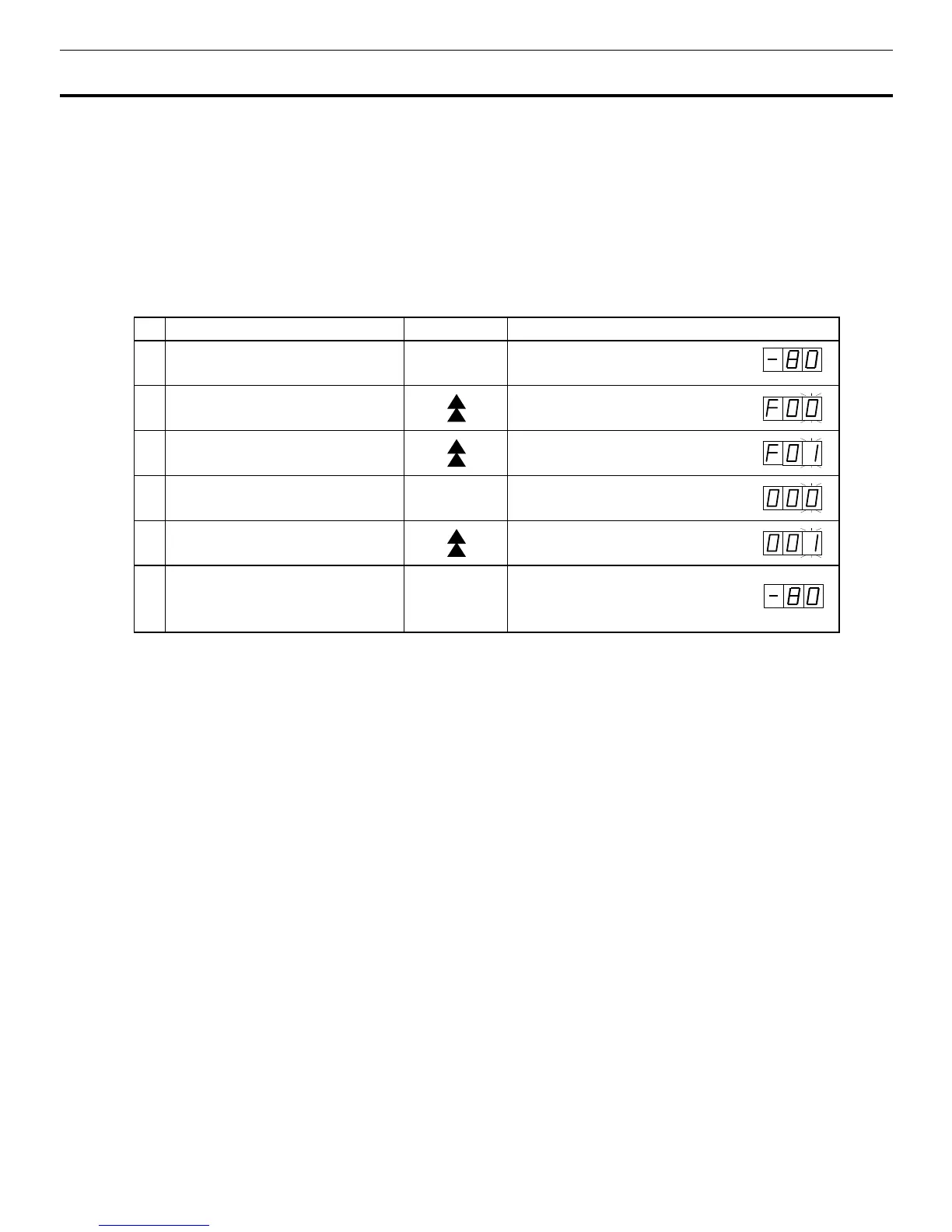
This unit is provided with the high temperature alarm. The setting of high temperature alarm is 10
o
C or
15
o
C (The setting value is 2 kinds.) higher than the setting of chamber temperature. The procedure in
table 2 shows the sequence to set the high temperature alarm at 15
o
C higher than the setting of chamber
temperature. Set the figure to 000 at step 5 when setting the high temperature alarm at 10
o
C higher
than the setting of chamber temperature.
Note:
The alarm temperature is set at the factory 10
o
C higher than the setting of chamber temperature.
Table 2. High temperature alarm setting (15
o
C higher than the setting of chamber temperature)
Description of operation
Key operated Indication after operation
1 -----
The current chamber temperature is
displayed.
2
Press the numerical value shift key
for about 5 seconds.
The first digit blinks.
3
Set the first digit to 1 with the
numerical value shift key.
The first digit blinks.
4 Press enter key. ENT The first digit blinks.
5
Set the first digit to 1 with the
numerical value shift key.
When pressed, the figure of settable
digit changes.
6 Press enter key. ENT
Alarm temperature is memorized and
the current chamber temperature
is displayed.
Note:
The alarm temperature set mode returns to the temperature display mode automatically when 90
seconds has passed without any key operation.



 To Next Page