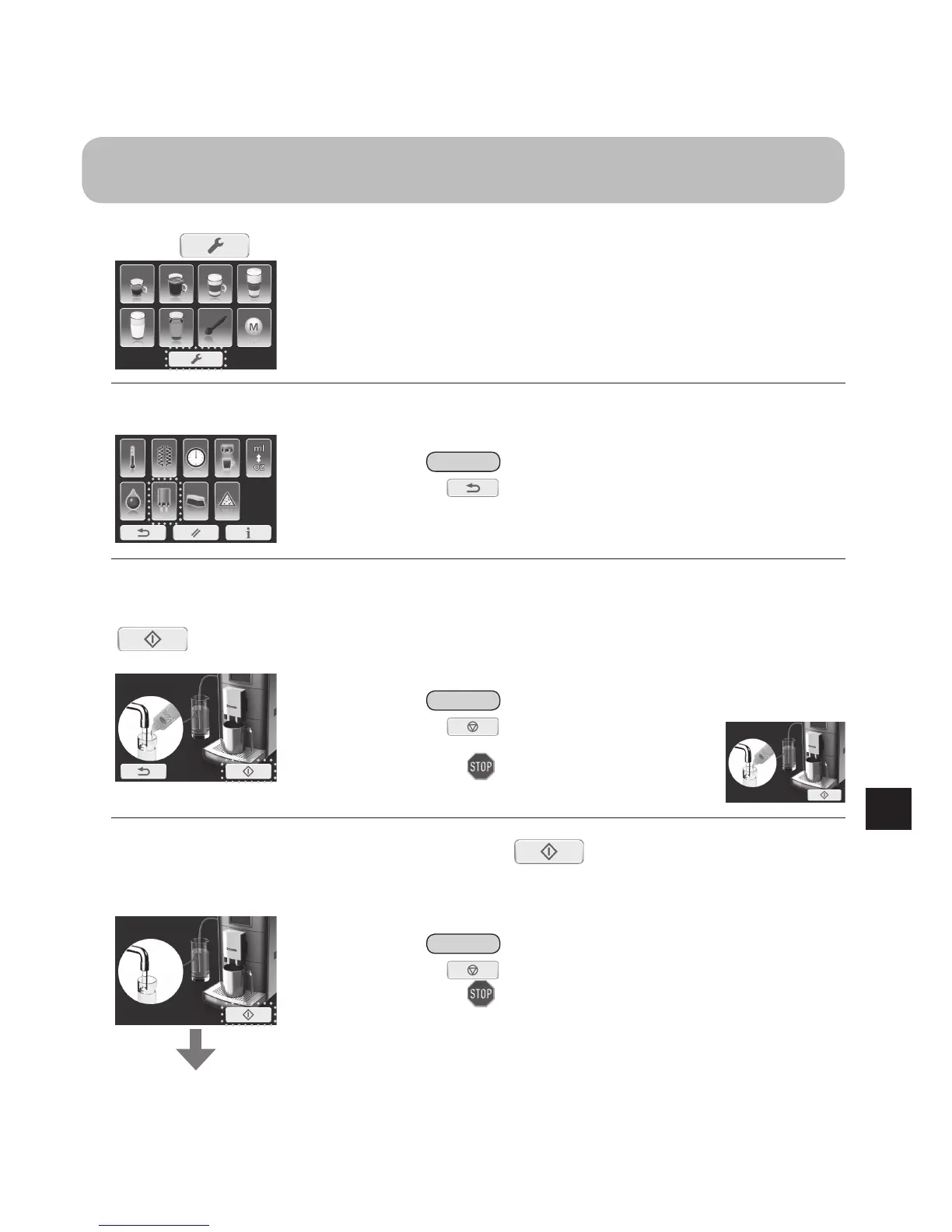
Milksystemcleaning:
Use this programme when quality of foam is low and when milk residue gets into coffee, espresso or hot water
during espresso machine use.
1
Press onthemainmenu.
2
Select“Milksystemcleaningprogramme”.
Note
• If is pressed, the display will return to the main menu.
3
Fillaglasswith250mLofwaterand7.5–15mLofmilksystemcleaner.
Placeanemptycupunderthedispenser.(Cupsize>250mL)Thenpress
tostartrinsingcycleformilksystem.
• If the milk hose is not attached, attach it to espresso machine. (P. EN19)
Note
• If is pressed , it immediately stops the
rinsing process.
After flashes, the display will show the
following display.
4
Filltheglasswithcleanwaterandpress tostarttherinsingcycle
again.Placeanemptycupunderthedispenserbeforestarting.(Cupsize>
250mL)
Displaywillreturntothemainmenuwhen
therinsingcycleiscompleted.
Note
• If is pressed, it immediately stops the rinsing process.
After
flashes, the display will return to the previous display.


 To Next Page