200 80-200
1-60
1-60
80-200
1-60 80-200
1-60 80-200
1-60 80-200
1-60 80-200
1-60 80-200
1-60 80-200
180
180
200
180
200
150
170
1-60 80-200
1-60 80-200
1-60 80-200
200
170
180
22
20
10
10
15
30
20
8
10
15
20
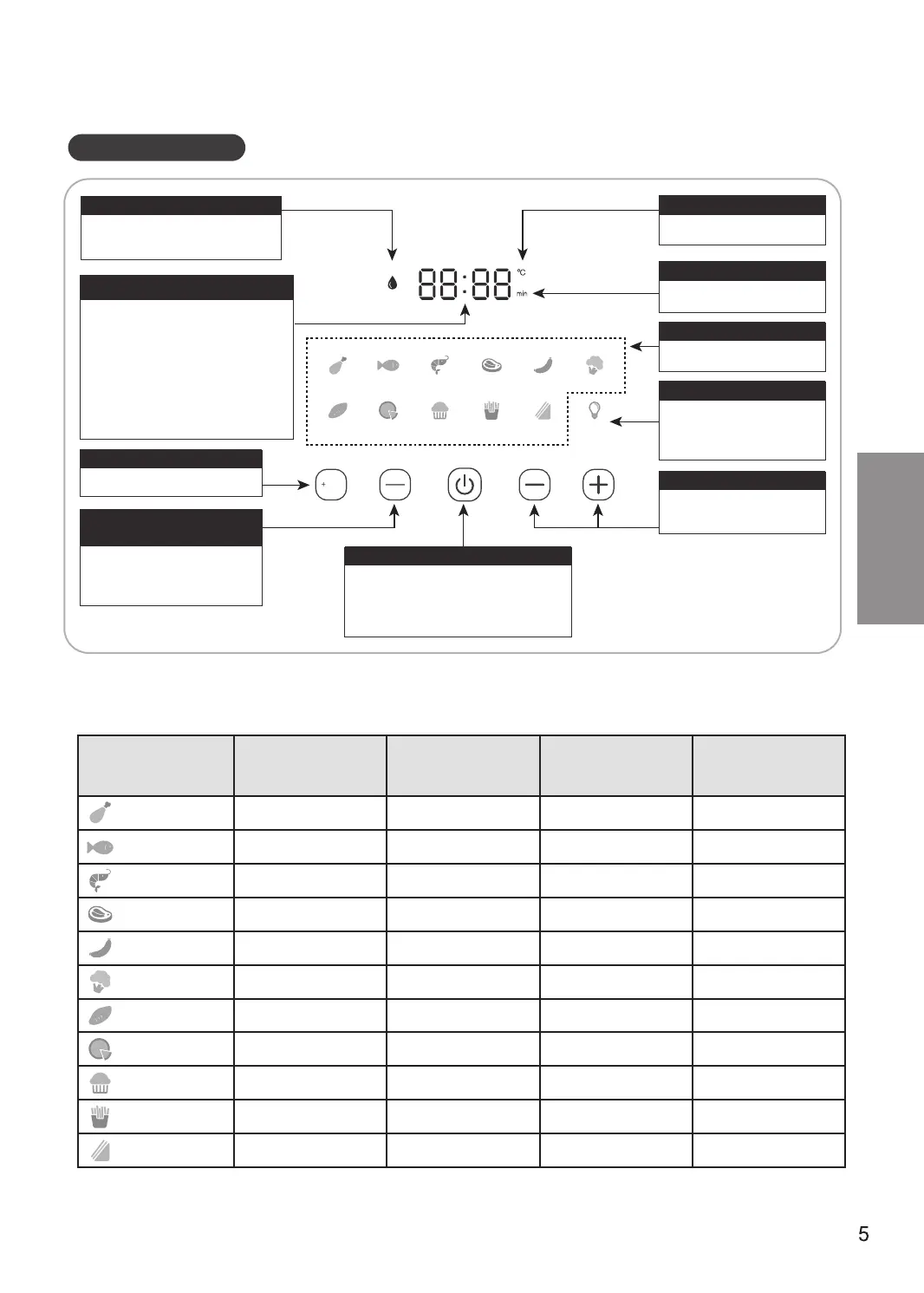
Parts - Control Panel
Time/ temperature display window
● In standby mode, "15:00" is displayed.
● Press the time and temperature
adjustment button to display the
currently selected cooking time or
temperature.
● After the menu is selected and Start
is pressed, the remaining cooking
time is displayed.
● "End" is displayed when cooking is
finished.
+Water button
● To increase moisture,
press this button.
Time/ temperature
adjustment button
● To adjust the time,
press this button.
● To adjust the temperature,
press this button.
Temperature icon
● Displayed when indicating
temperature.
Time icon
● Displayed when indicating
cooking time
Menu button
● Select Light to use it.
+/- Buttons
● For adjusting cooking time
and temperature.
Start/ Pause button
● If the product is switched off, press this
button to enter the standby mode.
● Press this button to start or pause.
● Long press this button to switch off the
product.
Preparation Cooking time and temperature adjustment
Table 1
Cooking
category
Default time
(Minute)
Default
temperature (°C)
Adjustable
time (Minute)
Adjustable
temperature (°C)
Chicken
Fish
Seafood
Steaks
Sausages
Veggies
Potatoes
Pizza
Cake
Fries
Toast
Before use
Control panel
Light button
● Select light to use.
● The light will be automatically
extinguished after one
minute.
Water refill icon
● Displayed after the "+ Water"
button is pressed.
Chicken Fish Seafood Steaks Sausages Veggies
Potatoes Pizza Cake Fries
Toast Light
Time
Temperature
Water



 To Next Page