Press to cancel or set humidity.
● By default (except in the baked foods menu),
the icon is on. If you want to cancel,
please press
2
3
4
8
1
5
Start cooking
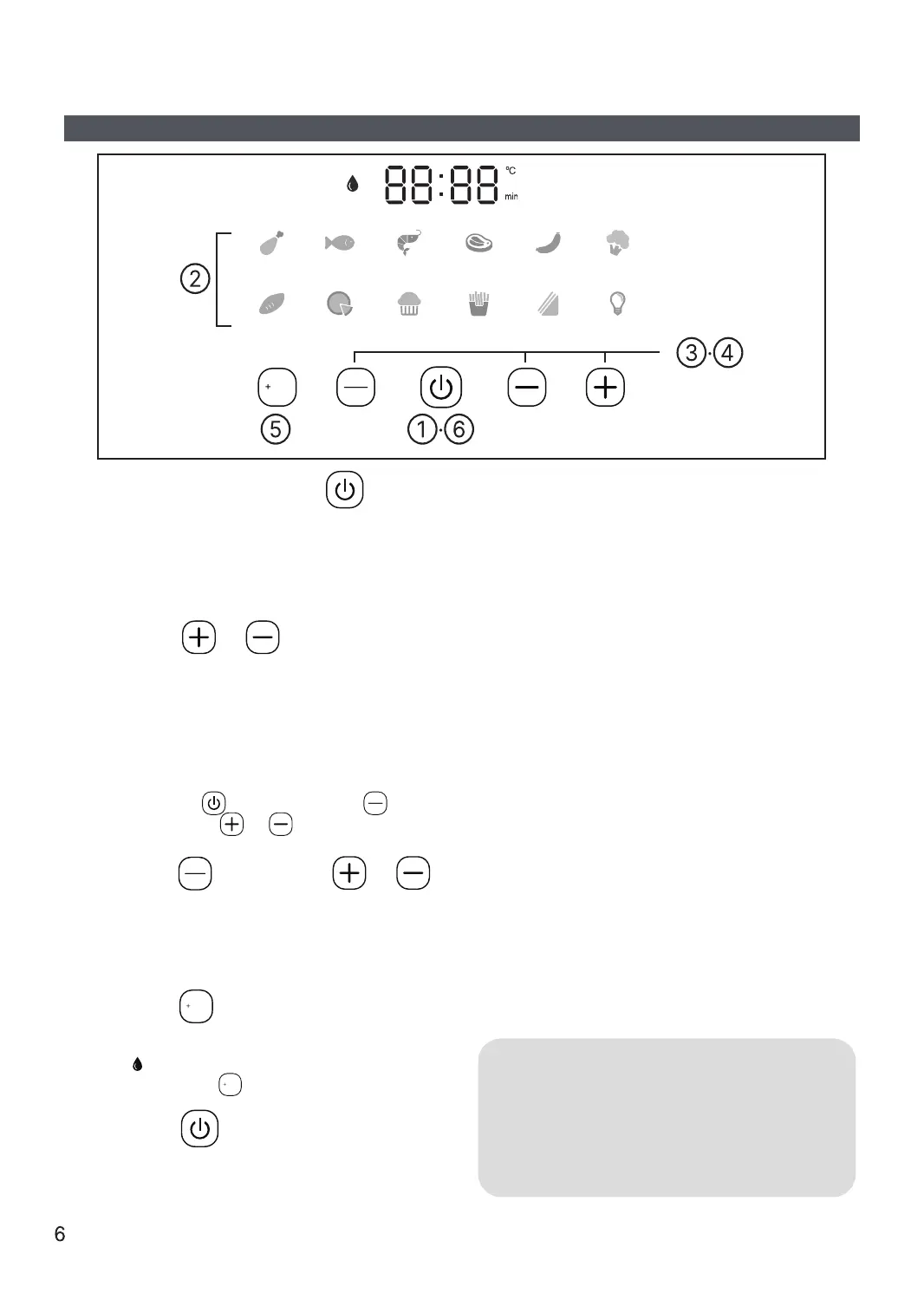
After power on, press
to enter standby mode.
Select the Menu icon.
● The selected menu flashes.
Press or to set the
cooking time.
● The selected time "min" icon lights up.
● Refer to Table 1 on P5 for the range of
cooking time that can be set.
● After the temperature is set, if you want to
adjust the cooking time again, please
press the first, second press ,
finally press or to adjust.
After cooking, pull out the frying
basket, place it on a stable
high-temperature resistant counter top,
and use utensils to remove the food.
● Do not touch it directly with your hands to
avoid burns.
7
Halfway through cooking, pull out the
frying basket to flip the ingredients
inside. Then, push the basket back in
to continue cooking.
● Whether the ingredients need to be flipped
depends on the type of ingredients, serving
size, and cooking time.
● When the frying basket is pulled out, the
machine will enter the standby mode and the
heating will stop. When the frying basket is
pushed back in place, the machine will
continue working.
● The frying basket, see-through window, and
baking tray in the working mode are hot.
Please do not touch them to avoid burns.
● It is normal that the light will be automatically
extinguished after one minute.
6
Press to start cooking.
● The selected menu changes from flashing
to a solid light.
● After the cooking is finished, the display window will display
"End", the heating tube will stop heating, and the cooling fan
will continue to work for 40 seconds to cool down the machine
as quickly as possible.
● After cooking, the temperature of the fryer is high, so please
do not place it directly on the table to avoid scalding it.
● When using the "+Water" function, please long press "+Water"
to drain the residual moisture in the water pipe. Then, replace
the purified water or filtered water in the water tank.
Press , then press or
to set the cooking temperature.
● The selected temperature “
°C”
icon lights up.
● Refer to Table 1 on P5 for the temperature
range that can be set.
Water
Time
Temperature
Water
Chicken Fish Seafood Steaks Sausages Veggies
Potatoes Pizza Cake Fries
Toast Light
Time
Temperature
Water
Time
Temperature


 To Next Page
 Loading...