EasyManua.ls Logo

Panasonic NN-6507 - Page 6

Panasonic NN-6507
12 pages
Print Icon
To Next Page IconTo Next Page
To Previous Page IconTo Previous Page
Loading...
Controls
and
Operation
Procedure
|iiititititititititititititiniti
CLOCK
Pad:
When
oven
is
first
plugged
in,
only
the
colon
in
the
display
window
will
light.
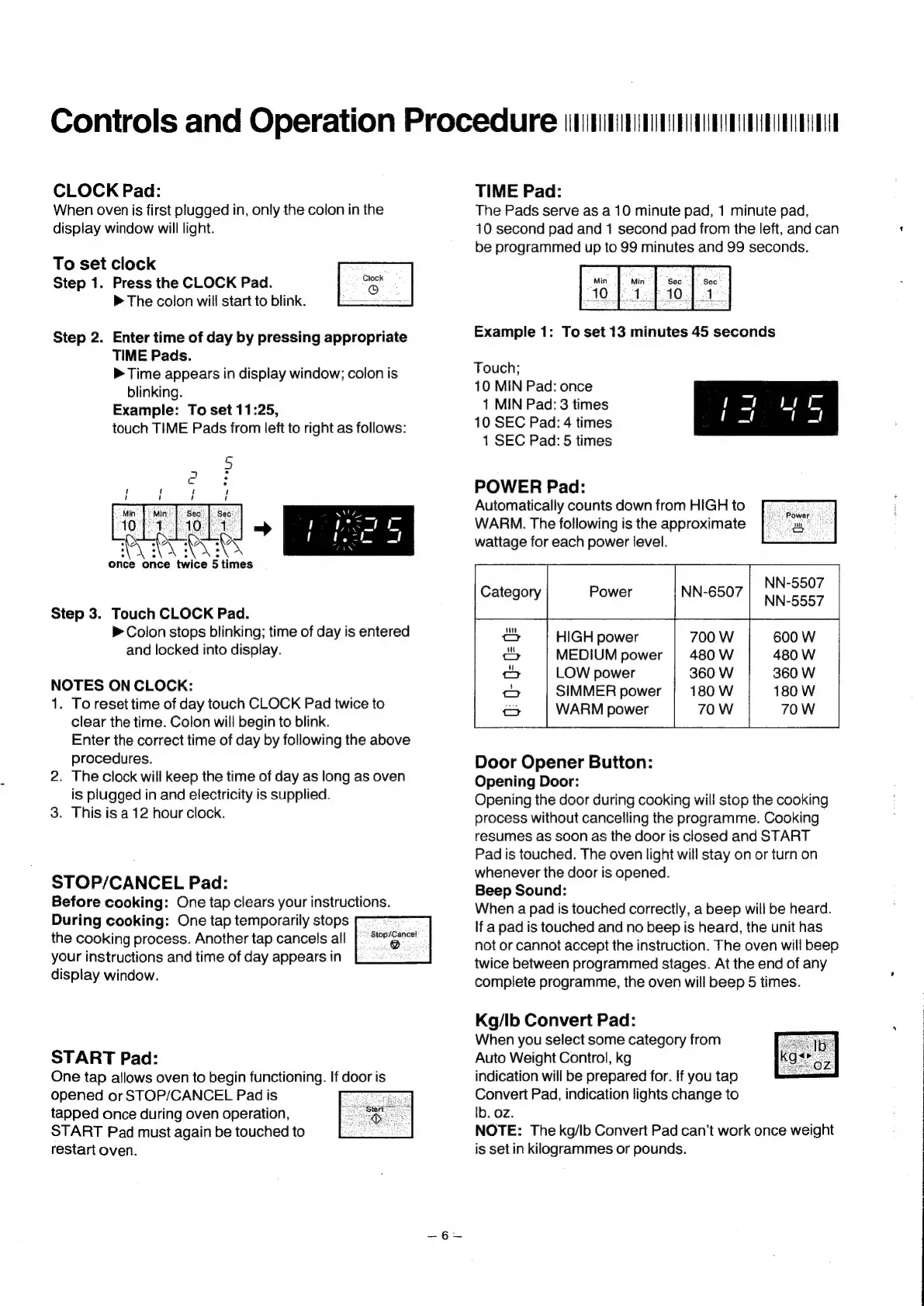
To
set
clock
Step
1.
Press
the
CLOCK
Pad.
eek
The
colon
will
start
to
blink.
————
Step
2.
Enter
time
of
day
by
pressing
appropriate
TIME
Pads.
Time
appears
in
display
window;
colon
is
blinking.
Example:
To
set
11:25,
touch
TIME
Pads
from
left
to
right
as
follows:
Once
once
twice
5
times
Step
3.
Touch
CLOCK
Pad.
>
Colon
stops
blinking;
time
of
day
is
entered
and
locked
into
display.
NOTES
ON
CLOCK:
1.
To
reset
time
of
day
touch
CLOCK
Pad
twice
to
clear
the
time.
Colon
will
begin
to
blink.
Enter
the
correct
time
of
day
by
following
the
above
procedures.
2.
The
clock
will
keep
the
time
of
day
as
long
as
oven
is
plugged
in
and
electricity
is
supplied.
3.
This
is
a
12
hour
clock.
STOP/CANCEL
Pad:
Before
cooking:
One
tap
clears
your
instructions.
During
cooking:
One
tap
temporarily
stops
°
the
cooking
process.
Another
tap
cancels
all
your
instructions
and
time
of
day
appears
in
display
window.
START
Pad:
One
tap
allows
oven
to
begin
functioning.
If
door
is
opened
or
STOP/CANCEL
Pad
is
tapped
once
during
oven
operation,
START
Pad
must
again
be
touched
to
restart
oven.
TIME
Pad:
The
Pads
serve
as
a
10
minute
pad,
1
minute
pad,
10
second
pad
and
1
second
pad
from
the
left,
and
can
be
programmed
up
to
99
minutes
and
99
seconds.
Example
1:
To
set
13
minutes
45
seconds
POWER
Pad:
Automatically
counts
down
from
HIGH
to
WARM.
The
following
is
the
approximate
wattage
for
each
power
level.
Power
NN-6507
Noes
Touch;
10
MIN
Pad:
once
1
MIN
Pad:
3
times
10
SEC
Pad:
4
times
1
SEC
Pad:
5
times
oO
HIGH
power
700
W
600
W
MEDIUM
power
|
480
W
480
W
LOW
power
360
W
360
W
SIMMER
power
180
W
180
W
WARM
power
Door
Opener
Button:
Opening
Door:
Opening
the
door
during
cooking
will
stop
the
cooking
process
without
cancelling
the
programme.
Cooking
resumes
as
soon
as
the
door
is
closed
and
START
Pad
is
touched.
The
oven
light
will
stay
on
or
turn
on
whenever
the
door
is
opened.
Beep
Sound:
When
a
pad
is
touched
correctly,
a
beep
will
be
heard.
lf
a
pad
is
touched
and
no
beep
is
heard,
the
unit
has
not
or
cannot
accept
the
instruction.
The
oven
will
beep
twice
between
programmed
stages.
At
the
end
of
any
complete
programme,
the
oven
will
beep
5
times.
Kg/lb
Convert
Pad:
When
you
select
some
category
from
Auto
Weight
Control,
kg
indication
will
be
prepared
for.
if
you
tap
Convert
Pad,
indication
lights
change
to
Ib.
oz.
NOTE:
The
kg/lb
Convert
Pad
can’t
work
once
weight
is
set
in
kilogrammes
or
pounds.