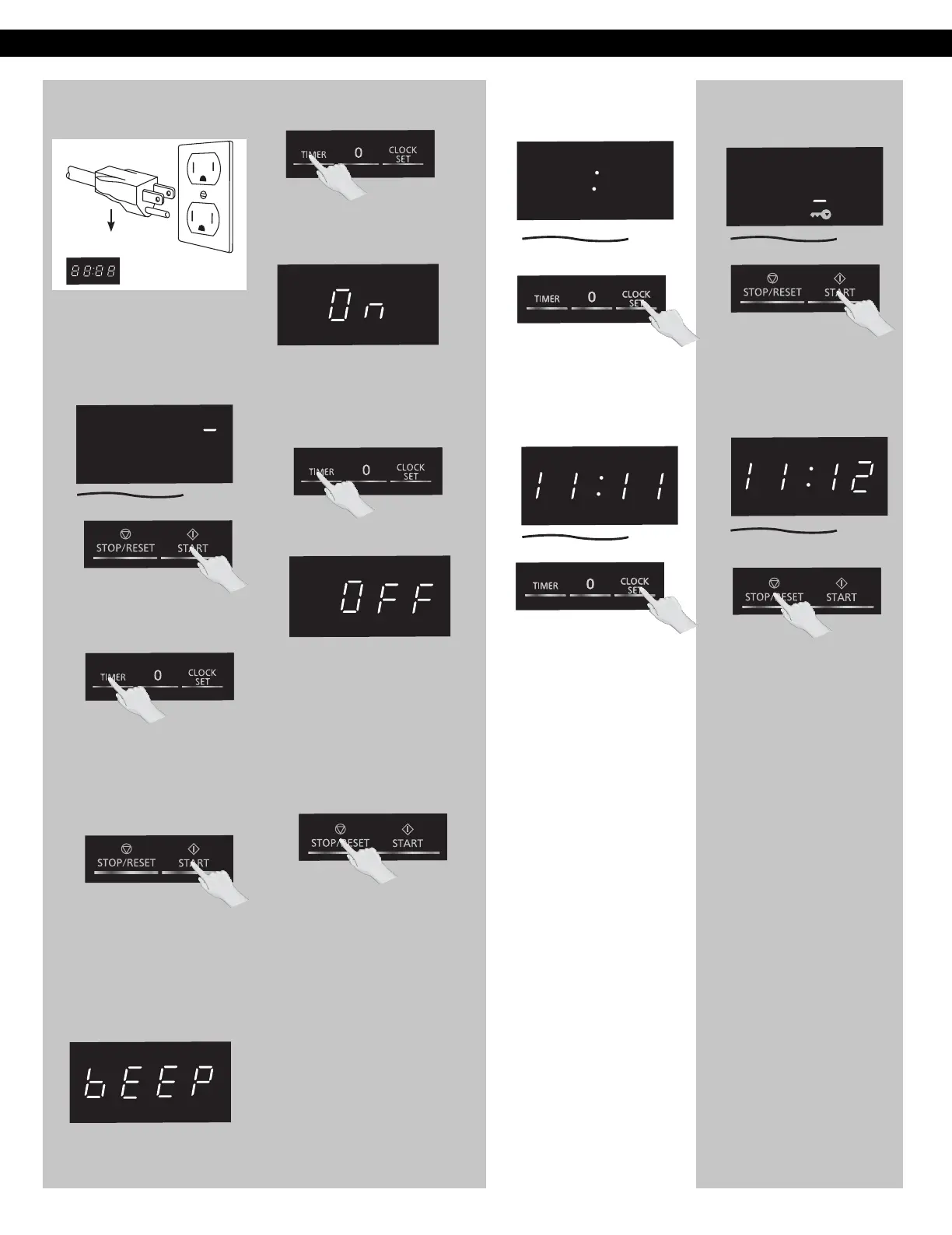
Using the Microwave
for the First Time
Plug into a properly grounded
electrical outlet. The oven
automatically defaults to the
imperial measure system
(oz/lb).
1
2
3
Setting the Clock
Setting the Child
Safety Lock
When the time of day appears
in the display, press Start three
times;
Press Stop/Reset three times;
the display will return to the
time of the day and Child Lock
will be cancelled.
NOTES:
1. This feature prevents the
electronic operation of
the oven until cancelled. It
does not lock the door.
2. To set or cancel child safety
lock, Start or Stop/Reset
pad must be pressed 3
times within 10 seconds.
3. You can set Child Lock
feature when the display
shows a colon or time of
day.
2
Press Clock/
finish setting and the colon (:)
will stop blinking.
NOTES:
1. To reset the clock, repeat
steps.
2. The clock will retain the
time of day as long as the
oven is plugged in and
electricity is supplied.
3. The clock is a 12-hour
display.
4. Oven will not operate while
colon (:) is flashing.
2
With the oven NOT cooking,
press Clock/ ;
the colon will blink. Enter time
of day using the Number pads.
1
1
Display Window
Set once
Set to
Press
Start
system.
once to enter the
weight
Press
to cycle
between
the
weight
system,
Metric
( / )
or
Imperial
(oz/lb).
g kg
Cooking Timer
Press
Start
once again to
access to the sound switch
system.
(If you press start twice after
plug-in, you can skip the
weight system and access
the sound switch system.)
The screen will display bEEP.
Press to cycle
the sound switch
On
or Beep
between
system. Beep
4
The default mode is Beep On.
The screen will display On
.
Cooking Timer
Press
Cooking Timer
5
once
The mode change to Beep
.
The screen will display
Press
On or
to cycle
the sound system,
between
Press
confirm;
a colon (: ) will appear
in
the
display window.
NOTES:
1. These choices can be
selected only when you
plug-in the oven.
2. After beep setting, it will
revert back to the metric
weight measurement setting
if start pad is pressed again.
3. Press pad to exit.
6
Cooking Timer
to
Stop/Reset
Stop/Reset
OFF
.
OFF
.
OFF
.
OFF



 To Next Page