33
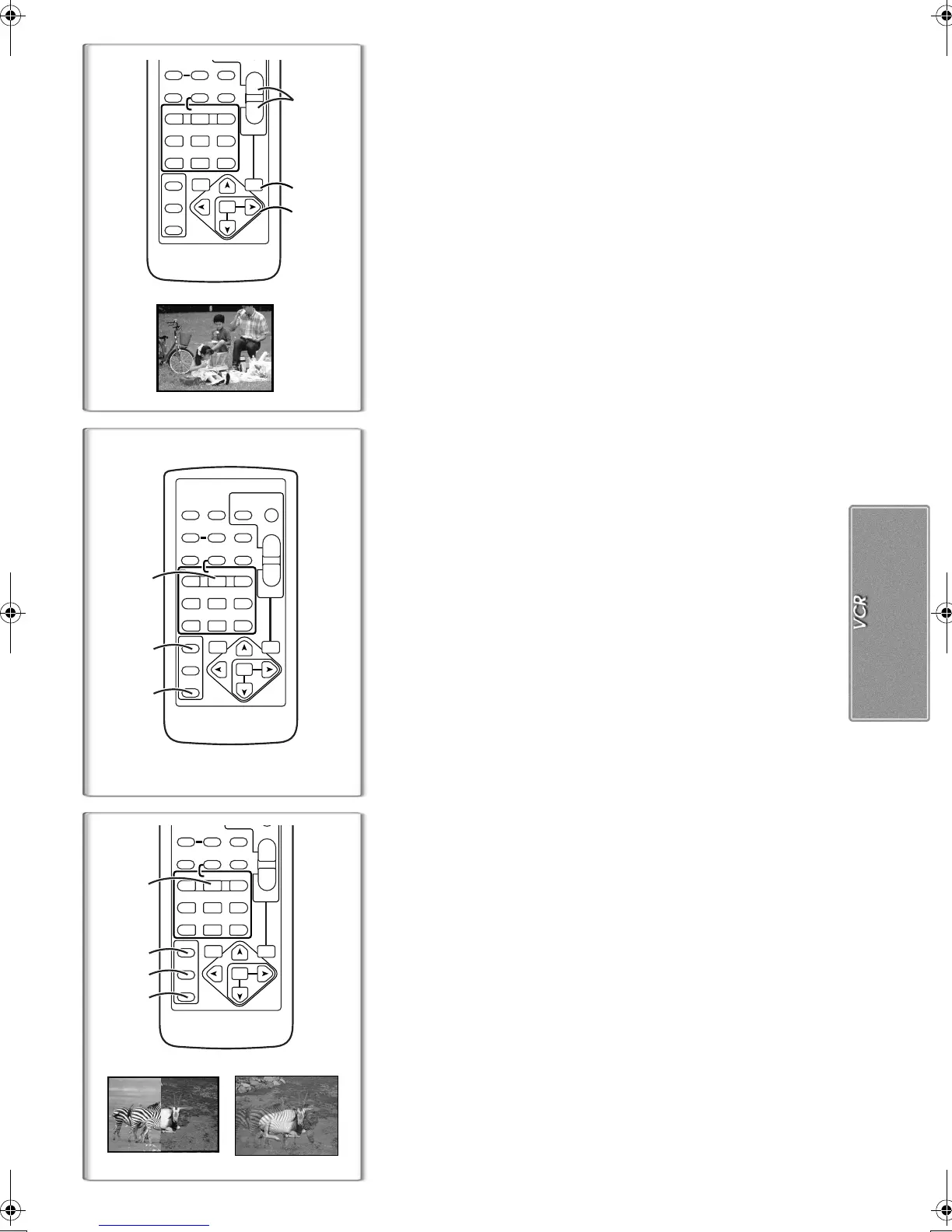
Playback Zoom Function
A part of the image can be enlarged up to 10 times during playback.
1
During playback, press the [P.B. ZOOM] Button on the
Remote Controller.
≥The centre of the image is enlarged to approximately 2 times.
To Change the Zoom Magnification
2
Change the magnification by pressing the [W] Button or [T]
Button on the Remote Controller.
To Change the Enlarging Area of an Image
3
Press the Arrow Button (π, ∑, ∏, ∫) on the Remote
Controller that points to the area you want to enlarge.
To Cancel the Playback Zoom Function
Press the [P.B. ZOOM] Button on the Remote Controller.
≥For other notes concerning this item, see page 53.
~~~~~~~~~~~~~~~~~~~~~~~~~
Playback Digital Effect Functions
During playback, special digital effects can be added to the recorded
pictures. The same effects as those of Digital Effects 1 and 2, which are used
during recording, are obtained.
1
Press the [
1
] Button.
2
Press the [SELECT] Button of the Remote Controller to
select a desired digital effect.
≥When the [SELECT] Button is pressed repeatedly, the digital effect
selection changes.
≥The same setting can be done using [DIGITAL EFFECT] Sub-Menu on
the [VCR FUNCTIONS] Main-Menu.
To suspend Playback Digital Effect Temporarily
Press the [OFF/ON] Button
1
to suspend or restart the digital effect. When
the digital effect is paused temporarily, the selected effect’s indication
flashes.
To Cancel the Digital Effect
Press the [SELECT] Button on the Remote Controller and clear the digital
effect indication.
≥For other notes concerning this item, see page 52.
ª
Wipe Mode and Mix Mode
1
Press the [
1
] Button.
2
Press the [SELECT] Button on the Remote Controller and
select [WIPE] or [MIX].
3
Press the [STORE] Button at the moment you want to save
as a still picture.
≥The [B] or [C] Indication appears, and the image is saved.
4
Press the [OFF/ON] Button in the scene in which you want to
use the Wipe or Mix effect.
≥The scene changes as a result of the Wipe or Mix effect.
≥The Wipe Function and Mix Function can be used only from the Remote
Controller during playback.
≥If the [OFF/ON] Button is pressed while Wipe or Mix is carried out, the effect
will stop temporarily at that point. Pressing the [OFF/ON] Button again will
bring back the effect.
1
2
3
4
WIPE
MIX
ZOOM
INDEX INDEX
SELECT
STORE
STOP
KL
∫
COUNTER
V
/REW
STILL ADV
OFF/ON
P.B.DIGITAL
RESET TITLE
T
W
sVOL r
¥REC
MULTI/
P-IN-P
A.DUB
PLAY
PAUSE
FF/
W
STILL ADV
MENU
ITEM
SET
61 5
;
ED
VAR.
SEARCH
P.B.
ZOOM
ZOOM
INDEX INDEX
SELECT
STORE
STOP
KL
∫
OSD
COUNTER
V
/REW
STILL ADV
OFF/ON
P.B.DIGITAL
DATE/
TIME
RESET
TITLE
T
W
sVOL r
¥REC
MULTI/
P-IN-P
PHOTO
SHOT
START/
STOP
A.DUB
PLAY
PAUSE
FF/
W
STILL ADV
MENU
ITEM
SET
61 5
;
ED
VAR.
SEARCH
P.B.
ZOOM
1
2
1
PB ZOOM
2t
ZOOM
INDEX INDEX
SELECT
STORE
STOP
KL
∫
COUNTER
V
/REW
STILL ADV
OFF/ON
P.B.DIGITAL
RESET TITLE
T
W
sVOL r
¥REC
MULTI/
P-IN-P
A.DUB
PLAY
PAUSE
FF/
W
STILL ADV
MENU
ITEM
SET
61 5
;
ED
VAR.
SEARCH
P.B.
ZOOM
2
1
3
B‑Text.fm33ページ2002年1月11日 金曜日 午後7時28分



 To Next Page