5
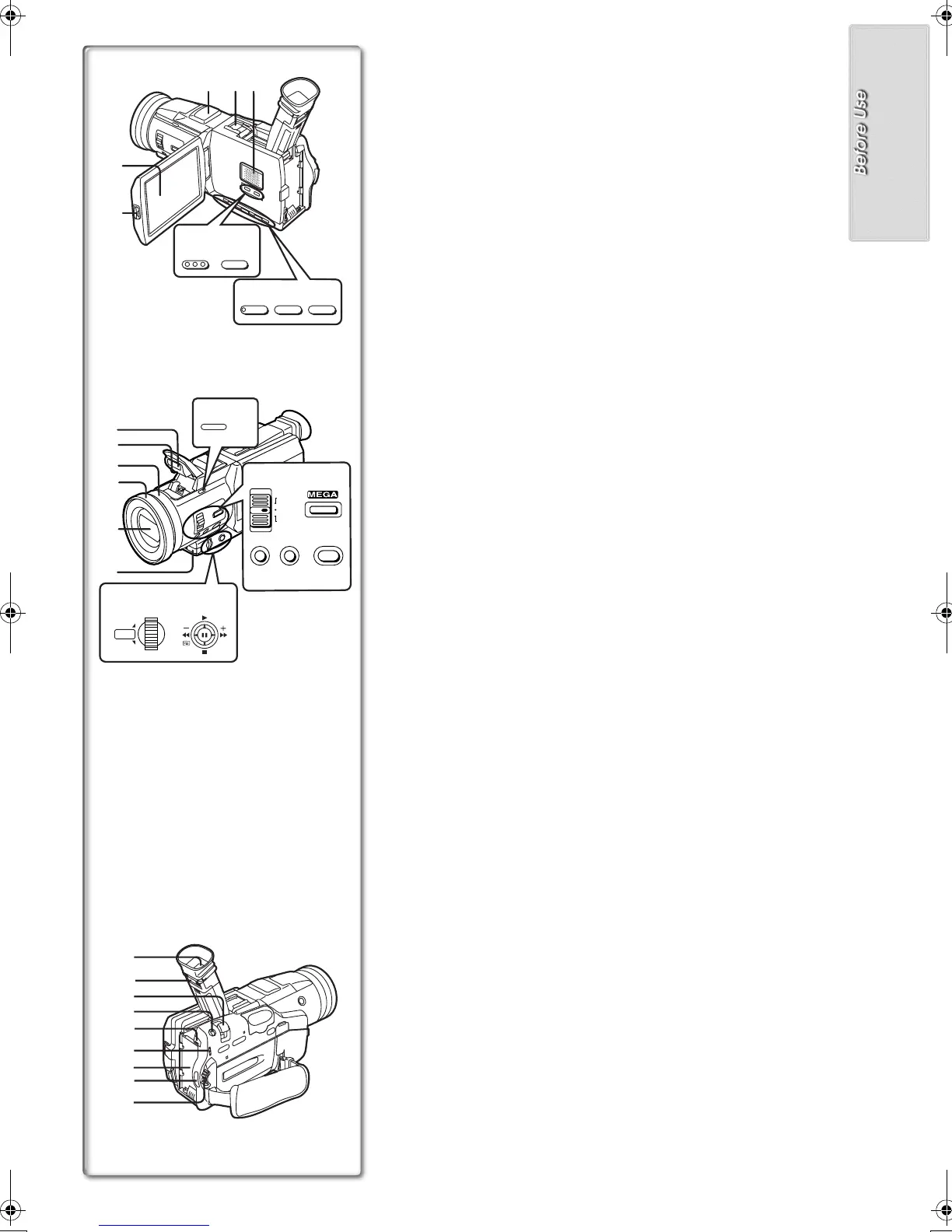
Controls and Components
1) LCD Monitor (l 11, 58)
.........................................................................................................................
≥Due to limitations in LCD production technology, there may be some
tiny bright or dark spots on the LCD Monitor screen. However, this is
not a malfunction and does not affect the recorded picture.
.........................................................................................................................
2) LCD Monitor Open Button [PUSH OPEN] (l 11)
3) Microphone (built-in, stereo) (l 35)
4) Smart Accessory Shoe
≥The Video Flash (VW-FLH3E:Optional) or the Stereo Microphone (VW-
VMS2E:Optional), etc. can be attached here. Power is supplied directly
from the Movie Camera when using an accessory supported by the
Smart Accessory Shoe.
≥Do not touch the connector part of the Smart Accessory Shoe.
5) Speaker
6) Title Button [TITLE] (l 45)
7) Multi/P-in-P Button [MULTI/P-IN-P] (l 28, 34, 45)
8) Fade Button [FADE] (l 22)
9) Backlight Button [BLC] (l 22)
10) Still Button [STILL] (l 20)
11) Flash Open Button [PUSH] (l 26)
12) Built-in Video Flash (l 26)
13) Flash sensor
14) Focus Ring (l 25)
15) Lens Hood (l 58)
16) Lens (LEICA DICOMAR)
17) Remote Control Sensor (l 8)
18) Mode Selector Switch [AUTO/MANUAL/AE LOCK] (l 18, 23, 24, 25)
19) Optical Image Stabilizer Button [OPTICAL IMAGE STABILIZER]
([OIS]) (l 21)
20) Focus Button [FOCUS] (l 25)
21) White Balance Button [W.B] (l 23, 24)
22) Menu Button [MENU] (l 12)
23) Multi-Function Dial [PUSH] (l 12, 25, 30)
24) Operation Lever
≥Operates by pushing the lever to each direction.
A
: Reverse Search [j] (l 18)
Rewind/Review [6] (l 30)
Recording Check [S] (l 18)
B
: Forward Search [i] (l 18)
Fast Forward/Cue [5] (l 30)
C
: Playback [1] (l 30, 44)
Pushing it twice activates the Variable Speed Search mode.
D
: Stop [∫] (l 30, 40)
≥Operates by pressing.
E
: Pause [;] (l 31, 44)
25) Viewfinder (l 11, 58)
.........................................................................................................................
≥Due to limitations in LCD production technology, there may be some
tiny bright or dark spots on the Viewfinder screen. However, this is not
a malfunction and does not affect the recorded picture.
.........................................................................................................................
26) Eyepiece Corrector Knob (l 11)
27) Zoom Lever [W/T] (l 21)
28) Photoshot Button [PHOTO SHOT] (l 20, 39, 43, 45)
29) Battery Eject Button [BATT PUSH] (l 9)
30) Mode Lamps (l 11, 18, 30, 42)
31) Battery Holder (l 9)
32) Recording Start/Stop Button (l 18)
33) Power Off/On Mode Selector Switch [OFF/ON/MODE]
(l 9, 11, 18, 56)
8) 9) 10)
5)
2)
1)
4)
3)
FADE STILLBLC
MULTI/P-IN-P
6)
7)
TITLE
16)
15)
14)
17)
11)
PUSH
12)
13)
23)
24)
SHUTTER/IRIS/ VOL/JOG
PUSH
18)
20)
21)
22)
19)
FOCUS W.B MENU
OPTICAL IMAGE
STABILIZER
AUTO
MANUAL
AE LOCK
26)
32)
31)
30)
29)
28)
25)
27)
33)
B‑Text.fm5ページ2002年1月11日 金曜日 午後7時28分






 To Next Page