11
VCR/DVD
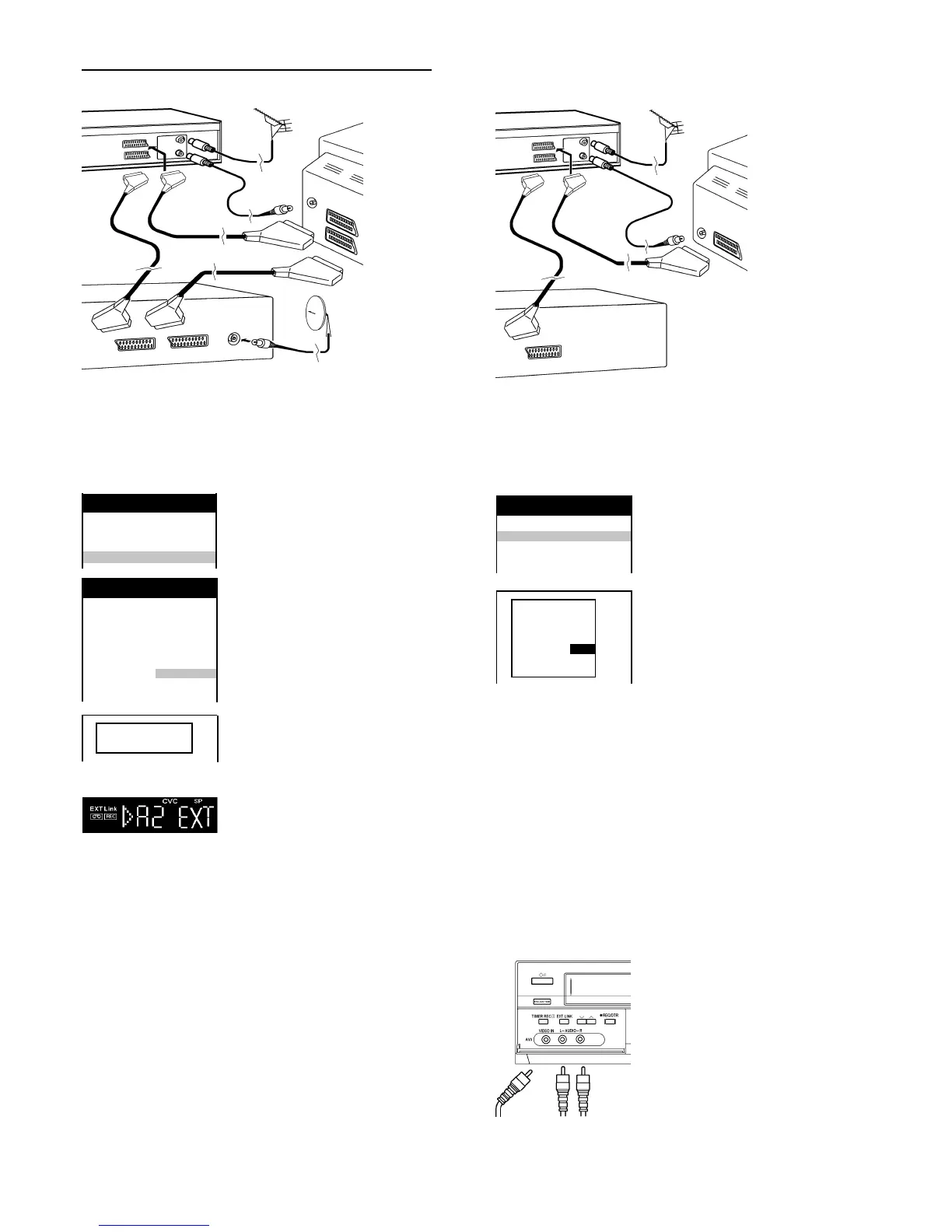
Controls for external recordings
with a Satellite Receiver
Press |MENU|
Select [Other settings]
Access by pressing |ENTER|
Select [AV2]
Select the input field
Select the settings
Store by pressing |ENTER|
Press |EXIT|
After you have preset the recording in the
Satellite Receiver, set the VCR on Standby
Recording by pressing |EXT LINK| on the
VCR . As long as a video picture is being
transmitted by the Satellite Receiver, the
VCR will record it. This notice is displayed
on the screen. In order to delete this
notice, press |ENTER|. To stop the
recording, press the EXT LINK button
on the VCR.
Note: The programmes to be recorded on
your VCR should not overlap with the
recordings of the Satellite Receiver.
VCR display
Receiver
(not supplied)
AV2
TV
(not supplied)
AV1
Connecting a Decoder
With a 21-pin scart lead (not supplied) connect a Decoder to AV2.
This device is used to decode scrambled broadcasts (Pay TV).
[EXT LINK2] To control external recording with some
Satellite Receiver (Videosignal).
[EXT LINK1] For a Digital Receiver which transmits
a special control signal for recordings,
for example the F.U.N. Receiver (TU-DSF31).
VCR/DVD
Decoder (not supplied)
AV2
AV1
TV
(not supplied)
Connecting External Equipment
[EXT] To connect an external equipment (e.g. TV),
the EXT LINK button on the VCR is not activated.
[DECODER] To connect an external decoder
Connecting a Receiver
With some Satellite- or Digital Receivers it is possible to start a Timer
recording, with a 21-pin scart lead (not supplied) by using EXT LINK
function. (Please read the operating instructions for your Satellite- or
Digital Receiver for further information).
Set the Channel to Decoder
Press |MENU|
Select [Tuning]
Access by pressing |ENTER|
Access [Manual] by pressing |ENTER|
Select the encoded channel
Access by pressing |ENTER|
Select [Decoder]
Select the input field
Select the Decoder to [ON]
(the picture in the background
should become clear)
Store change by pressing |ENTER|
Press |EXIT|
AV LINK Function
You can select the TV or video reception
with the |AV LINK| button.
If video reception has been selected,
the VCR display will indicate VCR.
Connect your external source
(for example: Video Camcorder)
to the front input. To select A3 press
|INPUT SELECT AV|
repeatedly. The sound will be recorded on
the HiFi audio tracks and the mono audio
track. To record only mono use L-audio input.
External source on AV3
Video
Audio
L R
RQTD0035-A
VCR now recording
this programme
Panasonic VCR
Main menu
Timer recording
Tuning
Clock setting
Other settings
Panasonic VCR
Other settings 1/2
Tape length : AUTO (
E-240)
Audio playback : NORMAL
SQPB : AUTO
VCR/DVD OUTPUT : AUTO
VCR display : DIMMED
OSD : 4:3
AV2 : EXT
TV system : PAL
Panasonic VCR
Tuning
Pos. Name Ch
33 ***33 124
34 PREMI 87
35 ***35 123
Pos : 34
Name :
PREMI
Channel : 87
Fine tuning : AUTO
Decoder : ON
Video system : PAL
Mono : OFF










 To Next Page