Find
A
*
MP3
WMA
CD-Text
DVD
TV
VCR
DVD
TV
VCR
MENU
ENTER
RETURN
SELECT
No
1
SELECT
NUMBER
00
99
2
3
4
5
G
1
1
1
Total
T
Tree
Prev Find Next
Group :
CELEBRATE
CHOSEN ONE
CHILD OF FORGIVENESS
YOUR LOVE, OH LORD
I NEED YOU
~
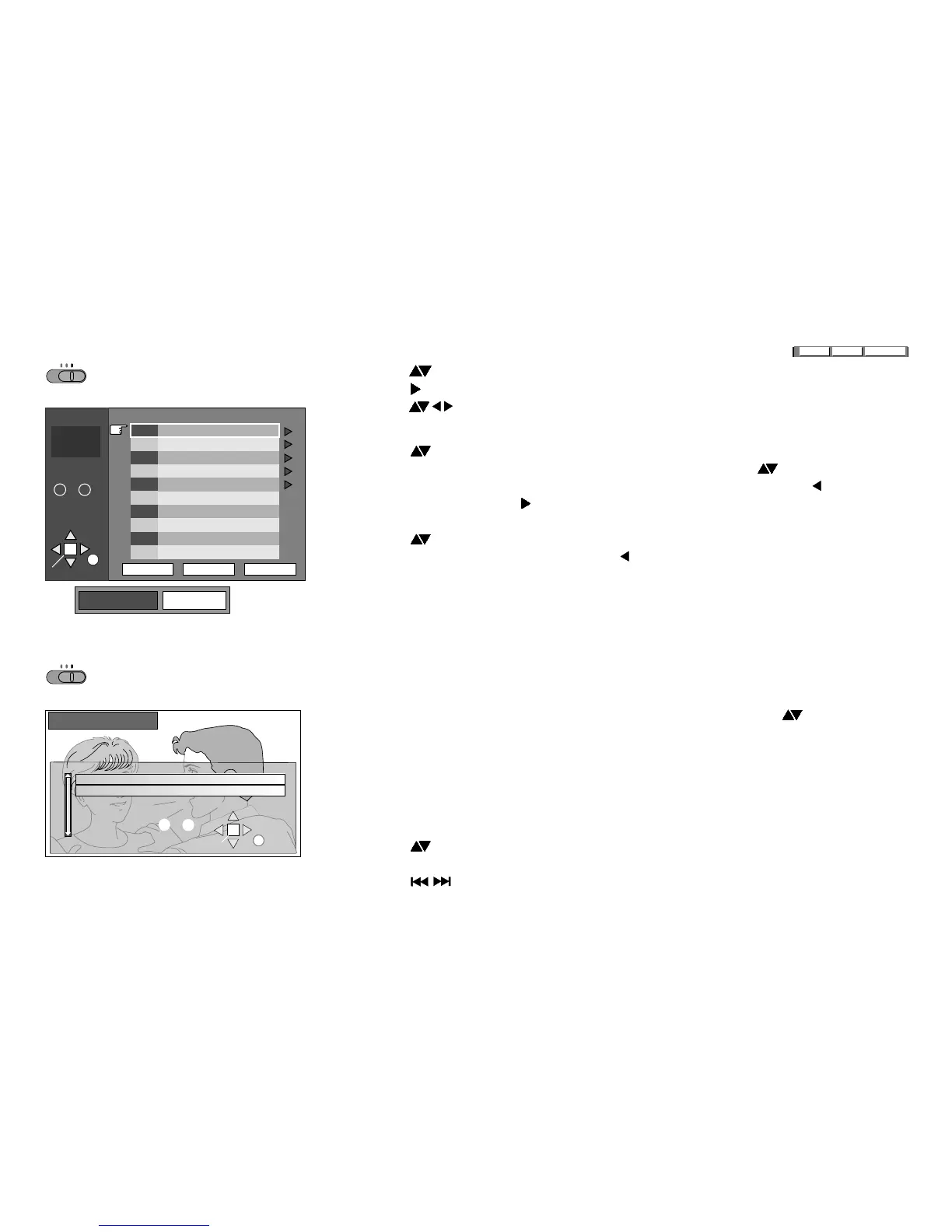
MP3 / WMA MENU
DVD-RAM menu
32
!
MENU to display/quit the MENU.
!
Press and ENTER to select a track.
!
Press to expand the "Tree" (table of contents).
!
Press to select a group, ENTER to confirm your selection.
To search for tracks
!
Press to select the "Find" item, then press ENTER to display the text box.
!
To enter a word from the track title you are looking for press .
!
Press ENTER after every letter to confirm it. To delete an entry press .
!
Upon completion press to select "Find" and ENTER to run the function.
All entries containing the word you specified are output to the match list.
!
Press and ENTER to select a track title.
!
To look for the first word in a title press to delete the asterisk.
All entries starting with the word you specified are output to the match list.
!
If there are no matches ("Not found") : press RETURN to change your search entry.
!
"Prev"/"Next" browses the album for the previous or next group.
Your DVD player can play DVD-RAM discs recorded in the video recording format,
version 1.1, by a DVD video recorder, DVD video camera, computer etc.
!
DIRECT NAVIGATOR to display/quit the menu.
!
Only programme names will be shown that were entered when the RAM was produced.
!
Select a programme number using the numeric keys or pressing .
The programme you selected will be played in the background.
!
ENTER to confirm the setting and hide the on-screen display.
To output a Playlist
This function allows you to play groups of scenes previously produced by means
of a DVD video recorder, for example.
!
PLAY LIST to display the PLAY LIST screen.
!
Press or use the numeric keys to select a Playlist.
!
ENTER to start playing the list.
!
Press skips individual scenes.
!
PLAY LIST quits the menu.
SELECT
Used 0:01:00
No Date On Program Title
1 9/12 (THU) 16:48 Friends
SELECT
NUMBER
ENTER
RETURN
9
0
~
DIRECT NAVIGATOR
2 9/12 (THU) 20:00 News






 To Next Page