-76-
ENGLISH
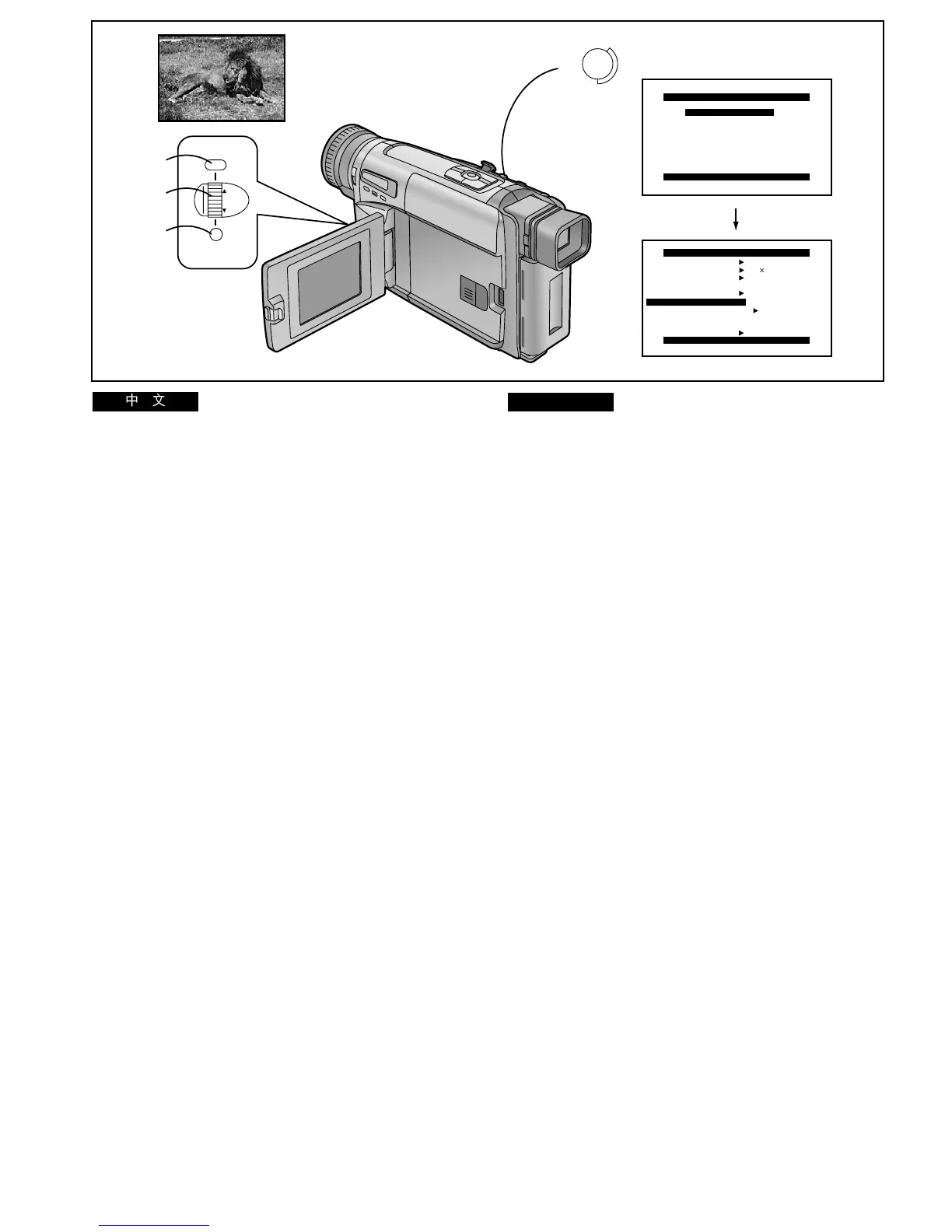
Recording a Still Picture
(Snapshot Recording)
You can record a still picture together with sound for
approximately 7 seconds at the press of a button. This is
convenient for example for recording sharp, stable still
pictures of signboards, maps, etc. in your videos.
≥Since the still picture is recorded from the digital image
memory, the picture quality is slightly inferior to that of
normally recorded pictures.
≥To prevent picture distortion, do not move or shake the
Movie Camera during still picture recording.
After displaying the [CAMERA SETUP] Sub-Menu... (l 28)
1 Turn the [34] Dial to select [TOP REC
BUTTON].
2 Press the [SET] Button to select [MULTI/SNAP].
3 Press the [MENU] Button to exit the menu.
4 Press the [SNAP] Button in the Recording
Pause Mode.
≥The image stands still and the [SNAP] Indication
appears.
≥The still picture is recorded for approximately
7 seconds.
Shutter Effect Mode
If you set [SHUTTER EFFECT] on the [CAMERA SETUP]
Sub-Menu to [ON], the screen blinks briefly like an SLR photo
camera when you press the [SNAP] Button. This visual
shutter effect is also recorded.
≥When using the Snapshot Function repeatedly, wait at least
3–4 seconds before pressing the [SNAP] Button again.
≥It is not possible to use the Snapshot Mode together with
the Mix, Wipe, Multi Image, or Picture-in-Picture Mode.
(l 90, 92, 94, 96)
SNAP
SNAP
4
REC
MULTI/
SNAP
MENU
FOCUS / SET
MF/
TRACKING
2
1
3
CAMERA FUNCTIONS
PRESS MENU TO EXIT
2.
DIGITAL EFFECT
3.
TITLE SETUP
4.
DATE/TIME SETUP
5.
DISPLAY SETUP
7.
OTHER FUNCTIONS
6.
LCD/EVF SETUP
1.
CAMERA SETUP
CAMERA SETUP
PRESS MENU TO EXIT
REC
MULTI/SNAP
RETURN ----
M.SENSOR OFF
D.ZOOM
MULTI
45
SHUTTER
STROBE1
EFFECT
ON
TOP REC BUTTON
!"#$
!"#
!"#$%&'() T !"#$ %&'()*
!"#$%&'()*+,-./01%23-45%6
!"#$%&'()*+
≥ !"#$%&'"#()*+,-./0"12345
!"#$%&
≥ !"#$%&'()*!"#+&,-./01/)2
!x`^jbo^=pbqrmz !"
l
OU
1
x
34
z
!
x
qlm=ob`=_rqqlk
z
!"
2
x
pbq
z
! !
x
jriqfLpk^m
z
3
x
jbkr
z
!"#$
4
!"#$%&'
x
pk^m
z
≥ !"#$%& '(xpk^mz
≥ ! T !"#$%
!"#
!x`^jbo^=pbqrmz !"xperqqbo
bccb`qz !"# xlkz xpk^mz !"#$%
pio !"#$%&'!()*+,-./01234(
≥ !"#$%&'()*+,-xpk^mz !"#$%
P
–
Q
≥ !"#$%&'()'*+,-+.+ !/&012
l
VMVOVQVS




 To Next Page