-112-
ENGLISH
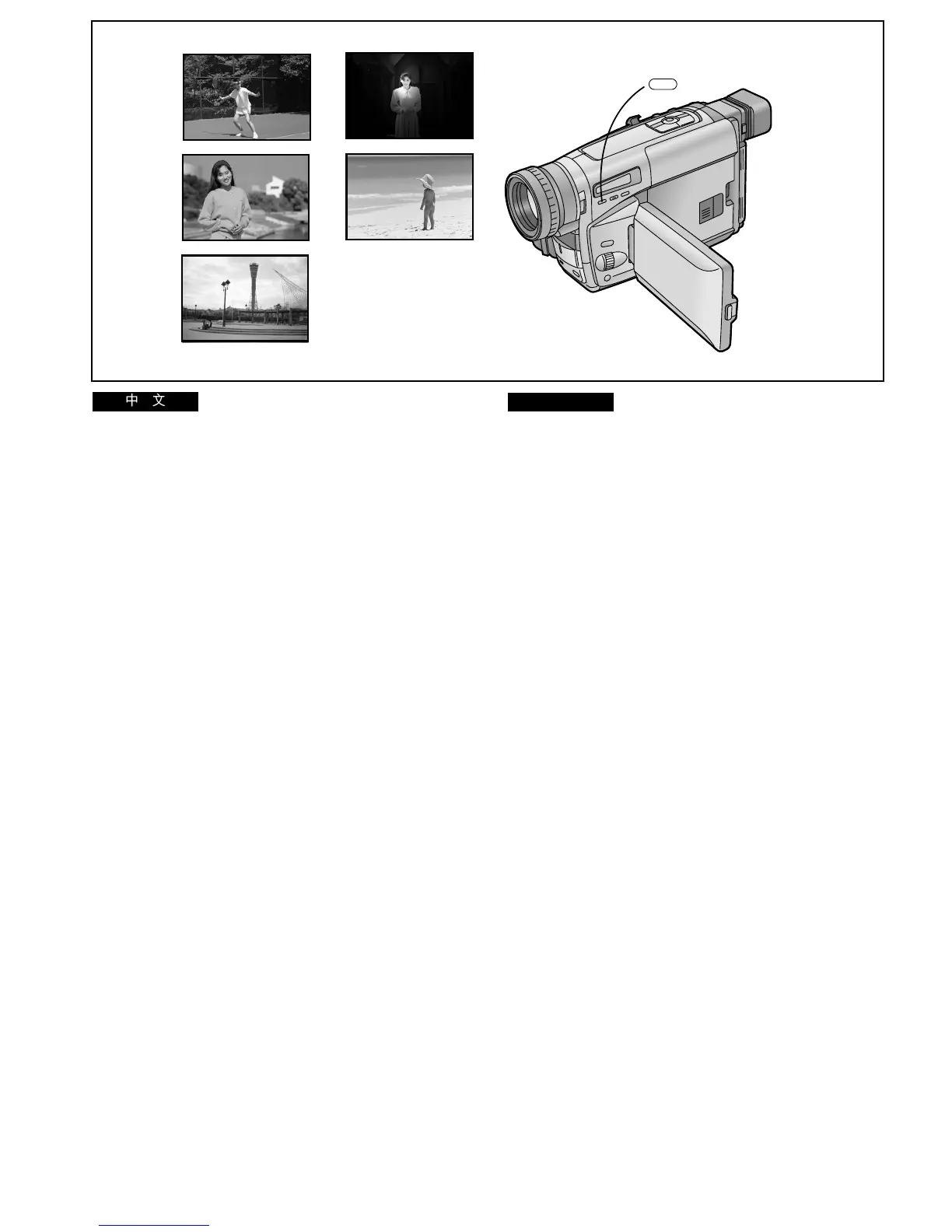
Recording in Special Situations
(Programme AE)
This function lets you select Automatic Exposure settings
optimized for special recording situations.
1 Press the [PROG. AE] Button repeatedly until
the indication of the desired mode ([5],
[7], [4], [Ω] or [º]) appears.
1 Sports Mode [5]
To record scenes with fast-moving subjects such as sports
scenes.
2 Portrait Mode [7]
To make subjects stand out sharply from the background.
3 Low Light Mode [4]
To record dark scenes more brightly.
4 Spotlight Mode [Ω]
To record subjects under spotlights (party, theatre, etc.).
5 Surf & Snow Mode [º]
To record subjects in brightly lit surroundings (ski slopes,
beach, etc.).
≥During recording, it is not possible to change the recording
mode ([AUTO], [MNL], [5], [7], [4], [Ω], [º]), even if
you press the [PROG. AE] Button.
≥It is not possible to use any of the Programme AE Modes
when the 0 Lux Night View Mode is activated.
Cancelling the Selected Programme AE Function
Press the [PROG. AE] Button repeatedly until none of the
indications ([5], [7], [4], [Ω], [º]) are displayed.
1
2
3
4
5
1
PROG. AE
5
7
4
º
Ω
!"#$%
^b
!"#$%&'()*+,-./0123456
1
!
x
moldK ^b
z
^b !"#$%&
!"
x
5
z
x7z
x
4
z
x
Ω
z
xºz
1
x5
z
!"#$%&'()"*+,-.
2
!"#
x
7
z
!"#$%&'()*+
3
!
x
4
z
!"#$%&'()
4
!"
x
Ω
z
!"#$%&'( !"#$%
5
!"#$
x
º
z
!"#$%&'( !"#$%
≥ !"#$%&'xmoldK ^bz !"#$%&'(
x^rqlz xjkiz x5zx7zx4zxΩz
xºz
≥ M=iìñ !"#$%&'()*+,-. ^b
!"#$% ^b
!xmoldK ^bz !"#$%&'$x5zx7z
x4zxΩzxºz




 To Next Page