-160-
ENGLISH
Dubbing
(Copying)
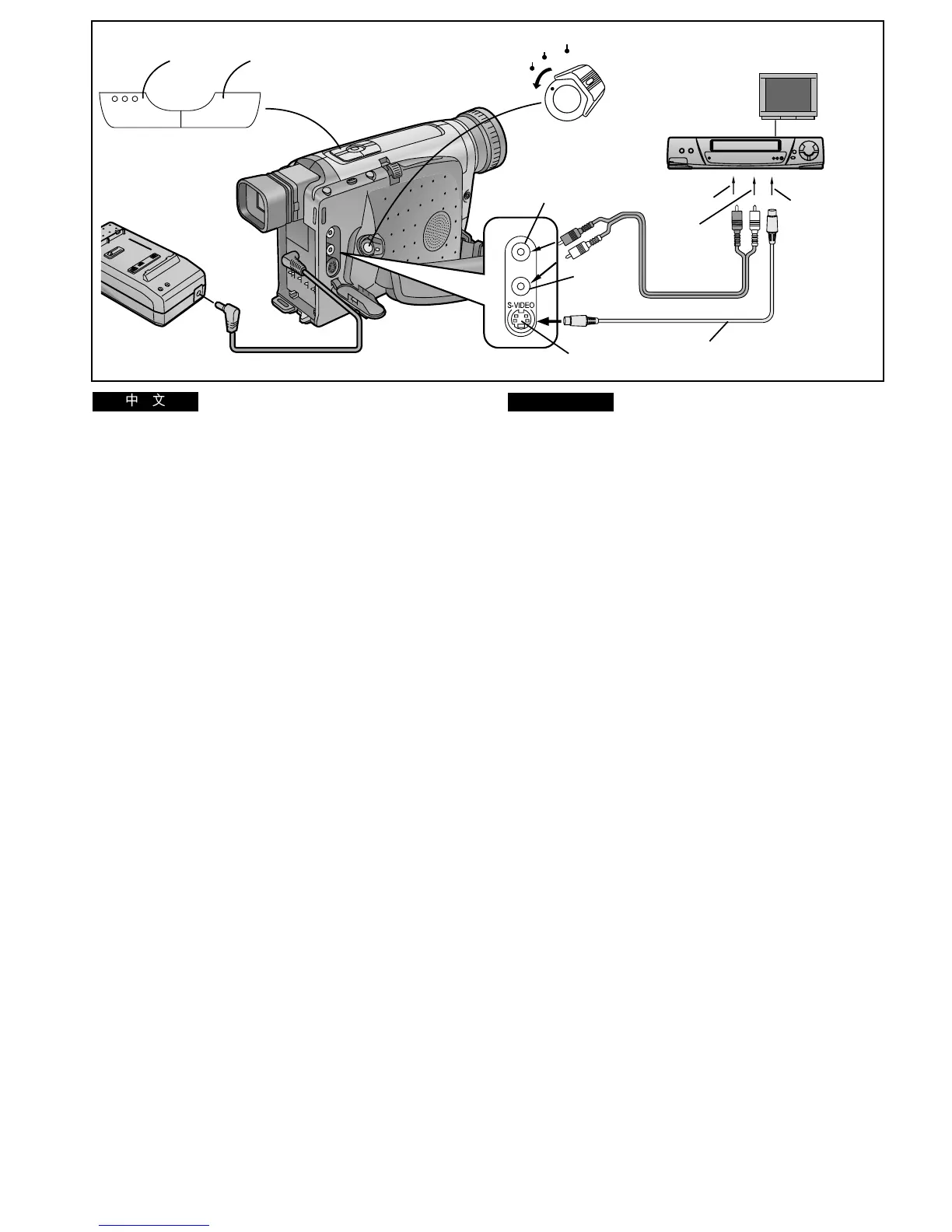
By connecting the AV Cable (supplied), you can copy the
cassette recorded with this Movie Camera onto a VCR.
1 Connect the AC Adaptor.
2 Insert the recorded cassette into the Movie
Camera and put it in the VCR Mode.
3 Insert an unrecorded cassette into the VCR and
put it in the Recording Pause Mode.
4 Start playback on the Movie Camera.
5 Start recording on the VCR.
6 After reaching the end of the original recording:
Stop recording on the VCR.
7 Stop playback on the Movie Camera.
≥As the picture quality on the dubbed cassette is slightly
reduced, we recommend that you select the standard speed
(SP Mode) on the VCR for dubbing.
(SP means Standard Play.)
≥If your VCR is equipped with an Edit Switch, turn it on to
ensure optimum picture quality of the dubbed cassette.
≥If your VCR is equipped with an S-Video socket, also
connect the S-Video Cable 1 (supplied).
BLC
∫
47
3, 5, 6
AUDIO
OUT
VIDEO OUT
2
V
A
1
VIDEO IN
AUDIO IN
CAMERA
OFF
VCR
S-VIDEO IN
S-VIDEO OUT
TBC
1
1
!
! L ! ! !"#$%&'()%*%
!" s`o !"
1
!"#$
2
!"#$%&!'()*+,#-./0
3
!"#$ s`o !"#$%&'()
4
!"#$%"&
5
s`o !
6
!"#$%&'()
s`o !
7
!"#$%"&
≥ !"#$%&'()*+,-./012345678
pm !"
pm !"#$%&
≥ !s`o !"#$%&'()*+,$-./01
!"#$%&'()
≥ !s`op !"#$%&'p !
1




 To Next Page