-92-
ENGLISH
∫ !"#$ V !" !"# O
!"#$%&'()* NKR !"# V !"#
xafdfq^i=bccb`qz ! !"xbccb`qNz
N xjriqfz !"#x`^jbo^=pbqrmz
!"
l
OU
≥ x©z !"
1
x
34
z
!
x
jriqf
z
!
x
pbq
z
!
!
x
pqol_bO
z
2
x
34
z
!
x
qlm=ob`=_rqqlk
z
!"
!
x
pbq
z
!
x
jriqfLpk^m
z
3
x
jbkr
z
!"#$
≥ xjriqfz
4
!"#$%&'()*O
x
jriqf
z
≥ !"#$% V !"#$%&'()xjriqfz
!
V !"#
xjriqfz !"#$%&'(V !"#$xjriqfz
!xjriqfz !"#$%&'()*+, V
!"#$%
xafdfq^i=bccb`qz ! !"xbccb`qNz
xlccz
≥ !"#$%&xjriqfz !"#$%&'()*+
≥ !"#$%&'()*+,-.$/0
≥ !"#$%&'() V !" !"#$%
!"
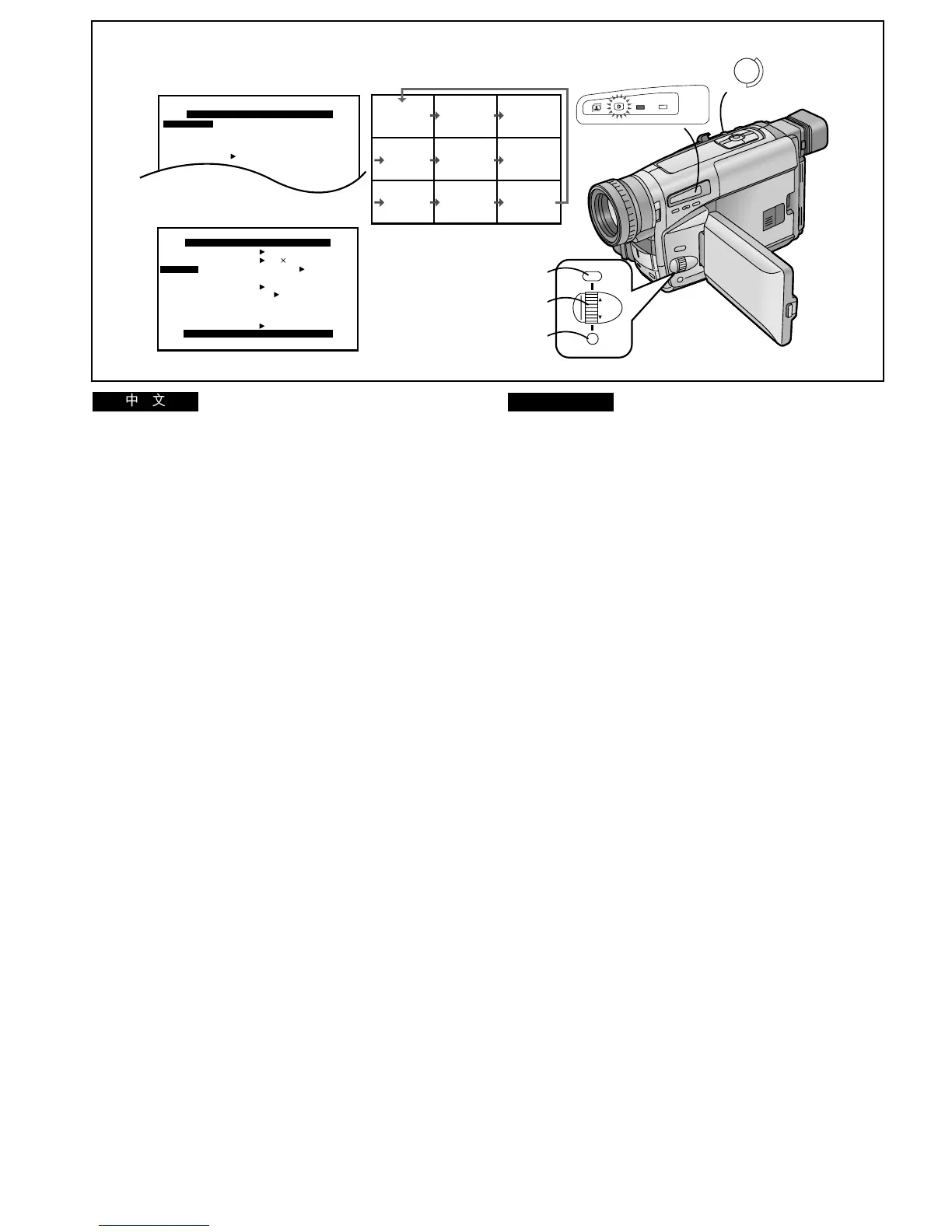
∫ Continuously Capturing and Displaying 9 Still
Pictures (Multi Image Strobe 2 Mode)
This function continuously captures and displays sequences
of 9 still pictures taken over approximately 1.5 seconds each.
After setting [EFFECT1] on the [DIGITAL EFFECT] Sub-
Menu to [MULTI] and then displaying the [CAMERA
SETUP] Sub-Menu... (l 28)
≥The [©] Lamp lights.
1 Turn the [34] Dial to select [MULTI] and then
press the [SET] Button to select [STROBE2].
2 Turn the [34] Dial to select [TOP REC
BUTTON] and then press the [SET] Button to
select [MULTI/SNAP].
3 Press the [MENU] Button to exit the menu.
≥The [MULTI] Indication appears.
4 Press the [MULTI] Button at the scene that you
want the Multi Image Strobe 2 Function to start.
≥Sequences of 9 still pictures are continuously displayed
until you press the [MULTI] Button again.
Erasing the 9 Still Pictures
After pressing the [MULTI] Button to stop the capturing and
displaying of sequences of 9 pictures, press the [MULTI]
Button again.
If you press the [MULTI] Button once more, the capturing and
displaying of sequences of 9 pictures starts again.
Cancelling the Multi Image Mode
Set [EFFECT1] on the [DIGITAL EFFECT] Sub-Menu to
[OFF].
≥If you press the [MULTI] Button during recording, a small
noise may also be recorded.
≥The quality of the pictures recorded in the Multi-Picture
Mode is slightly inferior.
≥The Sepia or Black & White Modes cannot be used for the
displayed 9 still pictures (even though these indications may
appear).
123
456
789
4
REC
MENU
FOCUS / SET
MF/
TRACKING
1, 2
1, 2
3
MULTI/
SNAP
INFO-
WINDOW
CAMERA
V C R




 To Next Page